Showing posts with label android games. Show all posts

Wednesday, 2 July 2014

Eight Amazing Board Games You Can Play on Your Tablet

scotland_yard.jpg

Also Read Few Tips To speed Up Your Android Smartphone

When you think of board games, you might remember childhood favourites like Ludo, Monopoly, or Scrabble. Other games like Scotland Yard or Game of Life introduced bigger boards, props, and complicated scoring mechanics as well.
Tablets, with their large screens and tactile interface are ideally positioned to play board games. With most games, you can see the whole board, and physically move pieces, spin wheels, and select cards the way you would in the real world, but the medium allows more than just replicating the physical experience - it's possible to make it better.
When you're playing a board game on a tablet, you're not thinking about unpacking and packing dozens of small pieces which might get lost - setting up a session of Game of Thrones can take a couple of hours before you even start playing - there's no need to have a complicated rulebook at hand to check if that last move was legal, and scorekeeping is accurate and automatic.
The iPad definitely has a lead over Android tablets in this space, and all the games we've listed are available on Apple's tablet, but some of the games are also available on Android.
1. Hearthstone: Heroes of Warcraft (Free)
Blizzard's trading card game is a bit of a break in tradition for the Warcraft publisher but Hearthstoneis one of the best card battle games on the App Store right now. There's a lot to love about this game - it features the same gorgeous art and audio that we've come to expect from Blizzard, but it is also a wonderfully enjoyable game.
hearthstone.jpg
In Hearthstone, you play as a hero with a fixed amount of health, and must play cards which can be used to summon minions who can attack the other hero, cast spells, and more. The game is very accessible, but there are layers and layers of complexity and strategy that slowly become clear as you keep playing. Hearthstone doesn't have the option to play with another player on the same iPad - you can only connect online, but it does a great ob of making you feel like you're sitting with another person and playing.

Also Read Samsung Galaxy Core Mini 4G With Android 4.4 KitKat Listed on Company Site

2. Risk HD (Rs. 420)
Build armies, move armies, and crush your enemies. Risk is at its core, a very simple board game, but setting up that huge board and managing all the cards and small pieces involved can be extremely intimidating. The iPad version takes all the set up out of things, and lets you play against a computer opponent, pass the iPad around for local multiplayer, or play with someone over the Internet.
risk.jpg
Since you don't have to do the turn-by-turn set up, and since moving units around can take just seconds, the biggest plus point of this version of Risk is that you can actually complete an entire game in less than an hour. Android users can try out Domination a free app which is pretty similar, though it doesn't have the same level of polish as the official version, which is only on iOS.
3. Scotland Yard (Rs. 300)
Scotland Yard (pictured top) has been around for 30 years now, and the digital version is also published by Ravensburger, just like the physical game. It retains the gameplay of the physical game, but makes it much easier to track your various tickets, and it has support for 3-6 players, and also can add AI players so if you've got a small group but want to make it challenging for Mr. X (who has to avoid the police while traveling around London) then you can just add some bots.
The game also includes a tutorial and tips, so you can pick up how to play much more easily than with the actual game. The game automatically tracks everyone's tickets and therefore it's easier for everyone to keep track of how the game is progressing, and lets you instead focus on strategy.
4. Scrabble for iPad (Rs. 620)
Scrabble (iPad, Android) is one of the most famous word games out there, so we probably don't need to describe it for you. The digital version of Scrabble faithfully replicates the real game, and unlike Words with Friends and other similar games, the board layout has the traditional X-shaped layout for high scoring tiles, encouraging you to play out to the corners. It also includes a built in dictionary, a teacher mode to help improve your scores, and no ads whatsoever.

Also Read Google Drive 2.0 App for Android Update Brings New, More Efficient UI

scrabble.jpg
You can play the game against the computer, or your Facebook friends, or pass and play on a single device. There are several free alternatives, but if you've played a lot of Scrabble in real life, then you will definitely prefer playing the real thing. The Android version is free, but includes pop-up ads.
One very interesting feature in the iPad version is that it can connect to iPhones, so you can use the iPad as the "board" while your tiles are on your phone. This way, you can play the game without having the pass the iPad around between turns. There are a few arcade style games with this feature, but it makes so much sense for board games, we're surprised more developers haven't adopted the idea.
5. Ticket to Ride (iPad Rs. 190; Android Rs. 420)
Ticket to Ride is one of the best board games for younger players, as it is not too difficult to learn the rules, and involves a good mix of cards, plastic pieces you can lay out, and a beautiful board. The app (available on the iPad and Android) is a very faithful rendition, and while you lose some of the tactile appeal of the actual game, the developers make up for it with some great animations and sound effects. It also helps by highlighting legal moves and organising your various tickets, and saves you half an hour of packing at the end of your game as well.
ticket_to_ride.jpg
The only catch is that the game is loaded with in-app purchases - the various add-ons can get quite expensive, with the pack for Ticket to Ride Europe (Rs. 300) costing more than the actual game. Given the price of the real board game though, we're not complaining.
6. Small World 2 (Rs. 620)
Another game by Days of Wonder, Small World (iPad, Android) also has the same visual appeal as Ticket to Ride, but it is actually a lot more complicated. It plays like an advanced version of Risk, with goblins and rat-men, instead of tanks and soldiers, and on a much smaller board. This means that you're constantly in conflict, and unlike Risk, in small world, you get a limited number of troops whom you spend and then send into decline, moving on to the next set of armies available. Each army has different abilities, so the gameplay is much more unpredictable and fun.

Also Read Thief Jailed For Forgetting To Log Off Victims PC

small_world.jpg
Small World 2 on tablets lets you play with your friends on a single machine, or across the Internet, and up to five players can play simultaneously.
The actual game can be a challenging one for new players, and the iPad version does a great job of explaining the rules and teaching you how to play the game, and it also automatically tracks the score, which can get pretty complicated with this game.
7. Carcassonne (iPad Rs. 620, Android Rs. 50)
Carcassonne (iPad, Android) is a city building game in the broadest sense of the term, but it is harder to define than that. There is a central deck of tiles, which could include roads, farms, or portions of a city, and each player must take a tile in turn, and place it on the table, touching a tile that has already been played. This continues until all the tiles run out, and you can claim the various roads, or farms that get built by placing one of your followers on the tile. Carcassonne looks deceptively simple, but there's a fair amount of strategy involved. At its most basic though, it is a simple jigsaw puzzle with as many solutions as you'd like, so anyone could play.
Carcasonne.jpg
The iPad version demystifies the scoring (which can get really confusing thanks to farms and cities) and since the game can also take up a pretty big table by the time it's getting finished, the digital version is a lot more convenient.

Also Read Transformers: Age of Extinction Brings Giant Robot Dinosaurs and Even Bigger Explosions

8. Catan HD (iPad Rs. 300, Android Rs. 212)
A city building game that is not for the faint hearted, Catan (iPad, Android) lets you play with other players or with the computer, and lets you compete with up to four other players to build armies, settlements and roads. The game includes construction, resource collection, and trading with the other players, though you have to use an in-game menu to trade things which can be a little more complicated than just handing over tokens to the other players.
catan.jpg
With that said, it's still got one thing going for it that the physical game does not - an interactive tutorial which takes you through an entire game, which is simply invaluable. Catan is not a game for kids, and it's not a very accessible game at all. It is a complex game which involves a lot of strategy, and while it's very rewarding once you get the hang of it, having the tablet version teach you how to play is really a huge step up from sitting with the manual with your eyes glazed over.
Honourable mentions
These are just some of an ever growing number of great board games on the iPad - and more are getting added every day. This includes not just classic games like Pandemic (where you are part of a team trying to contain an infectious global pandemic) and Puerto Rico (where you are a Spanish governor of Puerto Rico, building up the colony, but also modern games which nonetheless draw inspiration from board games.
This includes gems such as FTL where you are a space ship captain on a dangerous mission, who must manage his crew, upgrade the ship, and make life or death decisions at every turn. Frozen Synapse on the other hand could be described as a strategy version of Counter Strike, or chess with guns if everyone made their moves at the same time. XCOM is another contender for that title, as you lead your crew of soldiers from scenario to scenario, taking turns to make them move, shoot and defend, while facing an alien invasion.
Hopefully you've got a full list of games to buy. If there's a game you think others should know about, do let us know via the comments.


Also Read Ten best Android Browser Apps

NOTE: Feel Free To Comment....
Unknown  /  at  14:26  /  No comments

scotland_yard.jpg

Also Read Few Tips To speed Up Your Android Smartphone

When you think of board games, you might remember childhood favourites like Ludo, Monopoly, or Scrabble. Other games like Scotland Yard or Game of Life introduced bigger boards, props, and complicated scoring mechanics as well.
Tablets, with their large screens and tactile interface are ideally positioned to play board games. With most games, you can see the whole board, and physically move pieces, spin wheels, and select cards the way you would in the real world, but the medium allows more than just replicating the physical experience - it's possible to make it better.
When you're playing a board game on a tablet, you're not thinking about unpacking and packing dozens of small pieces which might get lost - setting up a session of Game of Thrones can take a couple of hours before you even start playing - there's no need to have a complicated rulebook at hand to check if that last move was legal, and scorekeeping is accurate and automatic.
The iPad definitely has a lead over Android tablets in this space, and all the games we've listed are available on Apple's tablet, but some of the games are also available on Android.
1. Hearthstone: Heroes of Warcraft (Free)
Blizzard's trading card game is a bit of a break in tradition for the Warcraft publisher but Hearthstoneis one of the best card battle games on the App Store right now. There's a lot to love about this game - it features the same gorgeous art and audio that we've come to expect from Blizzard, but it is also a wonderfully enjoyable game.
hearthstone.jpg
In Hearthstone, you play as a hero with a fixed amount of health, and must play cards which can be used to summon minions who can attack the other hero, cast spells, and more. The game is very accessible, but there are layers and layers of complexity and strategy that slowly become clear as you keep playing. Hearthstone doesn't have the option to play with another player on the same iPad - you can only connect online, but it does a great ob of making you feel like you're sitting with another person and playing.

Also Read Samsung Galaxy Core Mini 4G With Android 4.4 KitKat Listed on Company Site

2. Risk HD (Rs. 420)
Build armies, move armies, and crush your enemies. Risk is at its core, a very simple board game, but setting up that huge board and managing all the cards and small pieces involved can be extremely intimidating. The iPad version takes all the set up out of things, and lets you play against a computer opponent, pass the iPad around for local multiplayer, or play with someone over the Internet.
risk.jpg
Since you don't have to do the turn-by-turn set up, and since moving units around can take just seconds, the biggest plus point of this version of Risk is that you can actually complete an entire game in less than an hour. Android users can try out Domination a free app which is pretty similar, though it doesn't have the same level of polish as the official version, which is only on iOS.
3. Scotland Yard (Rs. 300)
Scotland Yard (pictured top) has been around for 30 years now, and the digital version is also published by Ravensburger, just like the physical game. It retains the gameplay of the physical game, but makes it much easier to track your various tickets, and it has support for 3-6 players, and also can add AI players so if you've got a small group but want to make it challenging for Mr. X (who has to avoid the police while traveling around London) then you can just add some bots.
The game also includes a tutorial and tips, so you can pick up how to play much more easily than with the actual game. The game automatically tracks everyone's tickets and therefore it's easier for everyone to keep track of how the game is progressing, and lets you instead focus on strategy.
4. Scrabble for iPad (Rs. 620)
Scrabble (iPad, Android) is one of the most famous word games out there, so we probably don't need to describe it for you. The digital version of Scrabble faithfully replicates the real game, and unlike Words with Friends and other similar games, the board layout has the traditional X-shaped layout for high scoring tiles, encouraging you to play out to the corners. It also includes a built in dictionary, a teacher mode to help improve your scores, and no ads whatsoever.

Also Read Google Drive 2.0 App for Android Update Brings New, More Efficient UI

scrabble.jpg
You can play the game against the computer, or your Facebook friends, or pass and play on a single device. There are several free alternatives, but if you've played a lot of Scrabble in real life, then you will definitely prefer playing the real thing. The Android version is free, but includes pop-up ads.
One very interesting feature in the iPad version is that it can connect to iPhones, so you can use the iPad as the "board" while your tiles are on your phone. This way, you can play the game without having the pass the iPad around between turns. There are a few arcade style games with this feature, but it makes so much sense for board games, we're surprised more developers haven't adopted the idea.
5. Ticket to Ride (iPad Rs. 190; Android Rs. 420)
Ticket to Ride is one of the best board games for younger players, as it is not too difficult to learn the rules, and involves a good mix of cards, plastic pieces you can lay out, and a beautiful board. The app (available on the iPad and Android) is a very faithful rendition, and while you lose some of the tactile appeal of the actual game, the developers make up for it with some great animations and sound effects. It also helps by highlighting legal moves and organising your various tickets, and saves you half an hour of packing at the end of your game as well.
ticket_to_ride.jpg
The only catch is that the game is loaded with in-app purchases - the various add-ons can get quite expensive, with the pack for Ticket to Ride Europe (Rs. 300) costing more than the actual game. Given the price of the real board game though, we're not complaining.
6. Small World 2 (Rs. 620)
Another game by Days of Wonder, Small World (iPad, Android) also has the same visual appeal as Ticket to Ride, but it is actually a lot more complicated. It plays like an advanced version of Risk, with goblins and rat-men, instead of tanks and soldiers, and on a much smaller board. This means that you're constantly in conflict, and unlike Risk, in small world, you get a limited number of troops whom you spend and then send into decline, moving on to the next set of armies available. Each army has different abilities, so the gameplay is much more unpredictable and fun.

Also Read Thief Jailed For Forgetting To Log Off Victims PC

small_world.jpg
Small World 2 on tablets lets you play with your friends on a single machine, or across the Internet, and up to five players can play simultaneously.
The actual game can be a challenging one for new players, and the iPad version does a great job of explaining the rules and teaching you how to play the game, and it also automatically tracks the score, which can get pretty complicated with this game.
7. Carcassonne (iPad Rs. 620, Android Rs. 50)
Carcassonne (iPad, Android) is a city building game in the broadest sense of the term, but it is harder to define than that. There is a central deck of tiles, which could include roads, farms, or portions of a city, and each player must take a tile in turn, and place it on the table, touching a tile that has already been played. This continues until all the tiles run out, and you can claim the various roads, or farms that get built by placing one of your followers on the tile. Carcassonne looks deceptively simple, but there's a fair amount of strategy involved. At its most basic though, it is a simple jigsaw puzzle with as many solutions as you'd like, so anyone could play.
Carcasonne.jpg
The iPad version demystifies the scoring (which can get really confusing thanks to farms and cities) and since the game can also take up a pretty big table by the time it's getting finished, the digital version is a lot more convenient.

Also Read Transformers: Age of Extinction Brings Giant Robot Dinosaurs and Even Bigger Explosions

8. Catan HD (iPad Rs. 300, Android Rs. 212)
A city building game that is not for the faint hearted, Catan (iPad, Android) lets you play with other players or with the computer, and lets you compete with up to four other players to build armies, settlements and roads. The game includes construction, resource collection, and trading with the other players, though you have to use an in-game menu to trade things which can be a little more complicated than just handing over tokens to the other players.
catan.jpg
With that said, it's still got one thing going for it that the physical game does not - an interactive tutorial which takes you through an entire game, which is simply invaluable. Catan is not a game for kids, and it's not a very accessible game at all. It is a complex game which involves a lot of strategy, and while it's very rewarding once you get the hang of it, having the tablet version teach you how to play is really a huge step up from sitting with the manual with your eyes glazed over.
Honourable mentions
These are just some of an ever growing number of great board games on the iPad - and more are getting added every day. This includes not just classic games like Pandemic (where you are part of a team trying to contain an infectious global pandemic) and Puerto Rico (where you are a Spanish governor of Puerto Rico, building up the colony, but also modern games which nonetheless draw inspiration from board games.
This includes gems such as FTL where you are a space ship captain on a dangerous mission, who must manage his crew, upgrade the ship, and make life or death decisions at every turn. Frozen Synapse on the other hand could be described as a strategy version of Counter Strike, or chess with guns if everyone made their moves at the same time. XCOM is another contender for that title, as you lead your crew of soldiers from scenario to scenario, taking turns to make them move, shoot and defend, while facing an alien invasion.
Hopefully you've got a full list of games to buy. If there's a game you think others should know about, do let us know via the comments.


Also Read Ten best Android Browser Apps

NOTE: Feel Free To Comment....

Posted in: , Read Complete Article»

Friday, 6 June 2014

Hitman Go Launched for Android; Square Enix Teases Next Game

hitman_go_app_gameplay_play_store.jpg
Square Enix has launched Hitman Go for Android users, and it is currently listed on the Indian Google Play store at Rs. 300.
Hitman Go is a puzzle-based game with 68 playing levels in which users would have to strategically navigate fixed spaces on a grid in order to take down an enemy or to infiltrate well-guarded locations. The Android game includes various disguises, distractions, weapons and the iconic Silverballers to keep the users interested.
"Hitman Go is a simple to play, but difficult to master puzzle game set in a stunning interpretation of the Hitman universe. Boasting 68 unlockable levels, the team at Square Enix Montréal has created a new and unique experience taking aspects of the Hitman universe to create a brand new and distinctive mobile gaming offering," said Square Enix in the press release.
hitman_go_app_gameplay_play_store_2.jpg
Hitman Go also challenges the users as it has unique ways to complete each level and lets them face off against the enemies with different behaviours. The game environments also include secret passageways and off-limit areas.

Also Read What is 2048, How to Play 2048 Game, Download 2048 Game For Android?

Hitman Go works with Android 2.3.3 Gingerbread and has to be purchased from the Google Play store. Notably, Hitman was released in April for iOS users, and it is currently listed on the App Store in India for $4.99.
Additionally, the official website Hitman.com, has revealed that an update will soon arrive for Hitman Go. The website also mentioned that Square Enix Montreal will soon give out the first details of the second Hitman game for smartphones and tablets.
hitman_go_app_gameplay_play_store_3.jpg
"On a separate note, we were happy to see so many of you enjoying Hitman Go from our friends at Square Enix Montréal. They're pretty close to announcing new details about upcoming updates for Go as well as the first details about their second Hitman game for smartphones and tablets, we've been playing it here at the studio and it's a lot of fun. Anyway, we'll let them be the ones to tell you about it, so stay tuned for a blog post from them soon."


Also Read How to Download Videos From YouTube

NOTE: Feel Free To Comment....
Unknown  /  at  00:05  /  No comments

hitman_go_app_gameplay_play_store.jpg
Square Enix has launched Hitman Go for Android users, and it is currently listed on the Indian Google Play store at Rs. 300.
Hitman Go is a puzzle-based game with 68 playing levels in which users would have to strategically navigate fixed spaces on a grid in order to take down an enemy or to infiltrate well-guarded locations. The Android game includes various disguises, distractions, weapons and the iconic Silverballers to keep the users interested.
"Hitman Go is a simple to play, but difficult to master puzzle game set in a stunning interpretation of the Hitman universe. Boasting 68 unlockable levels, the team at Square Enix Montréal has created a new and unique experience taking aspects of the Hitman universe to create a brand new and distinctive mobile gaming offering," said Square Enix in the press release.
hitman_go_app_gameplay_play_store_2.jpg
Hitman Go also challenges the users as it has unique ways to complete each level and lets them face off against the enemies with different behaviours. The game environments also include secret passageways and off-limit areas.

Also Read What is 2048, How to Play 2048 Game, Download 2048 Game For Android?

Hitman Go works with Android 2.3.3 Gingerbread and has to be purchased from the Google Play store. Notably, Hitman was released in April for iOS users, and it is currently listed on the App Store in India for $4.99.
Additionally, the official website Hitman.com, has revealed that an update will soon arrive for Hitman Go. The website also mentioned that Square Enix Montreal will soon give out the first details of the second Hitman game for smartphones and tablets.
hitman_go_app_gameplay_play_store_3.jpg
"On a separate note, we were happy to see so many of you enjoying Hitman Go from our friends at Square Enix Montréal. They're pretty close to announcing new details about upcoming updates for Go as well as the first details about their second Hitman game for smartphones and tablets, we've been playing it here at the studio and it's a lot of fun. Anyway, we'll let them be the ones to tell you about it, so stay tuned for a blog post from them soon."


Also Read How to Download Videos From YouTube

NOTE: Feel Free To Comment....
Posted in: , Read Complete Article»

Sunday, 1 June 2014

The Hunger Games Mobile Game Coming Soon to Smartphones and Tablets

hunger_game_lionsgate_site.jpg

Also Read Motorola Moto E Goes Out of Stock (Again) on Flipkart

"The Hunger Games" is becoming a mobile game.
Interactive entertainment company Kabam announced Friday that it agreed with film studio Lionsgate to make a title for play on smartphones or tablet computers based on the dystopian books and films.
San Francisco-based Kabam specializes in mobile games that are free-to-play, instead bringing in revenue through tactics such as digital ads or hawking virtual goods or abilities.
"Lionsgate has an unparalleled track record of developing and producing blockbuster movie franchises like 'The Hunger Games,'" Kabam chief operating officer Kent Wakeford said in a release.
"Partnering with Lionsgate, Kabam will build a mobile game that's as much fun to play as the movie is to watch."

Also Read Everything You Need To Know About Android Silver

Kabam's vision for the game included casting players in roles as District members out to build alliances and liberate themselves in the spirit of the story told in the books on which the film is based.
The story centers around a futuristic society which stages televised death matches among youth.
The first two "Hunger Games" films starring Jennifer Lawrence have taken in more than $1.5 billion at box offices worldwide, according to Kabam.
The next installment in the series is set for release in November.
"We are so pleased to be working with Kabam to give the fans an experience like they have never had before," said Lionsgate executive vice president of digital media Danielle DePalma.
"Being able to role-play with the mentors straight from the world of 'The Hunger Games' will let fans feel as if they are in the middle of the action."
The game will be developed in the Kabam studio in China that made a mobile game based on "The Hobbit."


Also Read Microsoft Unhappy About Windows XP Update Hack

NOTE: Feel Free To Comment....
Unknown  /  at  16:47  /  No comments

hunger_game_lionsgate_site.jpg

Also Read Motorola Moto E Goes Out of Stock (Again) on Flipkart

"The Hunger Games" is becoming a mobile game.
Interactive entertainment company Kabam announced Friday that it agreed with film studio Lionsgate to make a title for play on smartphones or tablet computers based on the dystopian books and films.
San Francisco-based Kabam specializes in mobile games that are free-to-play, instead bringing in revenue through tactics such as digital ads or hawking virtual goods or abilities.
"Lionsgate has an unparalleled track record of developing and producing blockbuster movie franchises like 'The Hunger Games,'" Kabam chief operating officer Kent Wakeford said in a release.
"Partnering with Lionsgate, Kabam will build a mobile game that's as much fun to play as the movie is to watch."

Also Read Everything You Need To Know About Android Silver

Kabam's vision for the game included casting players in roles as District members out to build alliances and liberate themselves in the spirit of the story told in the books on which the film is based.
The story centers around a futuristic society which stages televised death matches among youth.
The first two "Hunger Games" films starring Jennifer Lawrence have taken in more than $1.5 billion at box offices worldwide, according to Kabam.
The next installment in the series is set for release in November.
"We are so pleased to be working with Kabam to give the fans an experience like they have never had before," said Lionsgate executive vice president of digital media Danielle DePalma.
"Being able to role-play with the mentors straight from the world of 'The Hunger Games' will let fans feel as if they are in the middle of the action."
The game will be developed in the Kabam studio in China that made a mobile game based on "The Hobbit."


Also Read Microsoft Unhappy About Windows XP Update Hack

NOTE: Feel Free To Comment....

Posted in: , Read Complete Article»

Friday, 23 May 2014

What is 2048, How to Play 2048 Game, Download 2048 Game For Android?

Few Days later my friend told me about this amazing mathematical game, at first i did'nt liked this game, but when i started playing it was like an addiction. So, i thought of sharing it with you guys.

Also Read How to Block a Contact on WhatsApp

What Is 2048 Game


These days everyone is more attractive to games. 2048 is one of the most emerging and addictive games as of now. It has equal addiction same as Flappy birds. So, What is 2048 ? How to Play 2048 Game? are the most frequent queries trending in Google as of now.!
2048 is a single-player online and mobile game created in March 2014 by 19-year-old Italian web developer Gabriele Cirulli, in which the objective is to slide numbered tiles on a grid to combine them and create a tile with the number 2048. Recent Update included Multi-player Online game which also has huge response.

How to Play 2048 Game

The game is played on a 4×4 board with tiles of different colors which can slide when moved by the player. The player uses arrows keys to control the tile to move it inside the board. If two tiles collide, then they will merge and form a new tile with their existing values added up. If a tile has a higher score, then it will have a faint glow on it. A new tile will enter the game with values of 2 or 4 only.
Also Read How to Use Two Numbers in WhatsApp on Android Phones Without Rooting
There is a scoreboard on the top right that keeps track of the score created by the player, starting from zero. The game shows both the best score along with the current score. If a player is able to create the value of 2048 on a single tile, then they can still continue to play to make a high score and enjoy the game.
Players must know that the game will spawn two random tiles when the game starts. The player will get four possible move per position subjective to space on the board.

2048 Download APK file


Also Read How To Fix Google Play “No Connection – Retry” Problem

NOTE: Feel Free To Comment....
Unknown  /  at  16:59  /  No comments

Few Days later my friend told me about this amazing mathematical game, at first i did'nt liked this game, but when i started playing it was like an addiction. So, i thought of sharing it with you guys.

Also Read How to Block a Contact on WhatsApp

What Is 2048 Game


These days everyone is more attractive to games. 2048 is one of the most emerging and addictive games as of now. It has equal addiction same as Flappy birds. So, What is 2048 ? How to Play 2048 Game? are the most frequent queries trending in Google as of now.!
2048 is a single-player online and mobile game created in March 2014 by 19-year-old Italian web developer Gabriele Cirulli, in which the objective is to slide numbered tiles on a grid to combine them and create a tile with the number 2048. Recent Update included Multi-player Online game which also has huge response.

How to Play 2048 Game

The game is played on a 4×4 board with tiles of different colors which can slide when moved by the player. The player uses arrows keys to control the tile to move it inside the board. If two tiles collide, then they will merge and form a new tile with their existing values added up. If a tile has a higher score, then it will have a faint glow on it. A new tile will enter the game with values of 2 or 4 only.
Also Read How to Use Two Numbers in WhatsApp on Android Phones Without Rooting
There is a scoreboard on the top right that keeps track of the score created by the player, starting from zero. The game shows both the best score along with the current score. If a player is able to create the value of 2048 on a single tile, then they can still continue to play to make a high score and enjoy the game.
Players must know that the game will spawn two random tiles when the game starts. The player will get four possible move per position subjective to space on the board.

2048 Download APK file


Also Read How To Fix Google Play “No Connection – Retry” Problem

NOTE: Feel Free To Comment....

Posted in: , Read Complete Article»

Sunday, 4 May 2014

How To Make Backup Or .apk Of Android Apps Downloaded From Play Store Using AVG Mobile Antivirus?


Also Read How to Install Whatsapp on Android Tablet WiFi without SIM : Simple and Easy

Sometimes it happens that you have to restore or format your android device and after restoring, you have to download and install all the apps and games that you have downloaded from play store which results in 
wastage of your data and time.
So i am going to tell you a method by which you can make backup of your apps and games.


Step By Step Tutorial With Screenshots:

1. First download and install AVG Mobile Antivirus In your Android Device.

Note -  Make sure you have turned on the feature “Allow Installation of non-market Apps” and if you haven’t turned it on just Go to Menu -> Settings -> Applications -> Check mark Unknown sources
How to Install Whatsapp on Android Tablet WiFi Without SIM
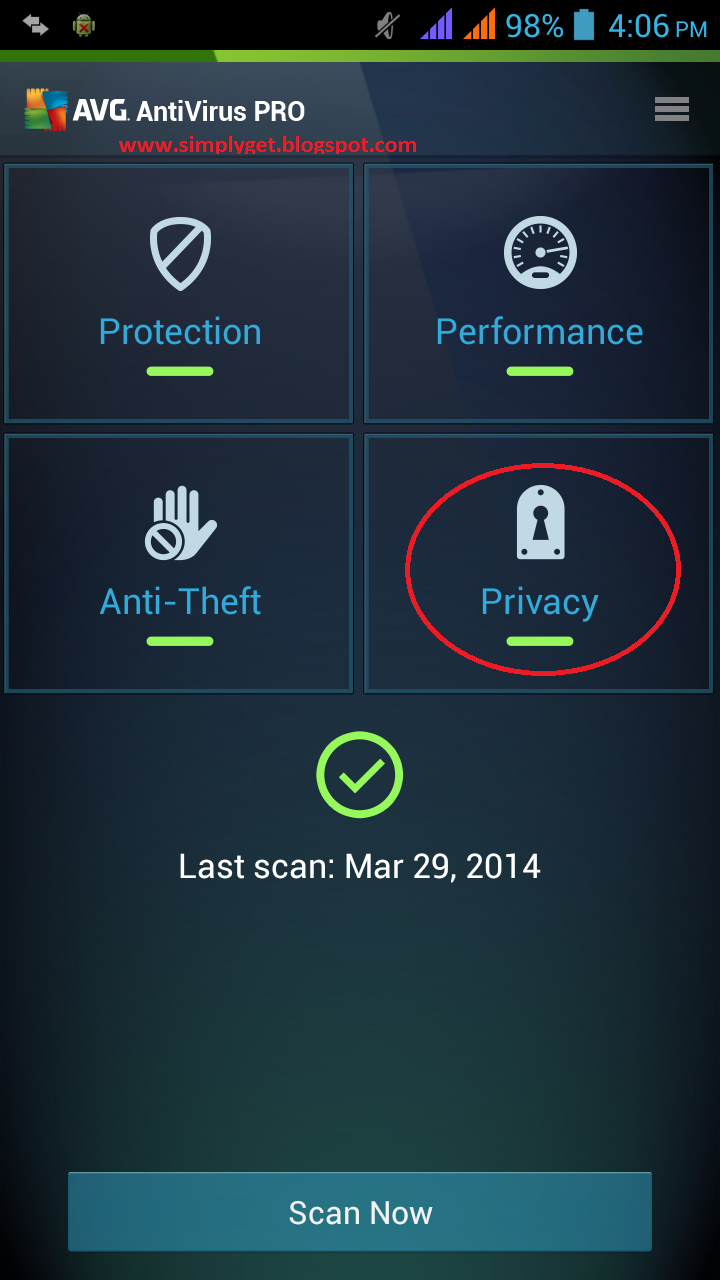
2. After installing antivirus open it and tap on "Privacy"

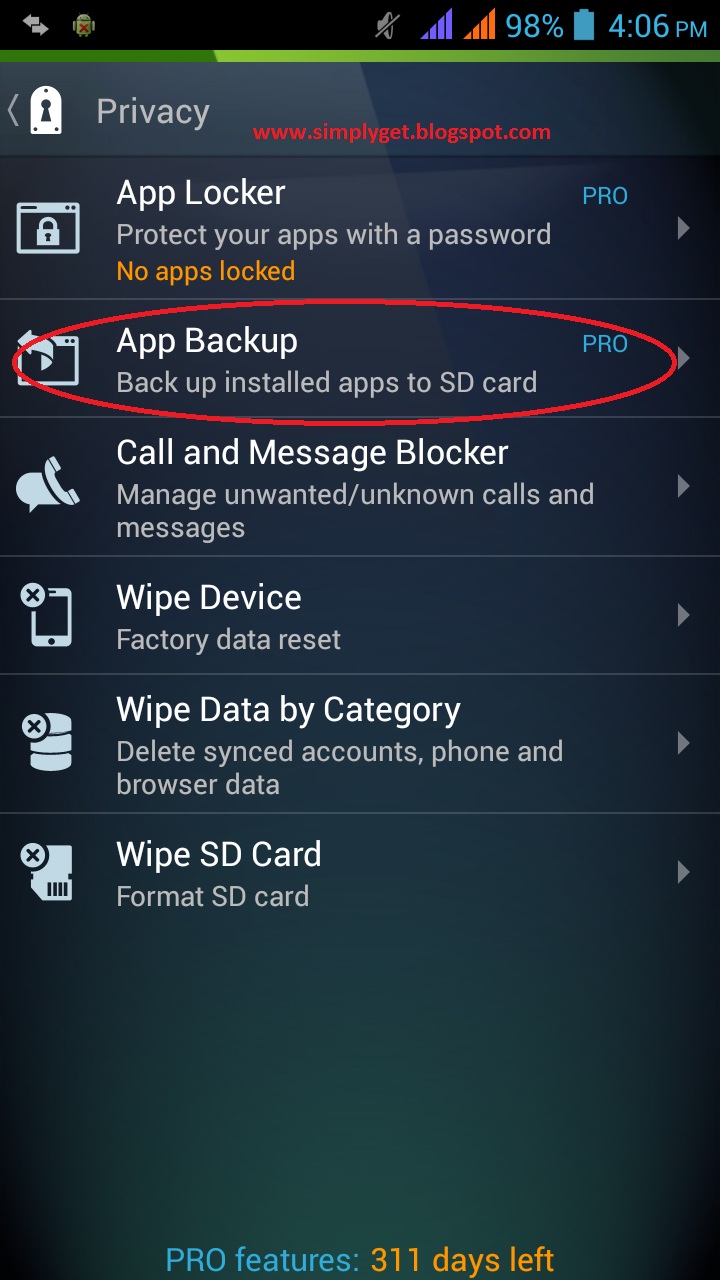
3. Now tap on "App Backup"
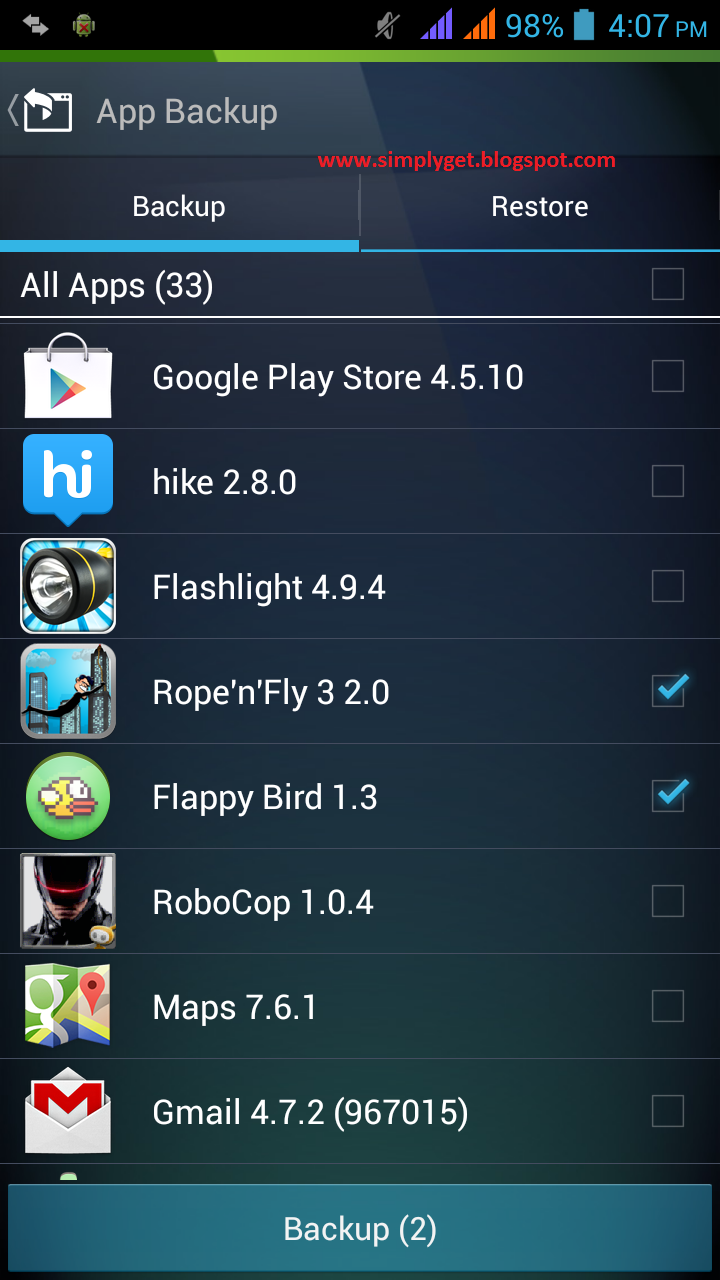
4. Now select the app or game you want make backup of and click on "backup"


5. A Popup will ask for your confirmation, click "OK" and it will take some time to create backup depending on the size of apps or games.


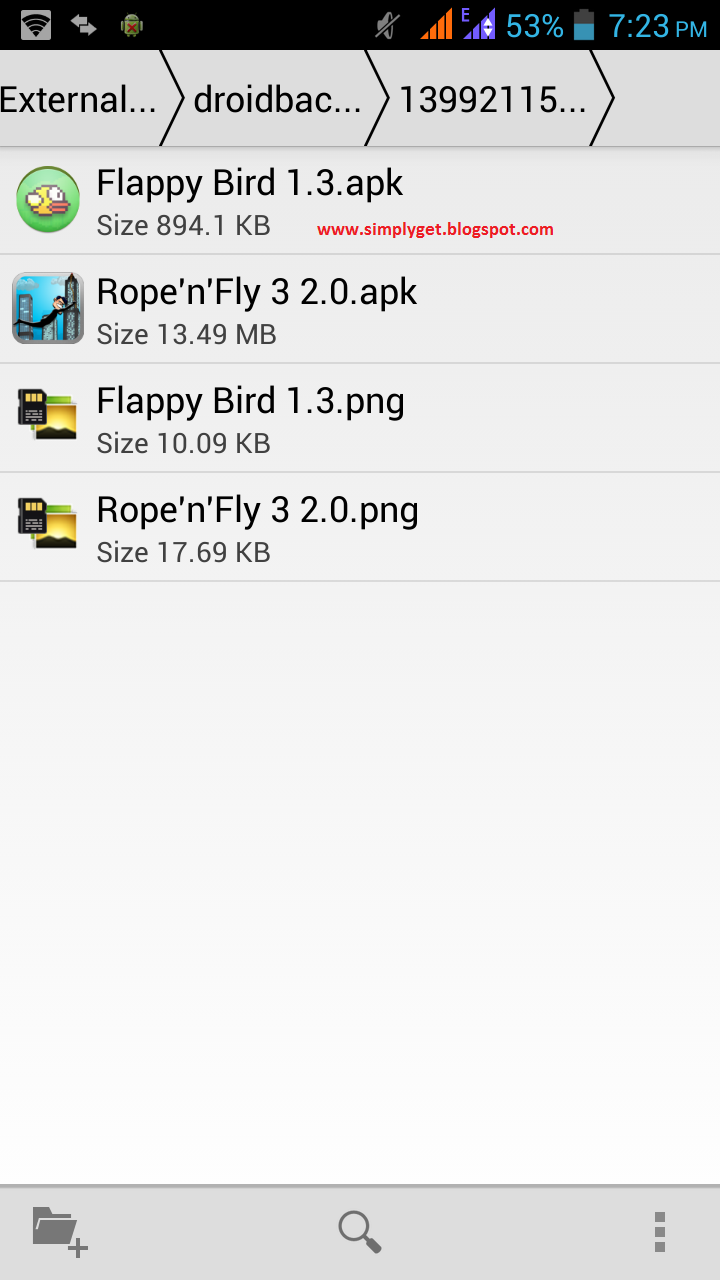
6. Now open your file manager and open memory card or External SD Card and locate a folder named "Droidbackupdir". Open this folder and you will see a folder open that folder and there you will get the apk file of your previously selected apps or games


Now make backup of all your apps and games and store them at a safe place.

You can also use many other features of AVG Mobile antivirus like "App Locker" to lock apps and settings, "Task Killer" to kill processes running in background....


This method is tested and working 100%


Also Read How To Share Video of Larger Size (more Than 16 MB) in WhatsApp

NOTE: Feel Free To Comment....
Unknown  /  at  21:17  /  No comments


Also Read How to Install Whatsapp on Android Tablet WiFi without SIM : Simple and Easy

Sometimes it happens that you have to restore or format your android device and after restoring, you have to download and install all the apps and games that you have downloaded from play store which results in 
wastage of your data and time.
So i am going to tell you a method by which you can make backup of your apps and games.


Step By Step Tutorial With Screenshots:

1. First download and install AVG Mobile Antivirus In your Android Device.

Note -  Make sure you have turned on the feature “Allow Installation of non-market Apps” and if you haven’t turned it on just Go to Menu -> Settings -> Applications -> Check mark Unknown sources
How to Install Whatsapp on Android Tablet WiFi Without SIM
2. After installing antivirus open it and tap on "Privacy"

3. Now tap on "App Backup"
4. Now select the app or game you want make backup of and click on "backup"


5. A Popup will ask for your confirmation, click "OK" and it will take some time to create backup depending on the size of apps or games.


6. Now open your file manager and open memory card or External SD Card and locate a folder named "Droidbackupdir". Open this folder and you will see a folder open that folder and there you will get the apk file of your previously selected apps or games


Now make backup of all your apps and games and store them at a safe place.

You can also use many other features of AVG Mobile antivirus like "App Locker" to lock apps and settings, "Task Killer" to kill processes running in background....


This method is tested and working 100%


Also Read How To Share Video of Larger Size (more Than 16 MB) in WhatsApp

NOTE: Feel Free To Comment....

Posted in: , , Read Complete Article»

Wednesday, 23 April 2014

30 Must-Try Apps For Rooted Android Phones


Rooting your Android phone is the first path towards customizing your phone for optimum use. Once you have your device rooted, you will not only be able to use certain apps, you can also remove bloatware, boost battery life, make your Android work snappier and faster plus further customize the internal systems for better performance you won’t be able to get from a non-rooted phone.

Also Read How To Create Android Apps for Free Without Coding

While you may enjoy exploring your Android device, rooted, please remember to always have a backup of your Android device before you begin any attempts to install these 30 must-try apps for rooted Android phones in this list.

Orange Backup

A full Android backup that allows your phone to revert to its most recent stable state is known as NAndroid backup. With Orange backup, you will be able to create a full Android backup right from within the app itself and even upload backups to the Cloud.
It also supports scheduled backups and popular Android recovery like ClockWorkMod and TWRP.
Orange Backup

Greenify

Overtime your Android will be filled with apps that consume a lot of your battery life, or worse make your device slow down. Greenify will help to identify and hibernate your battery-sucking apps when you are not using them.
This is different from freezing the app (which renders the program useless), a method other similar root apps use. Greenify merely puts those apps to sleep while not disabling their function entirely.
Greenify

Screen Standby

The frequent display timeout that is causing your device to lose connection when the screen is off can be rather annoying. To retain that connection whenver your screen is turned off you can use Screen Standby for that.
It will also prevent your device from overheating especially if you are connecting it via MHL/HDMI for a long gaming or movie streaming session.
Screen Standby

Chainfire 3D

Stil stuck with Froyo or Gingerbread, unable to run a high-end game? Chainfire 3D serves as the ‘middle man’ between your apps and graphic driver, allowing users to disable or enable graphics to run newer games, even on older devices.
Chainfire 3D

DataSync

This awesomely crafted app works perfectly especially for users with more than one Android device. Sync your data between multiple devices with 3 quick options: over Wi-Fi, Dropbox or FTP.
DataSync

Titanium Backup

Here is another popular backup app. With this app you can set a schedule backup so that you will always will have that important data saved in your phone. You can easily transfer the backups to your desktop via a USB cable and restore it at anytime with Titanium Backup.
Titanium Backup

Also Read Wi-fi Error in Android – FIXED Working

BusyBox Installer

BusyBox is an app that combines many common UNIX utilities into a single, small executable. Android is based on Linux which is also capable of running complex UNIX commands. BusyBox simplifies this type of process.
Many rooted apps and custom roms depend on BusyBox to run their script and make them work, hence some custom roms would have this automatically installed.
BusyBox Installer

Samba FileSharing For Android

Samba FileSharing enables you to project your SD Card storage in your Android and broadcast it all over your network for you to access its files. The settings are similar to what you setup on your desktop and you can even access the shared folder through another Android device too.
Samba FileSharing For Android

Pimp My Rom (Alpha)

Here’s a one-in-all tweaking app. There are just so many features and tweaks that you can enable and patch to improve your Android experience.
It also includes init.d scripts that are full of tweaks and a simplified version of buildprop to make it easier time to decide on the perfect settings for your device.
Pimp My Rom (Alpha)

Also Read Microsoft Surface 2 With 4G LTE Now Available – AT&T Only

OTA RootKeeper

A very straightforward app where you can keep your ‘Root’ access by saving it as a backup. Once you have the backup, flash over your Android device OTA updates and restore your root permission through this app. Simple!
OTA RootKeeper

Trickster MOD Kernel Settings

A tweaking tool for your Android device that supports many kernels. One of the fewer apps that allows you to overclock your GPU while having the combined functionality of many other apps in one convenient application.
Trickster MOD Kernel Settings

CatLog

A logcat app where you can find details on what is going on in your Android device. While scanning your logs, Catlog make it easier for you to do stacktraces to debug your apps. A neat tool for developers or testers.
CatLog

LBE Privacy Guard

Akin to an interactive desktop firewall, this will scan and list all the permissions required by every app you install. Through this list you will be able to customize your own permission settings to decide what kind of data the app can take from you.

Also Read How To Fix "Internal Storage Getting Low Automatically Error In Android"

Don’t worry about losing your settings, because this very thoughtful app will remember them.
LBE Privacy Guard

Root Uninstaller

Not happy with the bloatware your Android phone takes with it? Freeze, uninstall or hide any unsightly or useless app with Root Uninstaller and free up some space for apps that matter.
Warning: Removing system app carelessly might lead to a system crash. Know wha you are doing before you do it.
Root Uninstaller

GMD GestureControl Lite

Want to breeze through your phone with gestures? Here’s an app that can help you setup multi-touch gestures to run special action commands for your phone or tablet.
GMD GestureControl Lite

Market Helper

Certain apps are optimized only for phone, or only for tablet. Market Helper helps you to transform your phone or tablet into the (popular) Android device of your choice, allowing you to download that device-specific app you want from the Play Store.
Market Helper

Also Read mSpy-best monitoring device for mobile

DiskDigger

If you ever lost a photo before, DiskDigger is a nifty little app that allows you to dig back all your deleted photos easily. This free app include an experimental feature where you can retrieve even your deleted videos too. Visit this link for the instruction on how to use it.
DiskDigger

TopNTP

The objective of this app is to force your GPS to lock onto your location as fast as possible. It includes many different customized gps.conf file for you to test, to get the best possible results. You can use your own custom config and apply it via this app too.
TopNTP

AFWall+ (Android Firewall)

AFWall+ helps you restrict access to the data networks (2G, 3G or Wi-Fi) to cater to the needs of your apps. This can help you save battery juice and data usage while roaming.
AFWall+ (Android Firewall)

Full!Screen

Wish you can hide the navigation bar at the bottom of your device to have a real full view of your application? This app lets you hide the entire system bar in fullscreen mode while still keeping two configurable softbuttons which can be changed in position, size, color and transparency (or completely disabled).
full!screen

Also Read Nokia 220 Dual SIM vs Nokia Asha 230 Dual SIM comparison

Font Installer

This app comes with hundreds of custom fonts ready for you to install. Use any custom fonts just by saving it into your device and install it from your device storage.
Font Installer

Link2Sd

A useful app for users who are dealing with limited storage on their device. This app will help you to move your installed app to the SD card on your device so you can free up more space in your phone memory.
Link2Sd

Battery Calibration

Android batteries after long usage may need to recalibrate due to an effect called SOC mismatch. There are many battery calibration apps but this one has a simple UI and a notification that tells you when you have hit a full charge.
To start using it, tap on the ‘Battery Calibration’ button when your battery hits 100%.
Battery Calibration

StickMount

Through the use of OTG cable and by using this app you will be able to automatically mount and dismount USB device that is plugged into your Android.
StickMount

Also Read Top Best Apps and Games for Nokia Asha Phones 2014

Rescan Media ROOT

For users you keep a lot of songs in their Android, media scanning is going to take a while to complete. Rescan Media allows you to skip a media scan upon booting and will only run if you started any media app on your device.
Rescan Media ROOT

Wireless Tether For Root Users

Tethering is a feature that allows you to turn your smartphone into a mobile hotspot. This app will allow the phone to connect using their respective data network and setup a WiFi hotspot while distributing bandwidth to connected clients.
Wireless Tether for Root Users

Wifi Protector

Use Wifi Protector to protect your device from outside attack, especially on public wifi. This app will protect and inform you if there is any live attack on your device including options to enable vibrations or ringtone so you could react to it immediately.
Wifi Protector

Push Notifications Fixer

Do you have delayed push notifications on your Android device? Get this app which fixes the infamous late notifications from apps like Facebook, Gmail, Twitter and others. You can even set the heartbeat interval to 1 minute to make sure you never late in getting notifications.
Push Notifications Fixer

Also Read Google now launcher is now available exclusively for Nexus and GPE devices!

Root Browser Lite

Root Browser Lite will provide you with all the necessary features on top of root access permission that you need to make changes in your system files. You can view and edit any file or even search for files and folders all within this app easily. For a Lite version this app is pretty thorough.
Root Browser Lite

DriveDroid

Its ideal to have a rescue system without having to burn your Linux into a DVD or USB pendrives. Host your Linux operating system on your Android and connect it to your PC to have it booted to Linux whenever you need it.
DriveDroid also includes some downloadable Linux images in the app for your convenience.
DriveDroid


NOTE: Feel Free To Comment....
Unknown  /  at  03:06  /  No comments


Rooting your Android phone is the first path towards customizing your phone for optimum use. Once you have your device rooted, you will not only be able to use certain apps, you can also remove bloatware, boost battery life, make your Android work snappier and faster plus further customize the internal systems for better performance you won’t be able to get from a non-rooted phone.

Also Read How To Create Android Apps for Free Without Coding

While you may enjoy exploring your Android device, rooted, please remember to always have a backup of your Android device before you begin any attempts to install these 30 must-try apps for rooted Android phones in this list.

Orange Backup

A full Android backup that allows your phone to revert to its most recent stable state is known as NAndroid backup. With Orange backup, you will be able to create a full Android backup right from within the app itself and even upload backups to the Cloud.
It also supports scheduled backups and popular Android recovery like ClockWorkMod and TWRP.
Orange Backup

Greenify

Overtime your Android will be filled with apps that consume a lot of your battery life, or worse make your device slow down. Greenify will help to identify and hibernate your battery-sucking apps when you are not using them.
This is different from freezing the app (which renders the program useless), a method other similar root apps use. Greenify merely puts those apps to sleep while not disabling their function entirely.
Greenify

Screen Standby

The frequent display timeout that is causing your device to lose connection when the screen is off can be rather annoying. To retain that connection whenver your screen is turned off you can use Screen Standby for that.
It will also prevent your device from overheating especially if you are connecting it via MHL/HDMI for a long gaming or movie streaming session.
Screen Standby

Chainfire 3D

Stil stuck with Froyo or Gingerbread, unable to run a high-end game? Chainfire 3D serves as the ‘middle man’ between your apps and graphic driver, allowing users to disable or enable graphics to run newer games, even on older devices.
Chainfire 3D

DataSync

This awesomely crafted app works perfectly especially for users with more than one Android device. Sync your data between multiple devices with 3 quick options: over Wi-Fi, Dropbox or FTP.
DataSync

Titanium Backup

Here is another popular backup app. With this app you can set a schedule backup so that you will always will have that important data saved in your phone. You can easily transfer the backups to your desktop via a USB cable and restore it at anytime with Titanium Backup.
Titanium Backup

Also Read Wi-fi Error in Android – FIXED Working

BusyBox Installer

BusyBox is an app that combines many common UNIX utilities into a single, small executable. Android is based on Linux which is also capable of running complex UNIX commands. BusyBox simplifies this type of process.
Many rooted apps and custom roms depend on BusyBox to run their script and make them work, hence some custom roms would have this automatically installed.
BusyBox Installer

Samba FileSharing For Android

Samba FileSharing enables you to project your SD Card storage in your Android and broadcast it all over your network for you to access its files. The settings are similar to what you setup on your desktop and you can even access the shared folder through another Android device too.
Samba FileSharing For Android

Pimp My Rom (Alpha)

Here’s a one-in-all tweaking app. There are just so many features and tweaks that you can enable and patch to improve your Android experience.
It also includes init.d scripts that are full of tweaks and a simplified version of buildprop to make it easier time to decide on the perfect settings for your device.
Pimp My Rom (Alpha)

Also Read Microsoft Surface 2 With 4G LTE Now Available – AT&T Only

OTA RootKeeper

A very straightforward app where you can keep your ‘Root’ access by saving it as a backup. Once you have the backup, flash over your Android device OTA updates and restore your root permission through this app. Simple!
OTA RootKeeper

Trickster MOD Kernel Settings

A tweaking tool for your Android device that supports many kernels. One of the fewer apps that allows you to overclock your GPU while having the combined functionality of many other apps in one convenient application.
Trickster MOD Kernel Settings

CatLog

A logcat app where you can find details on what is going on in your Android device. While scanning your logs, Catlog make it easier for you to do stacktraces to debug your apps. A neat tool for developers or testers.
CatLog

LBE Privacy Guard

Akin to an interactive desktop firewall, this will scan and list all the permissions required by every app you install. Through this list you will be able to customize your own permission settings to decide what kind of data the app can take from you.

Also Read How To Fix "Internal Storage Getting Low Automatically Error In Android"

Don’t worry about losing your settings, because this very thoughtful app will remember them.
LBE Privacy Guard

Root Uninstaller

Not happy with the bloatware your Android phone takes with it? Freeze, uninstall or hide any unsightly or useless app with Root Uninstaller and free up some space for apps that matter.
Warning: Removing system app carelessly might lead to a system crash. Know wha you are doing before you do it.
Root Uninstaller

GMD GestureControl Lite

Want to breeze through your phone with gestures? Here’s an app that can help you setup multi-touch gestures to run special action commands for your phone or tablet.
GMD GestureControl Lite

Market Helper

Certain apps are optimized only for phone, or only for tablet. Market Helper helps you to transform your phone or tablet into the (popular) Android device of your choice, allowing you to download that device-specific app you want from the Play Store.
Market Helper

Also Read mSpy-best monitoring device for mobile

DiskDigger

If you ever lost a photo before, DiskDigger is a nifty little app that allows you to dig back all your deleted photos easily. This free app include an experimental feature where you can retrieve even your deleted videos too. Visit this link for the instruction on how to use it.
DiskDigger

TopNTP

The objective of this app is to force your GPS to lock onto your location as fast as possible. It includes many different customized gps.conf file for you to test, to get the best possible results. You can use your own custom config and apply it via this app too.
TopNTP

AFWall+ (Android Firewall)

AFWall+ helps you restrict access to the data networks (2G, 3G or Wi-Fi) to cater to the needs of your apps. This can help you save battery juice and data usage while roaming.
AFWall+ (Android Firewall)

Full!Screen

Wish you can hide the navigation bar at the bottom of your device to have a real full view of your application? This app lets you hide the entire system bar in fullscreen mode while still keeping two configurable softbuttons which can be changed in position, size, color and transparency (or completely disabled).
full!screen

Also Read Nokia 220 Dual SIM vs Nokia Asha 230 Dual SIM comparison

Font Installer

This app comes with hundreds of custom fonts ready for you to install. Use any custom fonts just by saving it into your device and install it from your device storage.
Font Installer

Link2Sd

A useful app for users who are dealing with limited storage on their device. This app will help you to move your installed app to the SD card on your device so you can free up more space in your phone memory.
Link2Sd

Battery Calibration

Android batteries after long usage may need to recalibrate due to an effect called SOC mismatch. There are many battery calibration apps but this one has a simple UI and a notification that tells you when you have hit a full charge.
To start using it, tap on the ‘Battery Calibration’ button when your battery hits 100%.
Battery Calibration

StickMount

Through the use of OTG cable and by using this app you will be able to automatically mount and dismount USB device that is plugged into your Android.
StickMount

Also Read Top Best Apps and Games for Nokia Asha Phones 2014

Rescan Media ROOT

For users you keep a lot of songs in their Android, media scanning is going to take a while to complete. Rescan Media allows you to skip a media scan upon booting and will only run if you started any media app on your device.
Rescan Media ROOT

Wireless Tether For Root Users

Tethering is a feature that allows you to turn your smartphone into a mobile hotspot. This app will allow the phone to connect using their respective data network and setup a WiFi hotspot while distributing bandwidth to connected clients.
Wireless Tether for Root Users

Wifi Protector

Use Wifi Protector to protect your device from outside attack, especially on public wifi. This app will protect and inform you if there is any live attack on your device including options to enable vibrations or ringtone so you could react to it immediately.
Wifi Protector

Push Notifications Fixer

Do you have delayed push notifications on your Android device? Get this app which fixes the infamous late notifications from apps like Facebook, Gmail, Twitter and others. You can even set the heartbeat interval to 1 minute to make sure you never late in getting notifications.
Push Notifications Fixer

Also Read Google now launcher is now available exclusively for Nexus and GPE devices!

Root Browser Lite

Root Browser Lite will provide you with all the necessary features on top of root access permission that you need to make changes in your system files. You can view and edit any file or even search for files and folders all within this app easily. For a Lite version this app is pretty thorough.
Root Browser Lite

DriveDroid

Its ideal to have a rescue system without having to burn your Linux into a DVD or USB pendrives. Host your Linux operating system on your Android and connect it to your PC to have it booted to Linux whenever you need it.
DriveDroid also includes some downloadable Linux images in the app for your convenience.
DriveDroid


NOTE: Feel Free To Comment....

About

This blog belong to all our youngster friendz, who believe in sharing their knowledge with others and want to try to hackin', crackin' , full version applications at free of cost.
you will found here valuable stuffs.

Labels

adf.ly blocked (1) android (109) Android and PC (19) android games (11) android news (3) android tricks (43) Antivirus (11) Anvsoft (1) apple (40) asha phones (1) avast (1) avast pro antivirus 8 2013 (1) avg (1) AVG pc tuneup 2013 full version (1) avira (1) blackberry (1) blogspot (2) body_language (1) bootable usb (1) Browsers (16) c cleaner pro + business (1) Cheatbook 2013 (1) Chetan Bhagat (1) compressor (1) crac (1) Crack (1) crack + keygen (2) cyberlink power2go full version (1) daemon tools 5.2 full version (1) daemon tools patch (1) defender (2) dictionary (1) direct link (1) DivX Pro 7 (1) Ebook (2) eset (1) etc (1) facebook (16) Firewall (2) free recharge tricks (1) free sms (1) FRUIT NINJA for windows full version (1) full version (8) Full Version MS Office 13 (1) GTA Sandreas (1) hack (4) hack pc (3) hacking using keylogger (1) hardware (1) hiDownload platinum 8 (1) how to (6) how to install .net (1) HTML (1) idm (1) idm crack (1) IDM full version (1) image editor (2) install .net in windows 8 (1) internet tricks (37) iPhone 5c (2) job (1) k j activator (1) kaspersky (2) keygen (2) leaked images (1) license key (1) manual updates (1) mediafire (1) MEDIAFIRE DOWNLOAD (2) mediafire link (2) mobiles (42) music player (1) nfs most wanted (1) Office 13 Activator (1) official site update (1) offline updates (1) patch (4) PC (3) pc customize (1) PC Drivers (2) pc games (15) pc games cheats (11) PC Software (152) PC tricks (146) PdaNET 3.50 (1) PDF (3) phone specifications (43) pic viewer (3) power iso 5.6 (1) premium zbigz account (1) problem with .net in windows 8 (1) review (11) reviews (2) Revolution 2020 PDF (1) science (2) sharebeast download (6) sharebeast link (2) symbian mobiles (2) tech knowledge (33) Tech News (343) tech reviews (146) Torrent To IDM (1) Tune-Up 2014 Full Version (1) Ubuntu Mobiles (1) video player (13) video tutorial (1) Web design (1) window 8.1 tricks (12) windows 8 activator (1) Windows 8 USB Installer Maker (1) windows phones (16) winrar 5 full version (1)
Copyright © 2014 SimplyGet. WP Theme-junkie converted by Bloggertheme9
Blogger templates. Proudly Powered by Blogger.