Showing posts with label review. Show all posts

Sunday, 23 February 2014

How to get the most out of your webcam

Learn how to use your webcam for face detection, augmented reality, see the Taj Mahal in 3D, swap bodies with a celeb, apply effects and filters, and more
How to get the most out of your webcam
Webcams are the next best thing to actually being with someone far away… or so it used to be. These days, it’s being used for surveillance, video broadcasting, as baby monitors and more. We have some tips for some of the coolest things you can do with your webcam.
Log in using face detection
A freeware called BananaScreen gives you the wonderful ability to log on to your Windows PC or laptop using your face. We’re already familiar with this feature on Android and iOS devices. Now the same facial recognition technology has been brought to Windows PCs. 
First, you’ll need to install BananaScreen on your PC. Once installation is done, you’ll proceed to configure your login settings. Here, you must record your own face and predefine how long your system can remain idle before it’s locked automatically. You can also use [Alt]+L to lock it. Now your webcam will keep looking for your face to appear, and when it detects and matches your face, it will immediately unlock your system. Cool, right? Download BananaScreen: http://dgit.in/137ykv7
Experience augmented reality
Before getting to this tip, you should first understand the concept of augmented reality (AR). If you’ve been a regular Digit reader, you might have already discovered what it means and how it works. If not, go grab our handy guide, ‘Fast Track to Augmented Reality’ from the Thinkdigit website. It sheds some light on AR and related terms. To explain briefly, Augmented Reality is simply a type of virtual reality that enhances your perception by adding more information to the real world. A recent and very popular example of augmented reality is Google Glass.
GE Smart Grid :
With this technique, you’ll be able to see a digital hologram of GE’s Smart Grid technology come to life in your hands. First, print out a 3D model from the company’s website at http://dgit.in/14Pb4SG. Turn on the sound on your computer and enable the webcam. Turn off any pop-up blockers. Now head to  http://dgit.in/12ncmBc and click on either “Launch Wind Turbine” or “Launch Solar Energy” button depending on the experience you want. Hold the printout in your hands and focus your computer’s webcam on it. Voila! It’s a basic yet interesting practical for experiencing augmented reality in your hands.

GE smart guide.jpg
3D Taj Mahal :
Similar to GE Smart Grid, you can have one of the world’s seven wonders in your hands using augmented reality. Go to http://dgit.in/137QUU1 and hit the Print button. Note that you must use stiff paper that doesn’t bend. Once done, hit the Start button on the same page to begin playing with your own 3D Taj Mahal. Let’s all cheer for this technology that allows you to experience a place without even visiting it in reality.
If you don’t have access to a printer, no worries. This technique even works without paper, as you can focus your external webcam directly to your computer screen. However, watching the image come alive in your hands is like a geek’s dream come true, isn’t it?
This is how the output for the 3d taj mahal will look like
Make your webcam multitask
This tip will help you access your webcam for more than one application – for instance Skype, Google+ hangouts, ooVoo etc. − simultaneously. To do the job, you’ll need software, such as CamSplitter, that will let you run multiple applications simultaneously with a single webcam device. Once installation is done, you’ll need to define CamSplitter as your video source, and the video output will be streamed for all your connected applications without any difficulties. It even lets you set webcam controls and values such as output brightness, contrast, white balance etc. Download CamSplitter: http://dgit.in/18cLqsu
A pop art webcamtoy filter effect adds new bling to video chats
Live stream your website
If you have a website and are looking for a tool to help you live stream your talks/podcasts/musical performances, you must check out Google+ hangouts. It simply lets you record videos on your webcam and place a live streaming of your creation directly on your YouTube channel. Once done, all you have to do is paste an embedded code snippet of that video on your website. Simple enough, right? Go to www.google.com/+/learnmore/hangouts/ > Sign in to your Google account > Create Hangout > Install the Hangouts Plug-in. You won’t need to install this plug-in each time you start Google+ hangout. Invite friends and start broadcasting your video on YouTube.
Webcam Toy Shortcuts
  • G : Show grid view
  •  I :  Show information
  • S : Make the picture square
  • F : Turn the flash on/off
  • C : Turn the countdown on/off
  • M : Mirror the image
Apply digital effects and filters
Webcam Toy :
Webcam Toy is an online application, which allows you to play with loads of fun camera effects and filters right within your web browser. You can capture your pictures online and save them to your computer’s hard drive, or you can even post them directly to your social media profiles. Before getting started with this application, you’ll need to connect your webcam. Make sure you select “allow” when the application requests for access to your webcam device. 
Head over to the Webcam Toy website to start having some fun with your webcam: www.webcamtoy.com
Comic Webcam :
Similar to Webcam Toy, Comic Webcam is also an online application. It helps you add noticeably amusing online filters and effects to your webcam’s video output. The uniqueness of this application is providing users the ability to customize effects and filters as per their wish. Once you’ve selected an effect or filter, you can easily increase/decrease its contrast, brightness and color values. Visit: www.comicwebcamo.com
Model for a magazine cover
Ever wish you were on the cover of your favourite magazines? The SillyWebcam website enables you to put your face on the front cover of any magazine you want from the list available on the site. You have the option to either upload pictures from your desktop or via your webcam or even graphics you’ve collected over the internet. Visit: http://dgit.in/12ohcOK
Create cheesy fake magazine covers on the fly
Swap your body
Here’s yet another fun thing to do with your webcam on the same website. Go to http://dgit.in/15b3Ibd and open a template you want from the list. You’ll just need to move your face around till it fits into the empty space. You can upload your pictures from your desktop or simply capture some new pictures straight from your webcam. The result will make you look like a real celebrity. Don’t worry if you already are. You can still check this out.

Blog Promotion Top Blogs
Promote Your Blog
Free Blog Directory
Blogs Tools Scented Candles

piyush  /  at  17:47  /  No comments

Learn how to use your webcam for face detection, augmented reality, see the Taj Mahal in 3D, swap bodies with a celeb, apply effects and filters, and more
How to get the most out of your webcam
Webcams are the next best thing to actually being with someone far away… or so it used to be. These days, it’s being used for surveillance, video broadcasting, as baby monitors and more. We have some tips for some of the coolest things you can do with your webcam.
Log in using face detection
A freeware called BananaScreen gives you the wonderful ability to log on to your Windows PC or laptop using your face. We’re already familiar with this feature on Android and iOS devices. Now the same facial recognition technology has been brought to Windows PCs. 
First, you’ll need to install BananaScreen on your PC. Once installation is done, you’ll proceed to configure your login settings. Here, you must record your own face and predefine how long your system can remain idle before it’s locked automatically. You can also use [Alt]+L to lock it. Now your webcam will keep looking for your face to appear, and when it detects and matches your face, it will immediately unlock your system. Cool, right? Download BananaScreen: http://dgit.in/137ykv7
Experience augmented reality
Before getting to this tip, you should first understand the concept of augmented reality (AR). If you’ve been a regular Digit reader, you might have already discovered what it means and how it works. If not, go grab our handy guide, ‘Fast Track to Augmented Reality’ from the Thinkdigit website. It sheds some light on AR and related terms. To explain briefly, Augmented Reality is simply a type of virtual reality that enhances your perception by adding more information to the real world. A recent and very popular example of augmented reality is Google Glass.
GE Smart Grid :
With this technique, you’ll be able to see a digital hologram of GE’s Smart Grid technology come to life in your hands. First, print out a 3D model from the company’s website at http://dgit.in/14Pb4SG. Turn on the sound on your computer and enable the webcam. Turn off any pop-up blockers. Now head to  http://dgit.in/12ncmBc and click on either “Launch Wind Turbine” or “Launch Solar Energy” button depending on the experience you want. Hold the printout in your hands and focus your computer’s webcam on it. Voila! It’s a basic yet interesting practical for experiencing augmented reality in your hands.

GE smart guide.jpg
3D Taj Mahal :
Similar to GE Smart Grid, you can have one of the world’s seven wonders in your hands using augmented reality. Go to http://dgit.in/137QUU1 and hit the Print button. Note that you must use stiff paper that doesn’t bend. Once done, hit the Start button on the same page to begin playing with your own 3D Taj Mahal. Let’s all cheer for this technology that allows you to experience a place without even visiting it in reality.
If you don’t have access to a printer, no worries. This technique even works without paper, as you can focus your external webcam directly to your computer screen. However, watching the image come alive in your hands is like a geek’s dream come true, isn’t it?
This is how the output for the 3d taj mahal will look like
Make your webcam multitask
This tip will help you access your webcam for more than one application – for instance Skype, Google+ hangouts, ooVoo etc. − simultaneously. To do the job, you’ll need software, such as CamSplitter, that will let you run multiple applications simultaneously with a single webcam device. Once installation is done, you’ll need to define CamSplitter as your video source, and the video output will be streamed for all your connected applications without any difficulties. It even lets you set webcam controls and values such as output brightness, contrast, white balance etc. Download CamSplitter: http://dgit.in/18cLqsu
A pop art webcamtoy filter effect adds new bling to video chats
Live stream your website
If you have a website and are looking for a tool to help you live stream your talks/podcasts/musical performances, you must check out Google+ hangouts. It simply lets you record videos on your webcam and place a live streaming of your creation directly on your YouTube channel. Once done, all you have to do is paste an embedded code snippet of that video on your website. Simple enough, right? Go to www.google.com/+/learnmore/hangouts/ > Sign in to your Google account > Create Hangout > Install the Hangouts Plug-in. You won’t need to install this plug-in each time you start Google+ hangout. Invite friends and start broadcasting your video on YouTube.
Webcam Toy Shortcuts
  • G : Show grid view
  •  I :  Show information
  • S : Make the picture square
  • F : Turn the flash on/off
  • C : Turn the countdown on/off
  • M : Mirror the image
Apply digital effects and filters
Webcam Toy :
Webcam Toy is an online application, which allows you to play with loads of fun camera effects and filters right within your web browser. You can capture your pictures online and save them to your computer’s hard drive, or you can even post them directly to your social media profiles. Before getting started with this application, you’ll need to connect your webcam. Make sure you select “allow” when the application requests for access to your webcam device. 
Head over to the Webcam Toy website to start having some fun with your webcam: www.webcamtoy.com
Comic Webcam :
Similar to Webcam Toy, Comic Webcam is also an online application. It helps you add noticeably amusing online filters and effects to your webcam’s video output. The uniqueness of this application is providing users the ability to customize effects and filters as per their wish. Once you’ve selected an effect or filter, you can easily increase/decrease its contrast, brightness and color values. Visit: www.comicwebcamo.com
Model for a magazine cover
Ever wish you were on the cover of your favourite magazines? The SillyWebcam website enables you to put your face on the front cover of any magazine you want from the list available on the site. You have the option to either upload pictures from your desktop or via your webcam or even graphics you’ve collected over the internet. Visit: http://dgit.in/12ohcOK
Create cheesy fake magazine covers on the fly
Swap your body
Here’s yet another fun thing to do with your webcam on the same website. Go to http://dgit.in/15b3Ibd and open a template you want from the list. You’ll just need to move your face around till it fits into the empty space. You can upload your pictures from your desktop or simply capture some new pictures straight from your webcam. The result will make you look like a real celebrity. Don’t worry if you already are. You can still check this out.

Blog Promotion Top Blogs
Promote Your Blog
Free Blog Directory
Blogs Tools Scented Candles

Posted in: , , Read Complete Article»

How to make the most of Google services

How to put lesser known Google services to good use, including Schemer, Fonts, Sky, Keep, Dart, NGrams, Think insights, Trends, People Finder and more
How to make the most of Google services
Google’s come a long way from the research project it used to be back in 1996. From the world’s first commercially successful search engine, this company’s branched out to become one of the world’s most trusted cyberworld corporations. From delivering your emails and showing you the way home to managing your money and social life, The Big G takes care of it all. Although this has made several people more paranoid about trusting a virtual entity, it does seem to make life a lot more convenient in more ways than one. There are several features Google offers that haven’t been explored to their full potential yet, and some that most people may know absolutely nothing about. Here are a few interesting facets of Google’s widespread portfolio that you should know about:
Plan your free time with Schemer:
Everyone plans, plots, and schemes. Google’s Schemer is like having a social networking website solely for the sake of your own personal plans and schemes. It’s the ‘Facebook events’ of websites. A place where one can make plans to Goa and call a mixed group of friends (and, if you’re feeling socially experimental, then maybe a bunch of complete strangers that you couldn’t possibly know anything about). The app could use some refining and possibly a touch of publicity but it has potential for harebrained plans and arranging cultural events and rallies, maybe even a flash mob or two (an authentic flash mob. Not the planned stuff that happens in malls and public places in India). Admittedly, the range of this app is somewhat limited for our country, but there is a scope for improvement, and one should keep an eye for any kind of update.
You can try out schemer for yourself at the official website: http://www.schemer.com/
 
Google’s Schemer
Jazz up your text with Google Fonts:
Google Fonts (which was previously called ‘Google Web Fonts’) is an open source database of fonts available for both private and commercial use. The font developers use this as a platform to display their talent, and you can make your website and professional showreel look a 
bit more unique than it would have otherwise.
Check out Google Fonts for yourself at: http://www.google.com/fonts
Look to the Google Sky:
A spin-off of Google Earth, Google Sky goes a few light years beyond physical experience. Putting together data and extrapolations of NASA and other space agencies, this software brings stargazing straight to your computer screen. Not quite like having the Hubble at your fingertips, but the closest we can get to that. http://www.google.co.in/sky/
Organize your thoughts with Google Keep:
Much like the numerous diary apps on the Apple, WP8 and Google Play stores, Google Keep is an app to consolidate your daily thoughts and ideas in one place and store them on the cloud. At first glance, Google Keep does absolutely nothing different. The only reason one would suggest this feature to you is the fact that it syncs data with the very popular Google Drive. This makes it easier for people to sync their Keep notes with every device they own, making it a virtual storage space for those inspiring moments where you need to write your thoughts down for reference, and then can’t remember when you need to because it’s on your PC (or in the classical way, you wrote it down on the first piece of paper you found, which vanished a few minutes later. Download the app from your respective phone app store and find out more about this feature at: http://dgit.in/googlekeepintro 
Code your way to Dart:
Not to be confused with DoubleClick, which used to be called Google Dart, Dart is Google’s self-developed open-source programming code. Its initial purpose was, in the words of Mark S. Miller, “ultimately to replace JavaScript as the lingua franca of web development on the open web platform.” It is a class-based, single inheritance, object-oriented language with C-style syntax. It was designed to be so simple that even beginner developers could use it.
The code is available for people online at: http://www.dartlang.org/ 
Isntances of Asimov, Clarke, Sagan, Lucas appearing over time
Expand your research with NGrams:
Google’s Ngram Viewer is a handy little tool. It lets you search millions of books over half a millennium for keywords. This comes in handy when you’re trying to find trends over a period of time. The Ngram Viewer also has advanced options to make this more effective. This helps expand your search if you’re looking for keywords that are specific parts of speech or if you want to combine keywords. 
For example, here’s the graph for Isaac Asimov, Arthur C. Clarke, Carl Sagan and George Lucas in fiction: http://dgit.in/sci-fivisionaries
Multilingua Franca avec Google Chat Bots:
Google Translate’s chat bots are an interesting feature for Google talk. If you tend to chat with people of a certain nationality very often, it makes typing in their language much easier. Adding a chat bot is quite easy:
Check the bot username from the list of available chat bots here: http://dgit.in/firangibots
Add them to your GTalk 
list with the domain ‘@bot.talk.google.com’ (for example, 
the English-French bot would be called ‘en2fr@bot.talk.google.com’)
Type in what you need translated, and the bot will reply with the translated text. Check the image for an example.
Google Chat Bots can be a lot of fun 
Manage Your Website and Business:
Webmaster Tools, coupled with Google’s Data Markup Helper and Places for Business has made website management a skill more easily available for people. These tools help monitor a site’s health, traffic and eyeballs.
Google’s Places for Business: Google’s Places for Business is the LinkedIn of enterprises. It’s a place where you can consolidate all the information you need to put forward with respect to running your own business enterprise. It’s a great instrument in the hands of people who can really use it to its full potential. It’s also good for entrepreneurs who want a place to meet people and expand their influence in the right circles. Check it out: http://dgit.in/tntwbms 
Trendy and Insightful: 
Google Think Insights and Google Trends is very useful for people who want to study emerging patterns in the behaviour of the masses. Keeping an eye open on this helps people know more about their constantly changing target audience.
Google Trends (as the name suggests) tracks the trends of people online based on searches run and pages which have been more frequently viewed by people. Try it out: http://www.google.com/trends/
Google Think Insights does the same, but with some more detail. It gives the user a list of studies conducted, trends and ideas across industries, platforms as well as audiences in one place. Everything from high-level visions to deck-ready data points is tracked and laid out. The website is effective, clean, and easy to use. http://www.google.com/think/
Finding those who are lost:
Google People Finder is Google’s initiative to help people in times of crisis when families and loved ones are separated from each other. When there is a major natural crisis, GPF creates a database of information provided by organizations and people in general in case they find someone who has been lost in the chaos. This information is available online for people looking for their loved ones, possibly from the other side of the globe. Currently GPF has been running databases on people still missing in Japan as well as the casualties of Typhoon Yolanda in the Philippines. It’s an admirable effort, and seems to be quite effective in its own right. It may not always have good news, but it does offer closure to people who have lost track of their family and loved ones in crises, one way or the other http://dgit.in/googlepeoplefinder
As mentioned before, Google’s come quite far from the search engine it used to be. Over time, it has expanded to occupying a more prominent space in modern culture. It has captured the trust and (almost blind) faith of people all over. Quite the street cred.

Blog Promotion Top Blogs
Promote Your Blog
Free Blog Directory
Blogs Tools Scented Candles

piyush  /  at  17:37  /  No comments

How to put lesser known Google services to good use, including Schemer, Fonts, Sky, Keep, Dart, NGrams, Think insights, Trends, People Finder and more
How to make the most of Google services
Google’s come a long way from the research project it used to be back in 1996. From the world’s first commercially successful search engine, this company’s branched out to become one of the world’s most trusted cyberworld corporations. From delivering your emails and showing you the way home to managing your money and social life, The Big G takes care of it all. Although this has made several people more paranoid about trusting a virtual entity, it does seem to make life a lot more convenient in more ways than one. There are several features Google offers that haven’t been explored to their full potential yet, and some that most people may know absolutely nothing about. Here are a few interesting facets of Google’s widespread portfolio that you should know about:
Plan your free time with Schemer:
Everyone plans, plots, and schemes. Google’s Schemer is like having a social networking website solely for the sake of your own personal plans and schemes. It’s the ‘Facebook events’ of websites. A place where one can make plans to Goa and call a mixed group of friends (and, if you’re feeling socially experimental, then maybe a bunch of complete strangers that you couldn’t possibly know anything about). The app could use some refining and possibly a touch of publicity but it has potential for harebrained plans and arranging cultural events and rallies, maybe even a flash mob or two (an authentic flash mob. Not the planned stuff that happens in malls and public places in India). Admittedly, the range of this app is somewhat limited for our country, but there is a scope for improvement, and one should keep an eye for any kind of update.
You can try out schemer for yourself at the official website: http://www.schemer.com/
 
Google’s Schemer
Jazz up your text with Google Fonts:
Google Fonts (which was previously called ‘Google Web Fonts’) is an open source database of fonts available for both private and commercial use. The font developers use this as a platform to display their talent, and you can make your website and professional showreel look a 
bit more unique than it would have otherwise.
Check out Google Fonts for yourself at: http://www.google.com/fonts
Look to the Google Sky:
A spin-off of Google Earth, Google Sky goes a few light years beyond physical experience. Putting together data and extrapolations of NASA and other space agencies, this software brings stargazing straight to your computer screen. Not quite like having the Hubble at your fingertips, but the closest we can get to that. http://www.google.co.in/sky/
Organize your thoughts with Google Keep:
Much like the numerous diary apps on the Apple, WP8 and Google Play stores, Google Keep is an app to consolidate your daily thoughts and ideas in one place and store them on the cloud. At first glance, Google Keep does absolutely nothing different. The only reason one would suggest this feature to you is the fact that it syncs data with the very popular Google Drive. This makes it easier for people to sync their Keep notes with every device they own, making it a virtual storage space for those inspiring moments where you need to write your thoughts down for reference, and then can’t remember when you need to because it’s on your PC (or in the classical way, you wrote it down on the first piece of paper you found, which vanished a few minutes later. Download the app from your respective phone app store and find out more about this feature at: http://dgit.in/googlekeepintro 
Code your way to Dart:
Not to be confused with DoubleClick, which used to be called Google Dart, Dart is Google’s self-developed open-source programming code. Its initial purpose was, in the words of Mark S. Miller, “ultimately to replace JavaScript as the lingua franca of web development on the open web platform.” It is a class-based, single inheritance, object-oriented language with C-style syntax. It was designed to be so simple that even beginner developers could use it.
The code is available for people online at: http://www.dartlang.org/ 
Isntances of Asimov, Clarke, Sagan, Lucas appearing over time
Expand your research with NGrams:
Google’s Ngram Viewer is a handy little tool. It lets you search millions of books over half a millennium for keywords. This comes in handy when you’re trying to find trends over a period of time. The Ngram Viewer also has advanced options to make this more effective. This helps expand your search if you’re looking for keywords that are specific parts of speech or if you want to combine keywords. 
For example, here’s the graph for Isaac Asimov, Arthur C. Clarke, Carl Sagan and George Lucas in fiction: http://dgit.in/sci-fivisionaries
Multilingua Franca avec Google Chat Bots:
Google Translate’s chat bots are an interesting feature for Google talk. If you tend to chat with people of a certain nationality very often, it makes typing in their language much easier. Adding a chat bot is quite easy:
Check the bot username from the list of available chat bots here: http://dgit.in/firangibots
Add them to your GTalk 
list with the domain ‘@bot.talk.google.com’ (for example, 
the English-French bot would be called ‘en2fr@bot.talk.google.com’)
Type in what you need translated, and the bot will reply with the translated text. Check the image for an example.
Google Chat Bots can be a lot of fun 
Manage Your Website and Business:
Webmaster Tools, coupled with Google’s Data Markup Helper and Places for Business has made website management a skill more easily available for people. These tools help monitor a site’s health, traffic and eyeballs.
Google’s Places for Business: Google’s Places for Business is the LinkedIn of enterprises. It’s a place where you can consolidate all the information you need to put forward with respect to running your own business enterprise. It’s a great instrument in the hands of people who can really use it to its full potential. It’s also good for entrepreneurs who want a place to meet people and expand their influence in the right circles. Check it out: http://dgit.in/tntwbms 
Trendy and Insightful: 
Google Think Insights and Google Trends is very useful for people who want to study emerging patterns in the behaviour of the masses. Keeping an eye open on this helps people know more about their constantly changing target audience.
Google Trends (as the name suggests) tracks the trends of people online based on searches run and pages which have been more frequently viewed by people. Try it out: http://www.google.com/trends/
Google Think Insights does the same, but with some more detail. It gives the user a list of studies conducted, trends and ideas across industries, platforms as well as audiences in one place. Everything from high-level visions to deck-ready data points is tracked and laid out. The website is effective, clean, and easy to use. http://www.google.com/think/
Finding those who are lost:
Google People Finder is Google’s initiative to help people in times of crisis when families and loved ones are separated from each other. When there is a major natural crisis, GPF creates a database of information provided by organizations and people in general in case they find someone who has been lost in the chaos. This information is available online for people looking for their loved ones, possibly from the other side of the globe. Currently GPF has been running databases on people still missing in Japan as well as the casualties of Typhoon Yolanda in the Philippines. It’s an admirable effort, and seems to be quite effective in its own right. It may not always have good news, but it does offer closure to people who have lost track of their family and loved ones in crises, one way or the other http://dgit.in/googlepeoplefinder
As mentioned before, Google’s come quite far from the search engine it used to be. Over time, it has expanded to occupying a more prominent space in modern culture. It has captured the trust and (almost blind) faith of people all over. Quite the street cred.

Blog Promotion Top Blogs
Promote Your Blog
Free Blog Directory
Blogs Tools Scented Candles

Posted in: , , , Read Complete Article»

15 productive websites to waste your time on online


Those days when you sit around your cubicles liking pictures off your Facebook news feed, or scanning 9GAG for a few chuckles, take a leaf from our book and look deeper for something more meaningful. In case you’re too lazy to do that (which we completely understand), we decided to put together a list of websites that put just a little bit of constructiveness into time-wasting:


1. How to do things
How To Do Things – It’s not like this site needs much of an introduction. From subjects ranging from ‘How to throw a great birthday party’ to ‘How to make a wind chime from spoons’ to the unconventional ‘How to fart silently’ and ‘Where to stash your… ahem… sandwiches.’ How To Do Things is a website that teaches you how to do things (no $#!t, Sherlock!).Other than some very entertaining articles, How to Do things does serve to help in unusual situations when you don’t know where to turn.
2. Mathrun
Any website that can make math fun has to be on this list. Mathrun is a website that turns math problems into a test of brain speed, refining your thought processes to think Math.  


3. Fiverr
Fiverr is a place where you can hire people for their posted services for the minimal charge of $5. Graphic designers, songwriters, marketing and advertising professionals, you name it. It’s a hub for people to hire freelancers for projects at an affordable price. A go-to website for both the people hiring and people hoping to be hired. Very helpful if you’re interested in personalized DIY options, but don’t really intend to put your own blood sweat and tears in the mix.


4. Spreeder
How fast can you read? Sure, it may be 800-900 words per minute, but reading without understanding or retaining what it is that you are reading is a fundamental mistake made by readers. Spreeder is a basic speed reading software that helps you increase your reading along with comprehension speed of what you’re reading. Which makes it a rather useless skill to have. Spreeder is a speed reading software that allows you to slowly improve upon your reading speed.
5. Classic Short Stories
Sometimes, when you’re bored, you may not really have any time to waste. But you need to get out of your work rut and distract yourself with a short story  – Classic Short Stories is a website with a widely appreciated collection of some of the world’s most famous short stories. So if you’re a reader, give this website a gander.
6. Poem Hunter
if you feel like kicking back and concentrating on some random poetry, login and read on! Poem Hunter is a comprehensive online database of published poetry ranging from the classic to the contemporary. Whether you’re looking for John Donne and Shelly or Ray Carver and Paul Auster - Poem Hunter has it.


7. Big Think
Big Think is a website that stands as a constantly evolving road map to the best thinking across the planet — it stands as a valid testament to the the ideas that can help people think flexibly and act decisively in the bid, bad myriad of an ever-expansive world. Always fun to read, with articles spanning various philosophies and life lessons.

8. Ted Ed
Ted Ed is the youtube channel maintained by TED (Technology, Entertainment, Design) the nonprofit devoted to ideas that are worth spreading. Ted Ed, similarly, is a youtube channel made for the sole purpose of educating people worldwide. Though more professionally-based, this TED channel propagates interesting and probable theories. It’s a fun visit.

9. Draw Space
Draw Space is an online portal meant to help the budding artist to learn the basics of drawing and sketching. It is a massive library of free and easily downloadable lessons. These lessons have been authored by world-renowned speakers. Draw Space is a community that consists of over 320,000 drawing enthusiasts, professional artists, art educators, and authors of art books.

10. Duo Lingo
DuoLingo is a website used to learn more than 18 different languages ranging from Italian, Portuguese, Spanish, Korean and several more. Duolingo encourages self-education, and just pushes you teach yourself a new language. Definitely a constructive use of your time.

11. Keyman
There’s a lot to be said about learning new things through the medium of entertainment. There are studies that show that game-based learning surpasses traditional methods of learning with respect to some innate skillsets like strategizing, good hand-eye coordination, etc. Similarly, the smart usage of audio-visual medium also prove extremely effective with respect of information retention, memory enhancement and even great hand-eye co-ordination. Keeping all this in mind, there are some ways the internet can be used to find educational entertainment – specifically, methods that can be used as a source of entertainment and learning as well. Keyman, for example, is a typing game using the classic arcade game Pac Man as a base. The difference between Pac Man and Keyman is the fact that Keyman doesn’t map specific keys for movement. Instead, it assigns random letter keys which change after every use. The result is players frantically hunting for the appropriate key to move Pac Man (or should we say ‘Keyman’?) from the ghost’s path and complete the game. This game comes in handy with people who want to test their muscle memory when it comes to typing on a keyboard. A challenging game, and very effective for people who want to practice typing efficiency.

12. Unplug The TV
Unplug The TV is a website which offers an alternative to television programming. The website is a simple single page that flashes random videos for you to watch as an alternative to the terrible material that is shown on TVs today. The subjects of these videos change from random well-made web series to educational material, to short documentaries and socio-cultural videos.
13. Free Rice
Free Rice is a non-profit website that is owned by and supported by the World Food Programme under the United Nations. As the name suggests, the web portal aims at giving free rice to underpoverished countries. And it relies on the masses to help out. All you need is a decent grip on your English vocabulary. The site throws words at you with four options to indicate their meaning, from which you have to select the most accurate one. Each correct answer donates 10 grains of rice. Improve your vocabulary and help out the needy in one fell swoop.


14. js1k
js1k is a place for coders to test out their skills at javascript. What started off as a joke formulated into a reputed online competition. js1k asks coders to create something innovative using not more than 1kb of java code. Not much scope, you say? Well, it has had some interesting results. From a lightweight chess program to an simulator for Luke Skywalker’s famous Death Star run from ‘A New Hope’. This website showcases all the submitted talent for all to see.

15. Music Theory
Music Theory
is a database for anything and everything related to musical research and theory. For people interested in technical questions about music, the site’s a very useful source for information and articles.

Blog Promotion Top Blogs
Promote Your Blog
Free Blog Directory
Blogs Tools Scented Candles

piyush  /  at  17:09  /  No comments


Those days when you sit around your cubicles liking pictures off your Facebook news feed, or scanning 9GAG for a few chuckles, take a leaf from our book and look deeper for something more meaningful. In case you’re too lazy to do that (which we completely understand), we decided to put together a list of websites that put just a little bit of constructiveness into time-wasting:


1. How to do things
How To Do Things – It’s not like this site needs much of an introduction. From subjects ranging from ‘How to throw a great birthday party’ to ‘How to make a wind chime from spoons’ to the unconventional ‘How to fart silently’ and ‘Where to stash your… ahem… sandwiches.’ How To Do Things is a website that teaches you how to do things (no $#!t, Sherlock!).Other than some very entertaining articles, How to Do things does serve to help in unusual situations when you don’t know where to turn.
2. Mathrun
Any website that can make math fun has to be on this list. Mathrun is a website that turns math problems into a test of brain speed, refining your thought processes to think Math.  


3. Fiverr
Fiverr is a place where you can hire people for their posted services for the minimal charge of $5. Graphic designers, songwriters, marketing and advertising professionals, you name it. It’s a hub for people to hire freelancers for projects at an affordable price. A go-to website for both the people hiring and people hoping to be hired. Very helpful if you’re interested in personalized DIY options, but don’t really intend to put your own blood sweat and tears in the mix.


4. Spreeder
How fast can you read? Sure, it may be 800-900 words per minute, but reading without understanding or retaining what it is that you are reading is a fundamental mistake made by readers. Spreeder is a basic speed reading software that helps you increase your reading along with comprehension speed of what you’re reading. Which makes it a rather useless skill to have. Spreeder is a speed reading software that allows you to slowly improve upon your reading speed.
5. Classic Short Stories
Sometimes, when you’re bored, you may not really have any time to waste. But you need to get out of your work rut and distract yourself with a short story  – Classic Short Stories is a website with a widely appreciated collection of some of the world’s most famous short stories. So if you’re a reader, give this website a gander.
6. Poem Hunter
if you feel like kicking back and concentrating on some random poetry, login and read on! Poem Hunter is a comprehensive online database of published poetry ranging from the classic to the contemporary. Whether you’re looking for John Donne and Shelly or Ray Carver and Paul Auster - Poem Hunter has it.


7. Big Think
Big Think is a website that stands as a constantly evolving road map to the best thinking across the planet — it stands as a valid testament to the the ideas that can help people think flexibly and act decisively in the bid, bad myriad of an ever-expansive world. Always fun to read, with articles spanning various philosophies and life lessons.

8. Ted Ed
Ted Ed is the youtube channel maintained by TED (Technology, Entertainment, Design) the nonprofit devoted to ideas that are worth spreading. Ted Ed, similarly, is a youtube channel made for the sole purpose of educating people worldwide. Though more professionally-based, this TED channel propagates interesting and probable theories. It’s a fun visit.

9. Draw Space
Draw Space is an online portal meant to help the budding artist to learn the basics of drawing and sketching. It is a massive library of free and easily downloadable lessons. These lessons have been authored by world-renowned speakers. Draw Space is a community that consists of over 320,000 drawing enthusiasts, professional artists, art educators, and authors of art books.

10. Duo Lingo
DuoLingo is a website used to learn more than 18 different languages ranging from Italian, Portuguese, Spanish, Korean and several more. Duolingo encourages self-education, and just pushes you teach yourself a new language. Definitely a constructive use of your time.

11. Keyman
There’s a lot to be said about learning new things through the medium of entertainment. There are studies that show that game-based learning surpasses traditional methods of learning with respect to some innate skillsets like strategizing, good hand-eye coordination, etc. Similarly, the smart usage of audio-visual medium also prove extremely effective with respect of information retention, memory enhancement and even great hand-eye co-ordination. Keeping all this in mind, there are some ways the internet can be used to find educational entertainment – specifically, methods that can be used as a source of entertainment and learning as well. Keyman, for example, is a typing game using the classic arcade game Pac Man as a base. The difference between Pac Man and Keyman is the fact that Keyman doesn’t map specific keys for movement. Instead, it assigns random letter keys which change after every use. The result is players frantically hunting for the appropriate key to move Pac Man (or should we say ‘Keyman’?) from the ghost’s path and complete the game. This game comes in handy with people who want to test their muscle memory when it comes to typing on a keyboard. A challenging game, and very effective for people who want to practice typing efficiency.

12. Unplug The TV
Unplug The TV is a website which offers an alternative to television programming. The website is a simple single page that flashes random videos for you to watch as an alternative to the terrible material that is shown on TVs today. The subjects of these videos change from random well-made web series to educational material, to short documentaries and socio-cultural videos.
13. Free Rice
Free Rice is a non-profit website that is owned by and supported by the World Food Programme under the United Nations. As the name suggests, the web portal aims at giving free rice to underpoverished countries. And it relies on the masses to help out. All you need is a decent grip on your English vocabulary. The site throws words at you with four options to indicate their meaning, from which you have to select the most accurate one. Each correct answer donates 10 grains of rice. Improve your vocabulary and help out the needy in one fell swoop.


14. js1k
js1k is a place for coders to test out their skills at javascript. What started off as a joke formulated into a reputed online competition. js1k asks coders to create something innovative using not more than 1kb of java code. Not much scope, you say? Well, it has had some interesting results. From a lightweight chess program to an simulator for Luke Skywalker’s famous Death Star run from ‘A New Hope’. This website showcases all the submitted talent for all to see.

15. Music Theory
Music Theory
is a database for anything and everything related to musical research and theory. For people interested in technical questions about music, the site’s a very useful source for information and articles.

Blog Promotion Top Blogs
Promote Your Blog
Free Blog Directory
Blogs Tools Scented Candles

Posted in: , Read Complete Article»

Saturday, 8 February 2014

Firefox Launcher for Android revealed with contextual adaptive app search

firefox_launcher_android_preview_mozilla.jpgThe Firefox Launcher for Android will be available for download in the coming weeks and is a home screen substitute made by EverythingMe, which is an Israeli contextual computing startup, and Mozilla.
Mozilla shared the screenshot of the yet-to-be-announced Firefox Launcher on its official blog post and revealed that the Launcher is still in development and will be soon available for beta testing.
Notably, the Firefox Launcher is said to offer suggestions and smart searches within the installed apps on the device. For example, the Firefox Launcher during the morning hours will show weather prediction apps and news apps for the start of the day, while in the afternoon the launcher will show apps that are related to a user's work, calendar and recommended apps to find a place to eat. It's worth pointing out that the Firefox Launcher will be filtering apps on the basis of user's searched keywords.
Mozilla's blog post notes, "Firefox Launcher for Android makes it easy to discover the content you want in any moment and is optimized for the way you use your phone. The app integrates the contextual adaptive app search from EverythingMe with the Firefox for Android Web browser to offer users a personalized and customizable Web experience that is fun and intuitive."
Mozilla, on Wednesday, launched the latest version of its browser: Firefox 27. The new version features major updates for the Firefox Social API. It includes support for Web 2.0 social bookmarking tool Delicious and the Indian music service Saavn. The social API would allow a Firefox user to run more than one service at a time allowing a person to receive notifications from multiple integrated services.

NOTE:-  FEEL FREE TO COMMENT
SOURCE:- http://www.ndtv.com
Unknown  /  at  14:42  /  No comments

firefox_launcher_android_preview_mozilla.jpgThe Firefox Launcher for Android will be available for download in the coming weeks and is a home screen substitute made by EverythingMe, which is an Israeli contextual computing startup, and Mozilla.
Mozilla shared the screenshot of the yet-to-be-announced Firefox Launcher on its official blog post and revealed that the Launcher is still in development and will be soon available for beta testing.
Notably, the Firefox Launcher is said to offer suggestions and smart searches within the installed apps on the device. For example, the Firefox Launcher during the morning hours will show weather prediction apps and news apps for the start of the day, while in the afternoon the launcher will show apps that are related to a user's work, calendar and recommended apps to find a place to eat. It's worth pointing out that the Firefox Launcher will be filtering apps on the basis of user's searched keywords.
Mozilla's blog post notes, "Firefox Launcher for Android makes it easy to discover the content you want in any moment and is optimized for the way you use your phone. The app integrates the contextual adaptive app search from EverythingMe with the Firefox for Android Web browser to offer users a personalized and customizable Web experience that is fun and intuitive."
Mozilla, on Wednesday, launched the latest version of its browser: Firefox 27. The new version features major updates for the Firefox Social API. It includes support for Web 2.0 social bookmarking tool Delicious and the Indian music service Saavn. The social API would allow a Firefox user to run more than one service at a time allowing a person to receive notifications from multiple integrated services.

NOTE:-  FEEL FREE TO COMMENT
SOURCE:- http://www.ndtv.com

Posted in: , Read Complete Article»

Micromax Bolt A37 with Android 4.2, 3G support launched at Rs. 3,999

micromax_bolt_a37_listed.jpg
Micromax has finally launched the Bolt A37 budget smartphone for the Indian market. The Micromax Bolt A37 is now available on company's online store at Rs. 3,999, and the listing notes that the smartphone will be delivered in 7 to 10 business days. The Bolt A37 was recently listed on Micromax's site without price.
The Micromax Bolt A37 comes with identical specifications to the Bolt A37B listed on company's site on recently with price.
The Micromax Bolt A37, much like Bolt A37B runs Android 4.2 Jelly Bean out-of-the-box. The Bolt A37 is a dual-SIM (GSM+GSM) device, and supports regular SIM size. It comes with 3.5-inch TFT display with 320x480 pixels (HVGA) resolution, and is powered by a 1GHz MediaTek MTK6572M processor along with 256MB of RAM.
micromax_bolt_a37_listing_official.jpg

It includes 512MB of inbuilt storage which is further expandable up to 32GB via microSD card. The Micromax Bolt A37 sports a 2-megapixel rear camera, though there is no word on the front camera. The device packs a 1450mAh battery, which according to the listing can give a standby time of up to 256 hours, and talktime of up to 5.5 hours. Connectivity options on the Bolt A37 include Bluetooth, Wi-Fi, Micro-USB, GPRS, EDGE and 3G.


NOTE:-  FEEL FREE TO COMMENT
SOURCE:- http://gadget.ndtv.com
Unknown  /  at  14:37  /  No comments

micromax_bolt_a37_listed.jpg
Micromax has finally launched the Bolt A37 budget smartphone for the Indian market. The Micromax Bolt A37 is now available on company's online store at Rs. 3,999, and the listing notes that the smartphone will be delivered in 7 to 10 business days. The Bolt A37 was recently listed on Micromax's site without price.
The Micromax Bolt A37 comes with identical specifications to the Bolt A37B listed on company's site on recently with price.
The Micromax Bolt A37, much like Bolt A37B runs Android 4.2 Jelly Bean out-of-the-box. The Bolt A37 is a dual-SIM (GSM+GSM) device, and supports regular SIM size. It comes with 3.5-inch TFT display with 320x480 pixels (HVGA) resolution, and is powered by a 1GHz MediaTek MTK6572M processor along with 256MB of RAM.
micromax_bolt_a37_listing_official.jpg

It includes 512MB of inbuilt storage which is further expandable up to 32GB via microSD card. The Micromax Bolt A37 sports a 2-megapixel rear camera, though there is no word on the front camera. The device packs a 1450mAh battery, which according to the listing can give a standby time of up to 256 hours, and talktime of up to 5.5 hours. Connectivity options on the Bolt A37 include Bluetooth, Wi-Fi, Micro-USB, GPRS, EDGE and 3G.


NOTE:-  FEEL FREE TO COMMENT
SOURCE:- http://gadget.ndtv.com

Posted in: , Read Complete Article»

Minuum Keyboard Takes the Tedium Out of Typing

Minuum


Minuum Keyboard Takes the Tedium Out of Typing

I found the Minuum keyboard intuitive and quickly got the hang of some of its quite brilliant aspects, including swipe-right as a substitute for the space bar and swipe right upward at 45-degrees to create an Enter button, and so on. The developer really has rethought the keyboard for the small screen. Its micro-footprint could be ideal for wearable tech too.
Minuum Keyboard is available in the Google Play store for US$1.99.Minuum

The holy grail of Android apps has got to be the one that best compensates for botched typing. The smaller the device I use, the more my typing deteriorates.
I'm reasonably quick and accurate on a desktop PC with spell check; I slow down on a laptop with short travel keys; I get by on a tablet with an installed optional SwiftKey app set to the thumb-type option, which splits the keyboard into three zones -- left zone with the left-thumb reachable QWERTY keys, right with the right-thumb's YUIOP keys, and the less-used number keys the middle; and I am virtually incapacitated on most smartphones, though my thick peasant fingers work better on an iPhone than an Android.
I've found SwiftKey's phone app to be not much better than stock at the phone-size screen level, so, I was intrigued when I came across Minuum Key, which tags itself as the little keyboard for big fingers. It claims to free up screen space while allowing you to type fast.
Right now, SwiftKey is the clear leader in the guess-the-word area, and it is consistently one of the top paid Android apps in the Google Play store. If you haven't tried it yet, do so.
New Keyboard Concept

The big question is whether Minuum Key could beat out super-app SwiftKey.
Minuum Key takes autocorrection seriously. Learning-style autocorrection is one of the ways these keyboard apps turn your clunky typing into precise typing. The other way is with keyboard layout, and Minuum Key has a novel approach to that.
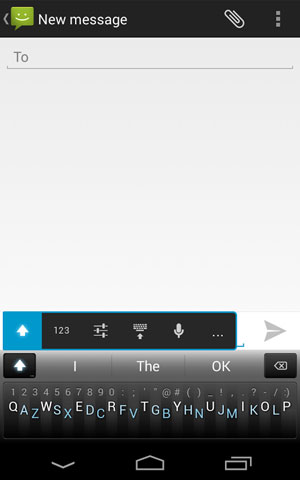
In addition to the now quite commonly available autocorrection guessing algorithms, Minuum Key ditches the traditional keyboard that usually overfills the device screen with a dense, impenetrable mass of keys obliterating whatever you're looking at, and creates a simple linear keyboard strip. It's a single line of keys that runs along the bottom of the screen.
It's still QWERTY, but QWERTY compressed into one line. So, instead of three lines of keys, it runs Q, from the first line, then pulls A from the second and then Z from the third: QAZWSX and so on. This should in theory mean you don't have to rethink your touch typing too much.
Testing the App

I found the keyboard intuitive and quickly got the hang of some of its quite brilliant aspects, including swipe-right as a substitute for the space bar and swipe right upward at 45-degrees to create an Enter button, and so on.
The developer really has rethought the keyboard for the small screen.
The idea is that you should be able to type vaguely and autocorrection will compensate. It takes time for the app to get up to speed, but it becomes more accurate as it learns your words. It didn't work too well for me, because of the time-to-learn considerations, but I see no reason why it ultimately wouldn't work as well as SwiftKey does.
One SwiftKey user recently told me that when creating an SMS text, he often doesn't enter words at all anymore. SwiftKey guesses accurately what words he wants to use with a press of the first character. If Minuum has its programming right, it should do the same.
If that's the case, then it all becomes a matter of keyboard preference. I've gotten used to SwiftKey's thumb-board for tablet, and I wouldn't want to change now.
However, the market is wide open, and there are likely many who haven't yet bought a custom keyboard. Minuum could therefore shuffle in.
In any case, this micro-sized keyboard potentially has other uses, and Minuum is quick to suggest that its micro-footprint -- or should it be fingerprint? -- is perfect for wearable tech.

NOTE:-  FEEL FREE TO COMMENT
SOURCE:- http://www.technewsworld.com
Unknown  /  at  14:23  /  No comments

Minuum


Minuum Keyboard Takes the Tedium Out of Typing

I found the Minuum keyboard intuitive and quickly got the hang of some of its quite brilliant aspects, including swipe-right as a substitute for the space bar and swipe right upward at 45-degrees to create an Enter button, and so on. The developer really has rethought the keyboard for the small screen. Its micro-footprint could be ideal for wearable tech too.
Minuum Keyboard is available in the Google Play store for US$1.99.Minuum

The holy grail of Android apps has got to be the one that best compensates for botched typing. The smaller the device I use, the more my typing deteriorates.
I'm reasonably quick and accurate on a desktop PC with spell check; I slow down on a laptop with short travel keys; I get by on a tablet with an installed optional SwiftKey app set to the thumb-type option, which splits the keyboard into three zones -- left zone with the left-thumb reachable QWERTY keys, right with the right-thumb's YUIOP keys, and the less-used number keys the middle; and I am virtually incapacitated on most smartphones, though my thick peasant fingers work better on an iPhone than an Android.
I've found SwiftKey's phone app to be not much better than stock at the phone-size screen level, so, I was intrigued when I came across Minuum Key, which tags itself as the little keyboard for big fingers. It claims to free up screen space while allowing you to type fast.
Right now, SwiftKey is the clear leader in the guess-the-word area, and it is consistently one of the top paid Android apps in the Google Play store. If you haven't tried it yet, do so.
New Keyboard Concept

The big question is whether Minuum Key could beat out super-app SwiftKey.
Minuum Key takes autocorrection seriously. Learning-style autocorrection is one of the ways these keyboard apps turn your clunky typing into precise typing. The other way is with keyboard layout, and Minuum Key has a novel approach to that.
In addition to the now quite commonly available autocorrection guessing algorithms, Minuum Key ditches the traditional keyboard that usually overfills the device screen with a dense, impenetrable mass of keys obliterating whatever you're looking at, and creates a simple linear keyboard strip. It's a single line of keys that runs along the bottom of the screen.
It's still QWERTY, but QWERTY compressed into one line. So, instead of three lines of keys, it runs Q, from the first line, then pulls A from the second and then Z from the third: QAZWSX and so on. This should in theory mean you don't have to rethink your touch typing too much.
Testing the App

I found the keyboard intuitive and quickly got the hang of some of its quite brilliant aspects, including swipe-right as a substitute for the space bar and swipe right upward at 45-degrees to create an Enter button, and so on.
The developer really has rethought the keyboard for the small screen.
The idea is that you should be able to type vaguely and autocorrection will compensate. It takes time for the app to get up to speed, but it becomes more accurate as it learns your words. It didn't work too well for me, because of the time-to-learn considerations, but I see no reason why it ultimately wouldn't work as well as SwiftKey does.
One SwiftKey user recently told me that when creating an SMS text, he often doesn't enter words at all anymore. SwiftKey guesses accurately what words he wants to use with a press of the first character. If Minuum has its programming right, it should do the same.
If that's the case, then it all becomes a matter of keyboard preference. I've gotten used to SwiftKey's thumb-board for tablet, and I wouldn't want to change now.
However, the market is wide open, and there are likely many who haven't yet bought a custom keyboard. Minuum could therefore shuffle in.
In any case, this micro-sized keyboard potentially has other uses, and Minuum is quick to suggest that its micro-footprint -- or should it be fingerprint? -- is perfect for wearable tech.

NOTE:-  FEEL FREE TO COMMENT
SOURCE:- http://www.technewsworld.com

Posted in: , Read Complete Article»

Friday, 31 January 2014

Specs Of HTC Desire 700 dual sim


GENERAL2G NetworkGSM 900 / 1800 / 1900 - SIM 1 & SIM 2
3G NetworkHSDPA 850 / 900 / 2100 - SIM 1
SIMDual SIM, (Micro-SIM, dual stand-by)
Announced2013, November
StatusAvailable. Released 2014, January
BODYDimensions145.5 x 72 x 10.3 mm (5.73 x 2.83 x 0.41 in)
Weight149 g (5.26 oz)
DISPLAYTypeCapacitive touchscreen, 16M colors
Size540 x 960 pixels, 5.0 inches (~220 ppi pixel density)
MultitouchYes
SOUNDAlert typesVibration, MP3, WAV ringtones
LoudspeakerYes, with stereo speakers, built-in amplifiers
3.5mm jackYes
MEMORYCard slotmicroSD, up to 64 GB
Internal8 GB, 1 GB RAM
DATAGPRSYes
EDGEYes
SpeedHSDPA, HSUPA
WLANWi-Fi 802.11 a/b/g/n, dual-band, DLNA, Wi-Fi Direct, Wi-Fi hotspot
BluetoothYes, v4.0 with A2DP
USBYes, microUSB v2.0
CAMERAPrimary8 MP, 3264 x 2448 pixels, autofocus, LED flash, check quality
FeaturesGeo-tagging, touch focus, face detection, simultaneous HD video and image recording
VideoYes, 1080p@30fps, check quality
SecondaryYes, 2.1 MP
FEATURESOSAndroid OS
CPUQuad-core 1.2 GHz
SensorsAccelerometer, proximity, compass
MessagingSMS (threaded view), MMS, Email, Push Email
BrowserHTML5
RadioFM radio
GPSYes, with A-GPS support and GLONASS
JavaYes, via Java MIDP emulator
ColorsBlack
 - SNS integration
- MP4/H.263/H.264/WMV player
- MP3/eAAC+/WMA/WAV player
- Google Search, Maps, Gmail,
YouTube, Calendar, Google Talk
- Organizer
- Document viewer
- Photo viewer/editor
- Voice memo/dial/commands
- Predictive text input
BATTERY Li-Po 2100 mAh battery
Stand-by(2G) / Up to 582 h (3G)
Talk time(2G) / Up to 11 h 40 min (3G)


source: gsmarena.com


NOTE: Feel Free To Comment....

Unknown  /  at  16:23  /  No comments


GENERAL2G NetworkGSM 900 / 1800 / 1900 - SIM 1 & SIM 2
3G NetworkHSDPA 850 / 900 / 2100 - SIM 1
SIMDual SIM, (Micro-SIM, dual stand-by)
Announced2013, November
StatusAvailable. Released 2014, January
BODYDimensions145.5 x 72 x 10.3 mm (5.73 x 2.83 x 0.41 in)
Weight149 g (5.26 oz)
DISPLAYTypeCapacitive touchscreen, 16M colors
Size540 x 960 pixels, 5.0 inches (~220 ppi pixel density)
MultitouchYes
SOUNDAlert typesVibration, MP3, WAV ringtones
LoudspeakerYes, with stereo speakers, built-in amplifiers
3.5mm jackYes
MEMORYCard slotmicroSD, up to 64 GB
Internal8 GB, 1 GB RAM
DATAGPRSYes
EDGEYes
SpeedHSDPA, HSUPA
WLANWi-Fi 802.11 a/b/g/n, dual-band, DLNA, Wi-Fi Direct, Wi-Fi hotspot
BluetoothYes, v4.0 with A2DP
USBYes, microUSB v2.0
CAMERAPrimary8 MP, 3264 x 2448 pixels, autofocus, LED flash, check quality
FeaturesGeo-tagging, touch focus, face detection, simultaneous HD video and image recording
VideoYes, 1080p@30fps, check quality
SecondaryYes, 2.1 MP
FEATURESOSAndroid OS
CPUQuad-core 1.2 GHz
SensorsAccelerometer, proximity, compass
MessagingSMS (threaded view), MMS, Email, Push Email
BrowserHTML5
RadioFM radio
GPSYes, with A-GPS support and GLONASS
JavaYes, via Java MIDP emulator
ColorsBlack
 - SNS integration
- MP4/H.263/H.264/WMV player
- MP3/eAAC+/WMA/WAV player
- Google Search, Maps, Gmail,
YouTube, Calendar, Google Talk
- Organizer
- Document viewer
- Photo viewer/editor
- Voice memo/dial/commands
- Predictive text input
BATTERY Li-Po 2100 mAh battery
Stand-by(2G) / Up to 582 h (3G)
Talk time(2G) / Up to 11 h 40 min (3G)


source: gsmarena.com


NOTE: Feel Free To Comment....

Posted in: Read Complete Article»

About

This blog belong to all our youngster friendz, who believe in sharing their knowledge with others and want to try to hackin', crackin' , full version applications at free of cost.
you will found here valuable stuffs.

Labels

adf.ly blocked (1) android (109) Android and PC (19) android games (11) android news (3) android tricks (43) Antivirus (11) Anvsoft (1) apple (40) asha phones (1) avast (1) avast pro antivirus 8 2013 (1) avg (1) AVG pc tuneup 2013 full version (1) avira (1) blackberry (1) blogspot (2) body_language (1) bootable usb (1) Browsers (16) c cleaner pro + business (1) Cheatbook 2013 (1) Chetan Bhagat (1) compressor (1) crac (1) Crack (1) crack + keygen (2) cyberlink power2go full version (1) daemon tools 5.2 full version (1) daemon tools patch (1) defender (2) dictionary (1) direct link (1) DivX Pro 7 (1) Ebook (2) eset (1) etc (1) facebook (16) Firewall (2) free recharge tricks (1) free sms (1) FRUIT NINJA for windows full version (1) full version (8) Full Version MS Office 13 (1) GTA Sandreas (1) hack (4) hack pc (3) hacking using keylogger (1) hardware (1) hiDownload platinum 8 (1) how to (6) how to install .net (1) HTML (1) idm (1) idm crack (1) IDM full version (1) image editor (2) install .net in windows 8 (1) internet tricks (37) iPhone 5c (2) job (1) k j activator (1) kaspersky (2) keygen (2) leaked images (1) license key (1) manual updates (1) mediafire (1) MEDIAFIRE DOWNLOAD (2) mediafire link (2) mobiles (42) music player (1) nfs most wanted (1) Office 13 Activator (1) official site update (1) offline updates (1) patch (4) PC (3) pc customize (1) PC Drivers (2) pc games (15) pc games cheats (11) PC Software (152) PC tricks (146) PdaNET 3.50 (1) PDF (3) phone specifications (43) pic viewer (3) power iso 5.6 (1) premium zbigz account (1) problem with .net in windows 8 (1) review (11) reviews (2) Revolution 2020 PDF (1) science (2) sharebeast download (6) sharebeast link (2) symbian mobiles (2) tech knowledge (33) Tech News (343) tech reviews (146) Torrent To IDM (1) Tune-Up 2014 Full Version (1) Ubuntu Mobiles (1) video player (13) video tutorial (1) Web design (1) window 8.1 tricks (12) windows 8 activator (1) Windows 8 USB Installer Maker (1) windows phones (16) winrar 5 full version (1)
Copyright © 2014 SimplyGet. WP Theme-junkie converted by Bloggertheme9
Blogger templates. Proudly Powered by Blogger.