Showing posts with label tech knowledge. Show all posts

Friday, 26 September 2014

Everything You Need to Know About the Bash Bug

man_typing_on_mac_book_ap.jpg

Also Read Full Specs Of Micromax Canvas Nitro

Internet security experts are warning that a new programming flaw known as the "Bash Bug" may pose a serious threat to millions of computers and other devices such as home Internet routers. Even the systems used to run factory floors and power plants could be affected.
So, is it time to panic? Here are some common questions and answers about the latest security scare.
Q. What is the Bash Bug, and why is it a big deal?
A. The bug, also known as "Shellshock," is in a commonly used piece of system software called Bash. Bash has been around since 1989 and is used on a variety of Unix-based systems, including Linux and Mac OS X.
Devices that use Unix in some form include many servers, routers, Android phones, Mac computers, medical devices and even the computers that create Bitcoins. Systems running power plants and municipal water systems could also be affected by the bug, though security experts already recommend that these systems remain disconnected from the Internet to avoid opening them to such risks.
Bash is a command shell - "the thing you use to tell your computer what you want it to do," explains Christopher Budd, global threat communications manager at security firm Trend Micro. Thus, exploiting a security hole in Bash means telling your computer, or other systems, what to do.
Q. Why are people saying it's worse than "Heartbleed," the flaw that exploited security technology used by hundreds of thousands of websites?
A. While Heartbleed exposed passwords and other sensitive data to hackers, Bash Bug lets outsiders take control of the affected device to install programs or run commands.
On the other hand, Bash Bug might be harder to exploit. Heartbleed affected any system running OpenSSL, a common Web encryption technology. With Bash Bug, your system actually has to be using Bash, Budd said. There are multiple types of command shells, so even if Bash is installed, the system could actually be using a different one.
Q. It's been a quarter century since Bash came out, so why is the bug a threat now?
A. That's because someone - Stephane Chazelas of Akamai Technologies Inc. to be specific - just found it.
Heartbleed was around for more than two years before it was discovered.
Q. Should you be worried?
A. For now, the Bash Bug appears to be more of a potential nuisance than a major threat.
It's a more vexing problem for Mac owners. The Bash Bug makes it easy for hackers to take control of a Mac running on a public Wi-Fi network, such as one in a coffee shop or airport, said Chris Wysopal, chief technologyofficer of computer security firm Veracode.
At home, a hacker who takes control of an Internet router could consume so much bandwidth for online mischief that the owner gets hit with a huge bill from service providers that impose monthly data caps, said Dave Lewis, Akamai Technologies' global security advocate.

Also Read Datawind to Launch Rs. 2,000 Android Phone With Free Lifetime Internet

Another possible security problem: A hacker who seizes control of a vulnerable Web server might collect online passwords stored in databases, said Joe Siegrist, CEO of LastPass, a service that stores and protects passwords. The threat doesn't appear to be as high as with Heartbleed, however.
The Bash Bug could cause massive damage if it's used to create an Internet "worm" - lines of malicious computer coding that wiggle from one vulnerable server to the next. A worm that reaches pandemic proportions could bog down the Internet and even render some services inaccessible. At this point, a worm feeding on the Bash Bug looms as a theoretical threat.
Q. What can you do about it?
A. Everyday users can't do much right now, except to wait for manufacturers to release fixes for their products. Budd recommends applying the patches for routers, Macs and other devices as they come out.
Even if a fix is developed, getting it could be another matter. Budd expects that to be an issue with Android phones, because their manufacturers and carriers are often slow to push out the system updates that Google provides.
Of course, it always helps to run up-to-date security software on your devices.
Q. Should these recurring security breakdowns cause people to reassess society's ever-increasing dependence on the Internet?
A. Probably, given that the revelations about Bash Bug and Heartbleed surfaced within six months of each other. What's especially troubling about Bash Bug is that it's been hiding in plain sight for the past two decades, even as millions of more machines came online to widen the threat.
Furthermore, these risks are likely to escalate as people store more documents, photos, videos and even medical records over the Internet. At the same time, technology is expected to make it possible to plug just about everything imaginable into the Internet, be it coffee machines or automobiles.
We'll just have to live with technological risks. As Lewis noted, "We are already too far down the road to take a step back."


Also Read How to Download and Install iOS 8 on Your iPhone, iPad, or iPod Touch

NOTE: Feel Free To Comment....
Unknown  /  at  18:41  /  No comments

man_typing_on_mac_book_ap.jpg

Also Read Full Specs Of Micromax Canvas Nitro

Internet security experts are warning that a new programming flaw known as the "Bash Bug" may pose a serious threat to millions of computers and other devices such as home Internet routers. Even the systems used to run factory floors and power plants could be affected.
So, is it time to panic? Here are some common questions and answers about the latest security scare.
Q. What is the Bash Bug, and why is it a big deal?
A. The bug, also known as "Shellshock," is in a commonly used piece of system software called Bash. Bash has been around since 1989 and is used on a variety of Unix-based systems, including Linux and Mac OS X.
Devices that use Unix in some form include many servers, routers, Android phones, Mac computers, medical devices and even the computers that create Bitcoins. Systems running power plants and municipal water systems could also be affected by the bug, though security experts already recommend that these systems remain disconnected from the Internet to avoid opening them to such risks.
Bash is a command shell - "the thing you use to tell your computer what you want it to do," explains Christopher Budd, global threat communications manager at security firm Trend Micro. Thus, exploiting a security hole in Bash means telling your computer, or other systems, what to do.
Q. Why are people saying it's worse than "Heartbleed," the flaw that exploited security technology used by hundreds of thousands of websites?
A. While Heartbleed exposed passwords and other sensitive data to hackers, Bash Bug lets outsiders take control of the affected device to install programs or run commands.
On the other hand, Bash Bug might be harder to exploit. Heartbleed affected any system running OpenSSL, a common Web encryption technology. With Bash Bug, your system actually has to be using Bash, Budd said. There are multiple types of command shells, so even if Bash is installed, the system could actually be using a different one.
Q. It's been a quarter century since Bash came out, so why is the bug a threat now?
A. That's because someone - Stephane Chazelas of Akamai Technologies Inc. to be specific - just found it.
Heartbleed was around for more than two years before it was discovered.
Q. Should you be worried?
A. For now, the Bash Bug appears to be more of a potential nuisance than a major threat.
It's a more vexing problem for Mac owners. The Bash Bug makes it easy for hackers to take control of a Mac running on a public Wi-Fi network, such as one in a coffee shop or airport, said Chris Wysopal, chief technologyofficer of computer security firm Veracode.
At home, a hacker who takes control of an Internet router could consume so much bandwidth for online mischief that the owner gets hit with a huge bill from service providers that impose monthly data caps, said Dave Lewis, Akamai Technologies' global security advocate.

Also Read Datawind to Launch Rs. 2,000 Android Phone With Free Lifetime Internet

Another possible security problem: A hacker who seizes control of a vulnerable Web server might collect online passwords stored in databases, said Joe Siegrist, CEO of LastPass, a service that stores and protects passwords. The threat doesn't appear to be as high as with Heartbleed, however.
The Bash Bug could cause massive damage if it's used to create an Internet "worm" - lines of malicious computer coding that wiggle from one vulnerable server to the next. A worm that reaches pandemic proportions could bog down the Internet and even render some services inaccessible. At this point, a worm feeding on the Bash Bug looms as a theoretical threat.
Q. What can you do about it?
A. Everyday users can't do much right now, except to wait for manufacturers to release fixes for their products. Budd recommends applying the patches for routers, Macs and other devices as they come out.
Even if a fix is developed, getting it could be another matter. Budd expects that to be an issue with Android phones, because their manufacturers and carriers are often slow to push out the system updates that Google provides.
Of course, it always helps to run up-to-date security software on your devices.
Q. Should these recurring security breakdowns cause people to reassess society's ever-increasing dependence on the Internet?
A. Probably, given that the revelations about Bash Bug and Heartbleed surfaced within six months of each other. What's especially troubling about Bash Bug is that it's been hiding in plain sight for the past two decades, even as millions of more machines came online to widen the threat.
Furthermore, these risks are likely to escalate as people store more documents, photos, videos and even medical records over the Internet. At the same time, technology is expected to make it possible to plug just about everything imaginable into the Internet, be it coffee machines or automobiles.
We'll just have to live with technological risks. As Lewis noted, "We are already too far down the road to take a step back."


Also Read How to Download and Install iOS 8 on Your iPhone, iPad, or iPod Touch

NOTE: Feel Free To Comment....

Posted in: , Read Complete Article»

Friday, 25 July 2014

Dropbox vs Google Drive vs SpiderOak: Which Cloud Storage Is Best For You?

It feels like cloud services have plateaued. We’re all familiar with how Dropbox works and how documents are stored in Google Drive. Other than price drops in cloud storage and the ongoing privacy debate, nothing much has been going on.

Also Read How to Block Popup Ads on Google Chrome?

Now that cloud storage has been popularized, it’s sometimes hard to tell which of the many services popping up is the best. Google Drive, Dropbox and SpiderOak are similar in a lot of senses. They give you a box to store your files, have iOS, Android apps, and web access to easily retrieve documents or previous version of them. They are free to start with, have paid options for added storage, and best of all, they are reliable.
So in this article I’ll focus on the differences rather than the similarities. And right now, it comes down to the cost, ecosystem, and privacy. Let’s get to it.

Cost To Space Ratio

money
Google Drive offers you 15 GB of free storage off the bat. But this is shared with all your Google services, including Gmail and Google+ photos (the high-res ones that don’t qualify for unlimited free storage). This means that if you’ve been harboring large attachment files in Gmail, it’s time to go on a cleaning spree.
Dropbox and SpiderOak both start you off with 2 GB of storage for free. Available upgrades are on the expensive side. While you can get 100 GB on Drive for $1.99 a month, the same costs $9.99 on Dropbox and SpiderOak. But Dropbox is pretty generous when it comes to giving space away. You can make a couple of gigs easily just by sharing the links, sending out the referral code or buying a phone with bundled cloud storage like Galaxy S5 among many others (50 GB storage for 2 years for free is the usual deal and Drive does this for handsets like Moto G as well).
SpiderOak however, doesn’t really like to play Oprah with their storage space.
Oprah

Also Read What's the difference between an Intel Core i3, i5 and i7?

Ecosystem And Services

Dropbox is your way out of the ecosystem rut.
When you’re buying hardware or software, what you’re really buying into is the “ecosystem”. Like it or not that’s the truth. So when you choose the privacy-first (SpiderOak over Dropbox) but then can’t connect with your favorite Markdown editor on iOS, you’ve got a problem on your hands.
ecosystem
Business users who work on the web will appreciate Google Drive’s productivity suite and the plethora of extensions and apps available. If you want something personal you can always whip it up with a script.
Dropbox is truly cross-platform and has by far the best integration with the cloud related services I’ve seen. When iOS 8′s integration comes in I’m sure Dropbox will be in there on day one, so will Google Drive. But Drive is still lagging behind with third party app integration. So before choosing your cloud service, check your app compatibility first.

Also Read Difference between Mainframe Computers and Supercomputers

Privacy

Privacy
Ever since the NSA story broke, privacy has been on everyone’s mind. The cloud especially has come under a lot of scrutiny. The problem stems from the fact that many users are still not completely familiar with how “the cloud” even works. To most, it’s a mystery.
ST Cloud LoL
SpiderOak is the only service in the list that has a “zero knowledge” policy. It means that the company doesn’t know what’s in your files and doesn’t have any access to it. Of course, Google and Dropbox encrypt your files as well but SpiderOak goes an extra step forward. The encryption key is user applicable. Meaning that when the feds come knocking at their door and demand your files, SpiderOak will hand it to them but as the encryption key is with you, they will need a warrant/permission from the government to swoop around.
Google Drive and Dropbox though won’t mind handing out complete access to your data to the proper authorities. More about that here. Of course, this doesn’t mean that SpiderOak is completely private and no one can ever get into it. But it’s good enough for Edward Snowden to use and that’s a man whose privacy advice is easy to follow.
But SpiderOak’s biggest problem is the lack of integration with big services. You can use it as a replacement for Dropbox for apps that run on desktop that have a file picker but not for mobile apps with tight cloud integration.
SpiderOak has structured their system in such a way that you can store all of your information on them with the same sort of features that Dropbox does, but they literally have no access to the content. So while they can be compelled to turn it over, the law enforcement agencies still have to go to a judge and get a warrant to actually get your encryption key from you. – Edward Snowden

So To Recap

  • Dropbox for all ecosystems.
  • Drive for the free storage and integrated productivity suite.
  • SpiderOak for the privacy, but little else.


Source:http://www.guidingtech.com/


Also Read What is the difference between a 32-bit and 64-bit CPU?

NOTE: Feel Free To Comment....
Unknown  /  at  13:07  /  No comments

It feels like cloud services have plateaued. We’re all familiar with how Dropbox works and how documents are stored in Google Drive. Other than price drops in cloud storage and the ongoing privacy debate, nothing much has been going on.

Also Read How to Block Popup Ads on Google Chrome?

Now that cloud storage has been popularized, it’s sometimes hard to tell which of the many services popping up is the best. Google Drive, Dropbox and SpiderOak are similar in a lot of senses. They give you a box to store your files, have iOS, Android apps, and web access to easily retrieve documents or previous version of them. They are free to start with, have paid options for added storage, and best of all, they are reliable.
So in this article I’ll focus on the differences rather than the similarities. And right now, it comes down to the cost, ecosystem, and privacy. Let’s get to it.

Cost To Space Ratio

money
Google Drive offers you 15 GB of free storage off the bat. But this is shared with all your Google services, including Gmail and Google+ photos (the high-res ones that don’t qualify for unlimited free storage). This means that if you’ve been harboring large attachment files in Gmail, it’s time to go on a cleaning spree.
Dropbox and SpiderOak both start you off with 2 GB of storage for free. Available upgrades are on the expensive side. While you can get 100 GB on Drive for $1.99 a month, the same costs $9.99 on Dropbox and SpiderOak. But Dropbox is pretty generous when it comes to giving space away. You can make a couple of gigs easily just by sharing the links, sending out the referral code or buying a phone with bundled cloud storage like Galaxy S5 among many others (50 GB storage for 2 years for free is the usual deal and Drive does this for handsets like Moto G as well).
SpiderOak however, doesn’t really like to play Oprah with their storage space.
Oprah

Also Read What's the difference between an Intel Core i3, i5 and i7?

Ecosystem And Services

Dropbox is your way out of the ecosystem rut.
When you’re buying hardware or software, what you’re really buying into is the “ecosystem”. Like it or not that’s the truth. So when you choose the privacy-first (SpiderOak over Dropbox) but then can’t connect with your favorite Markdown editor on iOS, you’ve got a problem on your hands.
ecosystem
Business users who work on the web will appreciate Google Drive’s productivity suite and the plethora of extensions and apps available. If you want something personal you can always whip it up with a script.
Dropbox is truly cross-platform and has by far the best integration with the cloud related services I’ve seen. When iOS 8′s integration comes in I’m sure Dropbox will be in there on day one, so will Google Drive. But Drive is still lagging behind with third party app integration. So before choosing your cloud service, check your app compatibility first.

Also Read Difference between Mainframe Computers and Supercomputers

Privacy

Privacy
Ever since the NSA story broke, privacy has been on everyone’s mind. The cloud especially has come under a lot of scrutiny. The problem stems from the fact that many users are still not completely familiar with how “the cloud” even works. To most, it’s a mystery.
ST Cloud LoL
SpiderOak is the only service in the list that has a “zero knowledge” policy. It means that the company doesn’t know what’s in your files and doesn’t have any access to it. Of course, Google and Dropbox encrypt your files as well but SpiderOak goes an extra step forward. The encryption key is user applicable. Meaning that when the feds come knocking at their door and demand your files, SpiderOak will hand it to them but as the encryption key is with you, they will need a warrant/permission from the government to swoop around.
Google Drive and Dropbox though won’t mind handing out complete access to your data to the proper authorities. More about that here. Of course, this doesn’t mean that SpiderOak is completely private and no one can ever get into it. But it’s good enough for Edward Snowden to use and that’s a man whose privacy advice is easy to follow.
But SpiderOak’s biggest problem is the lack of integration with big services. You can use it as a replacement for Dropbox for apps that run on desktop that have a file picker but not for mobile apps with tight cloud integration.
SpiderOak has structured their system in such a way that you can store all of your information on them with the same sort of features that Dropbox does, but they literally have no access to the content. So while they can be compelled to turn it over, the law enforcement agencies still have to go to a judge and get a warrant to actually get your encryption key from you. – Edward Snowden

So To Recap

  • Dropbox for all ecosystems.
  • Drive for the free storage and integrated productivity suite.
  • SpiderOak for the privacy, but little else.


Source:http://www.guidingtech.com/


Also Read What is the difference between a 32-bit and 64-bit CPU?

NOTE: Feel Free To Comment....

Posted in: , Read Complete Article»

Wednesday, 25 June 2014

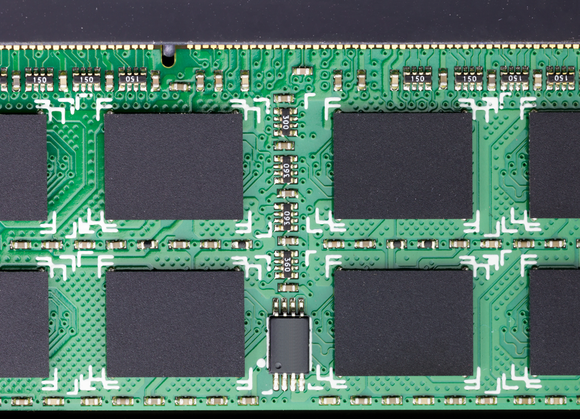
DDR4, the next-gen memory coming soon for PCs and mobile devices

DDR4 memory

Also Read How to Find and Trace Location of IP Address

New CPU and GPU architectures roil the market pretty much every year—sometimesmore than once a year. Yet in spite of the impact that system memory can have on a PC’s performance, the industry has relied on the same basic memory architecture for what seems like an eternity—in tech time, at least.
DDR3 SDRAM (the third generation of double data rate synchronous DRAM) was introduced way back in 2007. Carrie Underwood had scored her first Grammy. Russian leader Boris Yeltsin died. And Barry Bonds broke Hank Aaron’s home-run record. Now the PC industry is finally preparing to transition to DDR4 memory.
What took so long?
Part of the reason for the long gestation period is that memory manufacturers compete more on price than performance. And unlike the CPU and GPU markets, where just two companies dominate the market, memory standards are developed by a committee: The Joint Electron Devices Engineering Council (JEDEC). If you want a standard to develop slowly, do it by committee (consider how long the IEEE is taking to ratify the 802.11ac Wi-Fi standard).
JEDEC, which consists of every memory maker in the world, started work on the DDR4 spec in 2005—two years before DDR3 even hit the market—but the first test samples didn’t appear until 2011. DDR4 memory finally hit the market last year in very limited supply, but the industry finally shifted into high gear around Computex 2014.
What’s so great about DDR4? Read on and the truth shall be revealed.

What exactly is DDR4?

Also Read What's the difference between an Intel Core i3, i5 and i7?

There are a lot of deeply technical aspects to DDR4, but we won’t dive that far. The two key improvements in DDR4 are power consumption and data transfer speed, thanks to the development of an all-new bus.
DDR4 memory
DDR4 memory will deliver significant benefits in terms of performance and power consumption. 
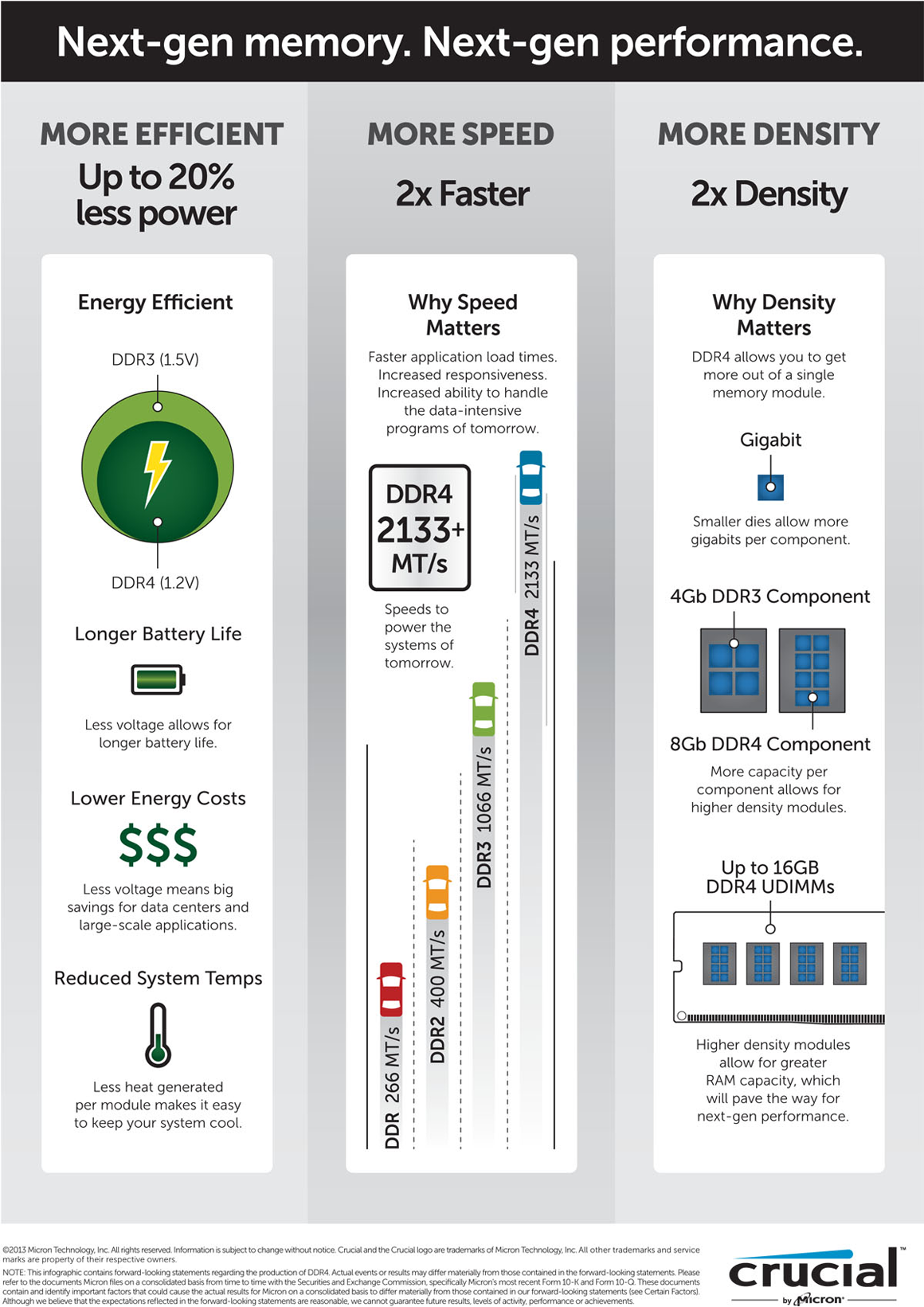
DDR3 generally requires 1.5 volts of electrical power to operate. DDR4 needs 20 percent less—just 1.2 volts. DDR4 also supports a new, deep power-down mode that will allow the host device to go into standby without needing to refresh its memory. Deep power-down mode is expected to reduce standby power consumption by 40- to 50 percent.  
Less power draw means less heat and longer battery life, so laptops and servers are expected to be the biggest beneficiaries of the jump to DDR4. Servers can be deployed with as much as a terabyte of memory and they routinely operate 24/7, so the power bills to keep them running—along with the onboard fans and outboard ventilation systems to keep them cool—can be enormous.  
Mid-range and high-end laptops routinely ship with 8GB of memory, so the 20-percent reduction in power consumption is more important for extending battery life than reducing utility bills. The LCD panel remains the biggest power draw, and the CPU eats its share of juice, but every little bit helps.  
Smartphones and tablets will benefit from DDR4 memory, too. Because they typically come with only 1GB or 2GB of memory—and their displays consume much more power than their memory—they'll benefit much like laptops will, from extended battery life rather than lower power bills.
But that hasn’t stopped Qualcomm from getting into the game. Its Snapdragon 810 mobile processor uses low-power DDR4 memory, and devices using this chip are expected to ship in the first half of 2015.
snapdragon 810 crop
Qualcomm's new Snapdragon 810 processor will take advantage of DDR4 memory. 
Reducing power consumption will give desktop PC users a warm, green feeling, but they’ll probably appreciate DDR4’s speed bump a lot more. DDR4 memory kits shown off at Computex boasted speeds ranging from 2133MHz to 3200MHz, and DDR4 could eventually hit 4266 MHz. DDR3 memory topped out at 2133 MHz, so there’s no question memory will be a lot faster.
Finally, DDR4 uses much higher-density chips, so each memory stick (DIMM, technically) will pack a lot more memory. Where you might buy DDR3 memory in 1- or 2GB kits for desktops and notebooks, expect to see 4- and 8GB kits with DDR4. And for high-end servers, each DDR4 DIMM could deliver 64- or even 128GB of memory.

Do you need DDR4 memory? Will you ever?

Also Read How To Watch FIFA World Cup 2014 Live On Your PC, Smartphone or Tablet

Before you get too excited about DDR4, note that it hasn’t even reached bleeding edge status. You can’t buy DDR4 memory today, and your existing hardware wouldn’t be able to use it if you could. But it’s a safe bet that it will be expensive when it does come to market. Mike Howard, memory analyst at the research firm IHS, said he expects DDR4 memory to launch later this year at prices 40- to 50 percent higher than DDR3 memory. So if you were to buy 16GB of DDR3 memory at the average price of $140, the same amount of DDR4 memory would set you back around $210.
"As we go forward, DDR4 will get more engineering resources,” said Howard. “2016 is when we will see price parity with DDR3. Then it will get cheaper as more people put resources into it.”
DDR4 memory
Improvements in memory technology occur at a relatively stately pace.
Howard doesn’t consider DDR4 a must-have update for most people. “Users don’t need 2400MHz speeds,” he said. “In the PC world, except for the power-user segment, people aren’t screaming for more memory bandwidth.”
Kelt Reeves, president of boutique PC builder Falcon Northwest, echoed that sentiment. “On current-generation CPUs, we see almost no benefit in DDR3 speeds above 1866MHz,” he said. “For 2133MHz and higher, you have to specifically run memory bandwidth tests to see anything outside of margin-of-error in most benchmarks.”
According to Reeves, DDR4’s lower power requirements—and the corresponding reduction in waste heat—will be this technology's real draw. “Memory has become so much more reliable in recent years with the voltage drops from 2.1- to 1.8- to now 1.5 volts,” he said.
An investment in DDR4 will also entail a motherboard upgrade, because you’ll need a new chipset. Intel’s upcoming X99 chipset will support DDR4 memory, along with a new Extreme Edition of its Haswell CPU (codenamed Haswell-E). And it’s precisely that power-user segment that would consider paying $1000 for Intel’s best processor.
If that doesn’t describe you, you don’t need to worry about jumping into a major upgrade anytime soon, or even postponing your next PC purchase until models with DDR4 come out.
That’s not to say DDR4 will be a waste of money. It’s just that in its early days, it won’t deliver significant benefits to anyone beyond the earliest of adopters.


Source:http://www.pcworld.com/


Also Read What is Mobile SEO and How you Build SEO for wapsites?

NOTE: Feel Free To Comment....
Unknown  /  at  14:55  /  No comments

DDR4 memory

Also Read How to Find and Trace Location of IP Address

New CPU and GPU architectures roil the market pretty much every year—sometimesmore than once a year. Yet in spite of the impact that system memory can have on a PC’s performance, the industry has relied on the same basic memory architecture for what seems like an eternity—in tech time, at least.
DDR3 SDRAM (the third generation of double data rate synchronous DRAM) was introduced way back in 2007. Carrie Underwood had scored her first Grammy. Russian leader Boris Yeltsin died. And Barry Bonds broke Hank Aaron’s home-run record. Now the PC industry is finally preparing to transition to DDR4 memory.
What took so long?
Part of the reason for the long gestation period is that memory manufacturers compete more on price than performance. And unlike the CPU and GPU markets, where just two companies dominate the market, memory standards are developed by a committee: The Joint Electron Devices Engineering Council (JEDEC). If you want a standard to develop slowly, do it by committee (consider how long the IEEE is taking to ratify the 802.11ac Wi-Fi standard).
JEDEC, which consists of every memory maker in the world, started work on the DDR4 spec in 2005—two years before DDR3 even hit the market—but the first test samples didn’t appear until 2011. DDR4 memory finally hit the market last year in very limited supply, but the industry finally shifted into high gear around Computex 2014.
What’s so great about DDR4? Read on and the truth shall be revealed.

What exactly is DDR4?

Also Read What's the difference between an Intel Core i3, i5 and i7?

There are a lot of deeply technical aspects to DDR4, but we won’t dive that far. The two key improvements in DDR4 are power consumption and data transfer speed, thanks to the development of an all-new bus.
DDR4 memory
DDR4 memory will deliver significant benefits in terms of performance and power consumption. 
DDR3 generally requires 1.5 volts of electrical power to operate. DDR4 needs 20 percent less—just 1.2 volts. DDR4 also supports a new, deep power-down mode that will allow the host device to go into standby without needing to refresh its memory. Deep power-down mode is expected to reduce standby power consumption by 40- to 50 percent.  
Less power draw means less heat and longer battery life, so laptops and servers are expected to be the biggest beneficiaries of the jump to DDR4. Servers can be deployed with as much as a terabyte of memory and they routinely operate 24/7, so the power bills to keep them running—along with the onboard fans and outboard ventilation systems to keep them cool—can be enormous.  
Mid-range and high-end laptops routinely ship with 8GB of memory, so the 20-percent reduction in power consumption is more important for extending battery life than reducing utility bills. The LCD panel remains the biggest power draw, and the CPU eats its share of juice, but every little bit helps.  
Smartphones and tablets will benefit from DDR4 memory, too. Because they typically come with only 1GB or 2GB of memory—and their displays consume much more power than their memory—they'll benefit much like laptops will, from extended battery life rather than lower power bills.
But that hasn’t stopped Qualcomm from getting into the game. Its Snapdragon 810 mobile processor uses low-power DDR4 memory, and devices using this chip are expected to ship in the first half of 2015.
snapdragon 810 crop
Qualcomm's new Snapdragon 810 processor will take advantage of DDR4 memory. 
Reducing power consumption will give desktop PC users a warm, green feeling, but they’ll probably appreciate DDR4’s speed bump a lot more. DDR4 memory kits shown off at Computex boasted speeds ranging from 2133MHz to 3200MHz, and DDR4 could eventually hit 4266 MHz. DDR3 memory topped out at 2133 MHz, so there’s no question memory will be a lot faster.
Finally, DDR4 uses much higher-density chips, so each memory stick (DIMM, technically) will pack a lot more memory. Where you might buy DDR3 memory in 1- or 2GB kits for desktops and notebooks, expect to see 4- and 8GB kits with DDR4. And for high-end servers, each DDR4 DIMM could deliver 64- or even 128GB of memory.

Do you need DDR4 memory? Will you ever?

Also Read How To Watch FIFA World Cup 2014 Live On Your PC, Smartphone or Tablet

Before you get too excited about DDR4, note that it hasn’t even reached bleeding edge status. You can’t buy DDR4 memory today, and your existing hardware wouldn’t be able to use it if you could. But it’s a safe bet that it will be expensive when it does come to market. Mike Howard, memory analyst at the research firm IHS, said he expects DDR4 memory to launch later this year at prices 40- to 50 percent higher than DDR3 memory. So if you were to buy 16GB of DDR3 memory at the average price of $140, the same amount of DDR4 memory would set you back around $210.
"As we go forward, DDR4 will get more engineering resources,” said Howard. “2016 is when we will see price parity with DDR3. Then it will get cheaper as more people put resources into it.”
DDR4 memory
Improvements in memory technology occur at a relatively stately pace.
Howard doesn’t consider DDR4 a must-have update for most people. “Users don’t need 2400MHz speeds,” he said. “In the PC world, except for the power-user segment, people aren’t screaming for more memory bandwidth.”
Kelt Reeves, president of boutique PC builder Falcon Northwest, echoed that sentiment. “On current-generation CPUs, we see almost no benefit in DDR3 speeds above 1866MHz,” he said. “For 2133MHz and higher, you have to specifically run memory bandwidth tests to see anything outside of margin-of-error in most benchmarks.”
According to Reeves, DDR4’s lower power requirements—and the corresponding reduction in waste heat—will be this technology's real draw. “Memory has become so much more reliable in recent years with the voltage drops from 2.1- to 1.8- to now 1.5 volts,” he said.
An investment in DDR4 will also entail a motherboard upgrade, because you’ll need a new chipset. Intel’s upcoming X99 chipset will support DDR4 memory, along with a new Extreme Edition of its Haswell CPU (codenamed Haswell-E). And it’s precisely that power-user segment that would consider paying $1000 for Intel’s best processor.
If that doesn’t describe you, you don’t need to worry about jumping into a major upgrade anytime soon, or even postponing your next PC purchase until models with DDR4 come out.
That’s not to say DDR4 will be a waste of money. It’s just that in its early days, it won’t deliver significant benefits to anyone beyond the earliest of adopters.


Source:http://www.pcworld.com/


Also Read What is Mobile SEO and How you Build SEO for wapsites?

NOTE: Feel Free To Comment....

Posted in: , Read Complete Article»

Tuesday, 24 June 2014

Requirement for a 3D Gaming PC


Also Read [[Problem Solved]]  "Windows could not complete the installation. To install Windows on this computer, restart the installation."

Home theaters and TV are now equipped with 3D TV, so is your chance to change your PC to a 3D gaming PC.
Here are the requirements for a 3D Gaming PC

Monitor with 3D support

This might be the most expensive equipment in a 3D Gaming PC. Since the result is projected on the monitor, you need to find the right model which suits right to your requirement and budget.
3D monitors use two types of 3D technology – Active and Passive.
Active 3D technology use battery operated special glasses which rapidly opens and close the shutter. The trick is, data meant for left eye is blocked from right and vice versa. First, the left eye receives the data and then the right. They are aligned in such a way that it trigger a 3D illusion. The only job for the TV is just to make sure there is a refresh rate of 60 frames per second which most modern TVs are capable.
Active 3D glasses are bulky, expensive and need a power source to operate. This may not be a great choice if the 3D is meant for lot of people to be watched at the same time. Since the image is blocked alternately, it might make it look dimmer. But they show more detailed images compared to Passive 3D.

Also Read How to Watch Fifa World Cup 2014 Live on Your PC, Smartphone or Tablet

Passive 3D gives you the same experience that you get from watching a 3D movie on theater. Passive 3D glasses are light weight and inexpensive. The only disadvantage is that your eye can only see part of the image. The precision is less with a Passive 3D glass.
Active 3D is considered superior in technology since it displays the screen is displayed at full resolution at a full frame rate.
For monitor, you need to choose between a monitor for Active and Passive 3D.

3D Graphics Card

Apart from having a powerful CPU, you need to have a separate powerful Graphics card. Onboard GPU’s are not powerful enough to give the full effect of 3D images. The main technologies involved in 3D technology for a graphics card are Nvidia’s 3D Vision system and AMD’s HD3D. Most of Nvidia’s card has got technology incorporated in most of their models, but make sure to check for HD3D and TriDef for AMD.
If the graphics card manufacturer is providing their own 3D glasses, it might save you money for buying one separately. Also, you have less possibility of having any 3D display related issues.

Also Read Be The First To Read All About The Release Of Firefox 30

3D capable Video Cable

In order to support 3D signals, your HDMI should be version 1.4 or above. Most modern monitors have support for HDMI 1.4. The latest version is HDMI 2.0.

3D Vision Glass

It depends on whether you choose the Active or Passive 3D technology. For Passive 3D technology, any polarized glass will be enough. You can get variety of models to choose from. For Active 3D, you need to get the glasses compatible for the higher frame rate of the monitor. Some manufacturers provide one along with buying a monitor. You can also use a 3D vision kit from Nvidia which comes with a USB chargeable shutter glasses and IR emitter which can be used to turn it on or off and change the depth of 3D effect.
Apart from this, you might need to install some softwares provided by the hardware manufacturer or game developers which will further enhance the 3D gaming experience.


Also Read How to Get – Use Cortana on Windows Phone 8.1 Outside US?

NOTE: Feel Free To Comment....
Unknown  /  at  11:58  /  2 comments


Also Read [[Problem Solved]]  "Windows could not complete the installation. To install Windows on this computer, restart the installation."

Home theaters and TV are now equipped with 3D TV, so is your chance to change your PC to a 3D gaming PC.
Here are the requirements for a 3D Gaming PC

Monitor with 3D support

This might be the most expensive equipment in a 3D Gaming PC. Since the result is projected on the monitor, you need to find the right model which suits right to your requirement and budget.
3D monitors use two types of 3D technology – Active and Passive.
Active 3D technology use battery operated special glasses which rapidly opens and close the shutter. The trick is, data meant for left eye is blocked from right and vice versa. First, the left eye receives the data and then the right. They are aligned in such a way that it trigger a 3D illusion. The only job for the TV is just to make sure there is a refresh rate of 60 frames per second which most modern TVs are capable.
Active 3D glasses are bulky, expensive and need a power source to operate. This may not be a great choice if the 3D is meant for lot of people to be watched at the same time. Since the image is blocked alternately, it might make it look dimmer. But they show more detailed images compared to Passive 3D.

Also Read How to Watch Fifa World Cup 2014 Live on Your PC, Smartphone or Tablet

Passive 3D gives you the same experience that you get from watching a 3D movie on theater. Passive 3D glasses are light weight and inexpensive. The only disadvantage is that your eye can only see part of the image. The precision is less with a Passive 3D glass.
Active 3D is considered superior in technology since it displays the screen is displayed at full resolution at a full frame rate.
For monitor, you need to choose between a monitor for Active and Passive 3D.

3D Graphics Card

Apart from having a powerful CPU, you need to have a separate powerful Graphics card. Onboard GPU’s are not powerful enough to give the full effect of 3D images. The main technologies involved in 3D technology for a graphics card are Nvidia’s 3D Vision system and AMD’s HD3D. Most of Nvidia’s card has got technology incorporated in most of their models, but make sure to check for HD3D and TriDef for AMD.
If the graphics card manufacturer is providing their own 3D glasses, it might save you money for buying one separately. Also, you have less possibility of having any 3D display related issues.

Also Read Be The First To Read All About The Release Of Firefox 30

3D capable Video Cable

In order to support 3D signals, your HDMI should be version 1.4 or above. Most modern monitors have support for HDMI 1.4. The latest version is HDMI 2.0.

3D Vision Glass

It depends on whether you choose the Active or Passive 3D technology. For Passive 3D technology, any polarized glass will be enough. You can get variety of models to choose from. For Active 3D, you need to get the glasses compatible for the higher frame rate of the monitor. Some manufacturers provide one along with buying a monitor. You can also use a 3D vision kit from Nvidia which comes with a USB chargeable shutter glasses and IR emitter which can be used to turn it on or off and change the depth of 3D effect.
Apart from this, you might need to install some softwares provided by the hardware manufacturer or game developers which will further enhance the 3D gaming experience.


Also Read How to Get – Use Cortana on Windows Phone 8.1 Outside US?

NOTE: Feel Free To Comment....

Posted in: , , Read Complete Article»

Sunday, 25 May 2014

What Is the Microsoft XNA Framework?


Also Read What's the difference between an Intel Core i3, i5 and i7?

Computer game creation typically requires a large amount of time and coding, making the implementation of large-scale games difficult for small design teams and individual programmers. To make this easier, many software companies release programming frameworks to reduce the workload required. One such tool set is Microsoft's XNA Framework, designed for use with Microsoft's various platforms.


XNA Framework

The Microsoft XNA Framework is a set of programming tools designed for use with Microsoft's .NET Framework. It consists of code libraries and program APIs to reduce the amount of coding required for common game-related tasks. The intent of the XNA Framework is to allow casual and independent programmers to focus more on the content of their games without having to spend a significant amount of time crafting a game engine and graphics framework beforehand.

XNA Game Studio

While the XNA Framework can be integrated into Visual Studio and used directly, Microsoft also makes it available through a software package known as XNA Game Studio. Game Studio allows developers to create games completely within its programming environment, coding, compiling and testing in-progress games without having to open a separate compiler. There have been five releases of XNA Game Studio as of 2012. The most recent is XNA Game Studio 4.0 Refresh, which incorporates bug fixes and support for both Windows Phone 7.5 and the Visual Basic programming language.

Supported Platforms

Games can be made using the Microsoft XNA Framework for Windows PCs, the Xbox 360, Windows Phone 7 and Windows Phone 7.5. Full support for the Windows Phone 8 platform is not available in the XNA Framework as of 2012, though games developed using Windows Phone 7 or 7.5 specifications will run as legacy applications on the newer platform.

XDK Extensions

Originally known as XNA Game Studio Professional, XNA's XDK Extensions is an optional component available to developers who have a valid Xbox development license and the Microsoft Xbox 360 Development Kit installed. The XDK Extensions component allows developers to include additional game components, such as achievements and online leaderboards, which are reserved only for use in licensed Xbox games.

XNA and Windows 8

While XNA-developed games are compatible with Windows 8 and run as legacy applications on the Desktop, as of 2012 the XNA Framework cannot be used to create game apps for the Windows Modern UI interface. Desktop games developed with the XNA Framework can still be listed in the Microsoft Store, though the listing directs visitors to the developer's website for purchase and download.

MonoGame

An open-source implementation of XNA Framework 4.0 known as MonoGame may allow developers to recompile XNA projects for publication as Modern UI apps and also allows publication of XNA games on other unsupported platforms such as Mac OS X, Apple iOS, Android, Linux and the PlayStation Suite. MonoGame requires Visual Studio for implementation, and as an ongoing open-source project some features may not be fully realized in the current version of the project.


NOTE: Feel Free To Comment....
Unknown  /  at  15:04  /  No comments


Also Read What's the difference between an Intel Core i3, i5 and i7?

Computer game creation typically requires a large amount of time and coding, making the implementation of large-scale games difficult for small design teams and individual programmers. To make this easier, many software companies release programming frameworks to reduce the workload required. One such tool set is Microsoft's XNA Framework, designed for use with Microsoft's various platforms.


XNA Framework

The Microsoft XNA Framework is a set of programming tools designed for use with Microsoft's .NET Framework. It consists of code libraries and program APIs to reduce the amount of coding required for common game-related tasks. The intent of the XNA Framework is to allow casual and independent programmers to focus more on the content of their games without having to spend a significant amount of time crafting a game engine and graphics framework beforehand.

XNA Game Studio

While the XNA Framework can be integrated into Visual Studio and used directly, Microsoft also makes it available through a software package known as XNA Game Studio. Game Studio allows developers to create games completely within its programming environment, coding, compiling and testing in-progress games without having to open a separate compiler. There have been five releases of XNA Game Studio as of 2012. The most recent is XNA Game Studio 4.0 Refresh, which incorporates bug fixes and support for both Windows Phone 7.5 and the Visual Basic programming language.

Supported Platforms

Games can be made using the Microsoft XNA Framework for Windows PCs, the Xbox 360, Windows Phone 7 and Windows Phone 7.5. Full support for the Windows Phone 8 platform is not available in the XNA Framework as of 2012, though games developed using Windows Phone 7 or 7.5 specifications will run as legacy applications on the newer platform.

XDK Extensions

Originally known as XNA Game Studio Professional, XNA's XDK Extensions is an optional component available to developers who have a valid Xbox development license and the Microsoft Xbox 360 Development Kit installed. The XDK Extensions component allows developers to include additional game components, such as achievements and online leaderboards, which are reserved only for use in licensed Xbox games.

XNA and Windows 8

While XNA-developed games are compatible with Windows 8 and run as legacy applications on the Desktop, as of 2012 the XNA Framework cannot be used to create game apps for the Windows Modern UI interface. Desktop games developed with the XNA Framework can still be listed in the Microsoft Store, though the listing directs visitors to the developer's website for purchase and download.

MonoGame

An open-source implementation of XNA Framework 4.0 known as MonoGame may allow developers to recompile XNA projects for publication as Modern UI apps and also allows publication of XNA games on other unsupported platforms such as Mac OS X, Apple iOS, Android, Linux and the PlayStation Suite. MonoGame requires Visual Studio for implementation, and as an ongoing open-source project some features may not be fully realized in the current version of the project.


NOTE: Feel Free To Comment....

Posted in: Read Complete Article»

Saturday, 24 May 2014

What's the difference between an Intel Core i3, i5 and i7?


Intel Core i3, Core i5, and Core i7 CPUs have been around for over a year now, but some buyers still get stumped whenever they attempt to build their own systems and are forced to choose among the three. With the more recent Sandy Bridge architecture now on store shelves, we expect the latest wave of buyers to ask the same kind of questions.


Core i3, Core i5, Core i7 — the difference in a nutshell


If you want a plain and simple answer, then generally speaking, Core i7s are better than Core i5s, which are in turn better than Core i3s. Nope, Core i7 does not have seven cores nor does Core i3 have three cores. The numbers are simply indicative of their relative processing powers.
Their relative levels of processing power are also signified by their Intel Processor Star Ratings, which are based on a collection of criteria involving their number of cores, clockspeed (in GHz), size of cache, as well as some new Intel technologies like Turbo Boost and Hyper-Threading.
Also Read What is a Processor Or CPU?
Core i3s are rated with three stars, i5s have four stars, and i7s have five. If you’re wondering why the ratings start with three, well they actually don’t. The entry-level Intel CPUs — Celeron and Pentium — get one and two stars respectively.
Note: Core processors can be grouped in terms of their target devices, i.e., those for laptops and those for desktops. Each has its own specific characteristics/specs. To avoid confusion, we’ll focus on the desktop variants. Note also that we’ll be focusing on the 2nd Generation (Sandy Bridge) Core CPUs.

Number of cores

The more cores there are, the more tasks (known as threads) can be served at the same time. The lowest number of cores can be found in Core i3 CPUs, i.e., which have only two cores. Currently, all Core i3s are dual-core processors.
Currently all Core i5 processors, except for the i5-661, are quad cores in Australia. The Core i5-661 is only a dual-core processor with a clockspeed of 3.33 GHz. Remember that all Core i3s are also dual cores. Furthermore, the i3-560 is also 3.33GHz, yet a lot cheaper. Sounds like it might be a better buy than the i5. What gives?
At this point, I’d like to grab the opportunity to illustrate how a number of factors affect the overall processing power of a CPU and determine whether it should be considered an i3, an i5, or an i7.
Even if the i5-661 normally runs at the same clockspeed as Core i3-560, and even if they all have the same number of cores, the i5-661 benefits from a technology known as Turbo Boost.
Also Read Why A Hard Drive Or Pen Drive Has Less Storage Space Than Promised?

Intel Turbo Boost

The Intel Turbo Boost Technology allows a processor to dynamically increase its clockspeed whenever the need arises. The maximum amount that Turbo Boost can raise clockspeed at any given time is dependent on the number of active cores, the estimated current consumption, the estimated power consumption, and the processor temperature.
For the Core i5-661, its maximum allowable processor frequency is 3.6 GHz. Because none of the Core i3 CPUs have Turbo Boost, the i5-661 can outrun them when it needs to. Because all Core i5 processors are equipped with the latest version of this technology — Turbo Boost 2.0 — all of them can outrun any Core i3.

Cache size

Whenever the CPU finds that it keeps on using the same data over and over, it stores that data in its cache. Cache is just like RAM, only faster — because it’s built into the CPU itself. Both RAM and cache serve as holding areas for frequently used data. Without them, the CPU would have to keep on reading from the hard disk drive, which would take a lot more time.
Basically, RAM minimises interaction with the hard disk, while cache minimises interaction with the RAM. Obviously, with a larger cache, more data can be accessed quickly. All Core i3 processors have 3MB of cache. All Core i5s, except again for the 661 (only 4MB), have 6MB of cache. Finally, all Core i7 CPUs have 8MB of cache. This is clearly one reason why an i7 outperforms an i5 — and why an i5 outperforms an i3.

Hyper-Threading

Strictly speaking, only one thread can be served by one core at a time. So if a CPU is a dual core, then supposedly only two threads can be served simultaneously. However, Intel has introduced a technology called Hyper-Threading. This enables a single core to serve multiple threads.
For instance, a Core i3, which is only a dual core, can actually serve two threads per core. In other words, a total of four threads can run simultaneously. Thus, even if Core i5 processors are quad cores, since they don’t support Hyper-Threading (again, except the i5-661) the number of threads they can serve at the same time is just about equal to those of their Core i3 counterparts.

Also Read What Is The Difference Between DDR2 & DDR3 RAM

This is one of the many reasons why Core i7 processors are the creme de la creme. Not only are they quad cores, they also support Hyper-Threading. Thus, a total of eight threads can run on them at the same time. Combine that with 8MB of cache and Intel Turbo Boost Technology, which all of them have, and you’ll see what sets the Core i7 apart from its siblings.
The upshot is that if you do a lot of things at the same time on your PC, then it might be worth forking out a bit more for an i5 or i7. However, if you use your PC to check emails, do some banking, read the news, and download a bit of music, you might be equally served by the cheaper i3.
Hopefully this gives you some insight for your next CPU selection.
Happy computing!


Also Read What is the difference between a 32-bit and 64-bit CPU?
NOTE: Feel Free To Comment....
Unknown  /  at  16:47  /  No comments


Intel Core i3, Core i5, and Core i7 CPUs have been around for over a year now, but some buyers still get stumped whenever they attempt to build their own systems and are forced to choose among the three. With the more recent Sandy Bridge architecture now on store shelves, we expect the latest wave of buyers to ask the same kind of questions.


Core i3, Core i5, Core i7 — the difference in a nutshell


If you want a plain and simple answer, then generally speaking, Core i7s are better than Core i5s, which are in turn better than Core i3s. Nope, Core i7 does not have seven cores nor does Core i3 have three cores. The numbers are simply indicative of their relative processing powers.
Their relative levels of processing power are also signified by their Intel Processor Star Ratings, which are based on a collection of criteria involving their number of cores, clockspeed (in GHz), size of cache, as well as some new Intel technologies like Turbo Boost and Hyper-Threading.
Also Read What is a Processor Or CPU?
Core i3s are rated with three stars, i5s have four stars, and i7s have five. If you’re wondering why the ratings start with three, well they actually don’t. The entry-level Intel CPUs — Celeron and Pentium — get one and two stars respectively.
Note: Core processors can be grouped in terms of their target devices, i.e., those for laptops and those for desktops. Each has its own specific characteristics/specs. To avoid confusion, we’ll focus on the desktop variants. Note also that we’ll be focusing on the 2nd Generation (Sandy Bridge) Core CPUs.

Number of cores

The more cores there are, the more tasks (known as threads) can be served at the same time. The lowest number of cores can be found in Core i3 CPUs, i.e., which have only two cores. Currently, all Core i3s are dual-core processors.
Currently all Core i5 processors, except for the i5-661, are quad cores in Australia. The Core i5-661 is only a dual-core processor with a clockspeed of 3.33 GHz. Remember that all Core i3s are also dual cores. Furthermore, the i3-560 is also 3.33GHz, yet a lot cheaper. Sounds like it might be a better buy than the i5. What gives?
At this point, I’d like to grab the opportunity to illustrate how a number of factors affect the overall processing power of a CPU and determine whether it should be considered an i3, an i5, or an i7.
Even if the i5-661 normally runs at the same clockspeed as Core i3-560, and even if they all have the same number of cores, the i5-661 benefits from a technology known as Turbo Boost.
Also Read Why A Hard Drive Or Pen Drive Has Less Storage Space Than Promised?

Intel Turbo Boost

The Intel Turbo Boost Technology allows a processor to dynamically increase its clockspeed whenever the need arises. The maximum amount that Turbo Boost can raise clockspeed at any given time is dependent on the number of active cores, the estimated current consumption, the estimated power consumption, and the processor temperature.
For the Core i5-661, its maximum allowable processor frequency is 3.6 GHz. Because none of the Core i3 CPUs have Turbo Boost, the i5-661 can outrun them when it needs to. Because all Core i5 processors are equipped with the latest version of this technology — Turbo Boost 2.0 — all of them can outrun any Core i3.

Cache size

Whenever the CPU finds that it keeps on using the same data over and over, it stores that data in its cache. Cache is just like RAM, only faster — because it’s built into the CPU itself. Both RAM and cache serve as holding areas for frequently used data. Without them, the CPU would have to keep on reading from the hard disk drive, which would take a lot more time.
Basically, RAM minimises interaction with the hard disk, while cache minimises interaction with the RAM. Obviously, with a larger cache, more data can be accessed quickly. All Core i3 processors have 3MB of cache. All Core i5s, except again for the 661 (only 4MB), have 6MB of cache. Finally, all Core i7 CPUs have 8MB of cache. This is clearly one reason why an i7 outperforms an i5 — and why an i5 outperforms an i3.

Hyper-Threading

Strictly speaking, only one thread can be served by one core at a time. So if a CPU is a dual core, then supposedly only two threads can be served simultaneously. However, Intel has introduced a technology called Hyper-Threading. This enables a single core to serve multiple threads.
For instance, a Core i3, which is only a dual core, can actually serve two threads per core. In other words, a total of four threads can run simultaneously. Thus, even if Core i5 processors are quad cores, since they don’t support Hyper-Threading (again, except the i5-661) the number of threads they can serve at the same time is just about equal to those of their Core i3 counterparts.

Also Read What Is The Difference Between DDR2 & DDR3 RAM

This is one of the many reasons why Core i7 processors are the creme de la creme. Not only are they quad cores, they also support Hyper-Threading. Thus, a total of eight threads can run on them at the same time. Combine that with 8MB of cache and Intel Turbo Boost Technology, which all of them have, and you’ll see what sets the Core i7 apart from its siblings.
The upshot is that if you do a lot of things at the same time on your PC, then it might be worth forking out a bit more for an i5 or i7. However, if you use your PC to check emails, do some banking, read the news, and download a bit of music, you might be equally served by the cheaper i3.
Hopefully this gives you some insight for your next CPU selection.
Happy computing!


Also Read What is the difference between a 32-bit and 64-bit CPU?
NOTE: Feel Free To Comment....

Posted in: Read Complete Article»

Thursday, 22 May 2014

What is Mobile SEO and How you Build SEO for wapsites?


Also Read Difference between Mainframe Computers and Supercomputers

In today’s Scenario Things are changing rapidly, and if it comes on world wide web (WWW) then you can not imagine how fast thing is going On.

Today’s in the web there are billions of sites and every one using SEO tools & Techniques to make popular His site on Google or search engines. So i am going to tell you about Mobile SEO because mostly site owners working on desktop sites and some owners are only using mobile seo. But if you are talking about Mobile site then mostly people thinks what was the need of mobile sites when we have website etc.

Why mobile sites are necessary:

Yes you think deeply why mobile site/ SEO is necessary,if you see these days every one have a mobile devices and most of the people using internet in mobiles. According to some reports in upcoming few years mobile internet users are more than PC internet surfers(users). So now you Think mobile internet users increasing regularly and if your site users and customers have mobile phones then he sure visit your site via mobile devices and if your website is not comfortable with mobile, taking too much time to open not responsive in mobile devices then your users phases difficulties and he try to choose other services and you loose your chance your business here.

How to convert your Website into Mobile sites:

I Think you understand why mobile sites are necessary for every website owners. And if you have not optimizes,your website for mobile, then it should be your first priority.According to Google search reports day by day mobile users increasing so take this advantages as soon as possible.
The best way of the converting your website into mobile is that contact your website designer and ask him to provide mobile theme and mobile design which specially open where your web site open via mobiles end.But if you are searching alternate methods Then in this internet world there are so much third parties site which offer you conversion of website to mobile site like Ginwiz.comdudamobile.com and lots of more .So just go and start converting.

Mobile SEO Tips:

In this post this is last but not Least. Mobile Seo, Making a mobile site is not means you have done all the things to compete your competitors. Mobile search engine optimization also very necessary part of this. So that search engines like Google, bing etc are recognize your brand power and show your site in top of searches.

Some Points To consider while making mobile sites:

  • Ensuring your mobile site is responsive and dedicated.
  • Ensuring that users or visitors find all the detail in mobile sites.
  • Most important it’s mobile FRIENDLY.
  • Making use of a ‘click to call’ feature.
  • Keeping in mind the differences in user intent between mobile and desktop users.
  • Always remember you site is page loading time is very fast between 1 to 2 seconds.
  • Google would like to see mobile pages loading in around 1 second.
Follow all the steps and see the magic of Search engines how quickly you popular and growth in your sail.


Also Read Why A Hard Drive Or Pen Drive Has Less Storage Space Than Promised?

NOTE: Feel Free To Comment....
Unknown  /  at  14:51  /  No comments


Also Read Difference between Mainframe Computers and Supercomputers

In today’s Scenario Things are changing rapidly, and if it comes on world wide web (WWW) then you can not imagine how fast thing is going On.

Today’s in the web there are billions of sites and every one using SEO tools & Techniques to make popular His site on Google or search engines. So i am going to tell you about Mobile SEO because mostly site owners working on desktop sites and some owners are only using mobile seo. But if you are talking about Mobile site then mostly people thinks what was the need of mobile sites when we have website etc.

Why mobile sites are necessary:

Yes you think deeply why mobile site/ SEO is necessary,if you see these days every one have a mobile devices and most of the people using internet in mobiles. According to some reports in upcoming few years mobile internet users are more than PC internet surfers(users). So now you Think mobile internet users increasing regularly and if your site users and customers have mobile phones then he sure visit your site via mobile devices and if your website is not comfortable with mobile, taking too much time to open not responsive in mobile devices then your users phases difficulties and he try to choose other services and you loose your chance your business here.

How to convert your Website into Mobile sites:

I Think you understand why mobile sites are necessary for every website owners. And if you have not optimizes,your website for mobile, then it should be your first priority.According to Google search reports day by day mobile users increasing so take this advantages as soon as possible.
The best way of the converting your website into mobile is that contact your website designer and ask him to provide mobile theme and mobile design which specially open where your web site open via mobiles end.But if you are searching alternate methods Then in this internet world there are so much third parties site which offer you conversion of website to mobile site like Ginwiz.comdudamobile.com and lots of more .So just go and start converting.

Mobile SEO Tips:

In this post this is last but not Least. Mobile Seo, Making a mobile site is not means you have done all the things to compete your competitors. Mobile search engine optimization also very necessary part of this. So that search engines like Google, bing etc are recognize your brand power and show your site in top of searches.

Some Points To consider while making mobile sites:

  • Ensuring your mobile site is responsive and dedicated.
  • Ensuring that users or visitors find all the detail in mobile sites.
  • Most important it’s mobile FRIENDLY.
  • Making use of a ‘click to call’ feature.
  • Keeping in mind the differences in user intent between mobile and desktop users.
  • Always remember you site is page loading time is very fast between 1 to 2 seconds.
  • Google would like to see mobile pages loading in around 1 second.
Follow all the steps and see the magic of Search engines how quickly you popular and growth in your sail.


Also Read Why A Hard Drive Or Pen Drive Has Less Storage Space Than Promised?

NOTE: Feel Free To Comment....

Posted in: , Read Complete Article»

About

This blog belong to all our youngster friendz, who believe in sharing their knowledge with others and want to try to hackin', crackin' , full version applications at free of cost.
you will found here valuable stuffs.

Labels

adf.ly blocked (1) android (109) Android and PC (19) android games (11) android news (3) android tricks (43) Antivirus (11) Anvsoft (1) apple (40) asha phones (1) avast (1) avast pro antivirus 8 2013 (1) avg (1) AVG pc tuneup 2013 full version (1) avira (1) blackberry (1) blogspot (2) body_language (1) bootable usb (1) Browsers (16) c cleaner pro + business (1) Cheatbook 2013 (1) Chetan Bhagat (1) compressor (1) crac (1) Crack (1) crack + keygen (2) cyberlink power2go full version (1) daemon tools 5.2 full version (1) daemon tools patch (1) defender (2) dictionary (1) direct link (1) DivX Pro 7 (1) Ebook (2) eset (1) etc (1) facebook (16) Firewall (2) free recharge tricks (1) free sms (1) FRUIT NINJA for windows full version (1) full version (8) Full Version MS Office 13 (1) GTA Sandreas (1) hack (4) hack pc (3) hacking using keylogger (1) hardware (1) hiDownload platinum 8 (1) how to (6) how to install .net (1) HTML (1) idm (1) idm crack (1) IDM full version (1) image editor (2) install .net in windows 8 (1) internet tricks (37) iPhone 5c (2) job (1) k j activator (1) kaspersky (2) keygen (2) leaked images (1) license key (1) manual updates (1) mediafire (1) MEDIAFIRE DOWNLOAD (2) mediafire link (2) mobiles (42) music player (1) nfs most wanted (1) Office 13 Activator (1) official site update (1) offline updates (1) patch (4) PC (3) pc customize (1) PC Drivers (2) pc games (15) pc games cheats (11) PC Software (152) PC tricks (146) PdaNET 3.50 (1) PDF (3) phone specifications (43) pic viewer (3) power iso 5.6 (1) premium zbigz account (1) problem with .net in windows 8 (1) review (11) reviews (2) Revolution 2020 PDF (1) science (2) sharebeast download (6) sharebeast link (2) symbian mobiles (2) tech knowledge (33) Tech News (343) tech reviews (146) Torrent To IDM (1) Tune-Up 2014 Full Version (1) Ubuntu Mobiles (1) video player (13) video tutorial (1) Web design (1) window 8.1 tricks (12) windows 8 activator (1) Windows 8 USB Installer Maker (1) windows phones (16) winrar 5 full version (1)
Copyright © 2014 SimplyGet. WP Theme-junkie converted by Bloggertheme9
Blogger templates. Proudly Powered by Blogger.