Showing posts with label android. Show all posts

Thursday, 17 September 2015

Xiaomi plans to unveil the Mi 4c on September 22


Also Read New Galaxy S6/S6 edge update brings more Microsoft apps

The highly anticipated Mi 4c is set to be unveiled by Xiaomi on September 22. The company released the above teaser promotional image on Google+, confirming the both date and the handset. Unfortunately, all information surrounding the unannounced smartphone is nothing but a rumor.

According to the Xiaomi CEO Lin Bin, the Mi 4c will be released in two versions, one with 2GB of RAM and 16GB of internal storage, and a more powerful variant with 3GB of RAM and 32GB of internal storage. Pricing is expected to commence at $235 USD. It's believed Type-C USB will also make an appearance. The report also states that the smartphone will pack a 3,080mAh battery.

Previous leaks suggest that the Mi 4c will flaunt a 5-inch 1080p display, 13-megapixel rear camera, and a 5-megapixel selfie camera. On the software front, it runs on the latest MIUI 7 based on Android Lollipop.


So stay tuned for more updates and leaks about Xiaomi's upcoming beast and other smartphones.


Also Read Leaked photos of BlackBerry Venice


Note: Feel Free To Comment....
Unknown  /  at  12:51  /  No comments


Also Read New Galaxy S6/S6 edge update brings more Microsoft apps

The highly anticipated Mi 4c is set to be unveiled by Xiaomi on September 22. The company released the above teaser promotional image on Google+, confirming the both date and the handset. Unfortunately, all information surrounding the unannounced smartphone is nothing but a rumor.

According to the Xiaomi CEO Lin Bin, the Mi 4c will be released in two versions, one with 2GB of RAM and 16GB of internal storage, and a more powerful variant with 3GB of RAM and 32GB of internal storage. Pricing is expected to commence at $235 USD. It's believed Type-C USB will also make an appearance. The report also states that the smartphone will pack a 3,080mAh battery.

Previous leaks suggest that the Mi 4c will flaunt a 5-inch 1080p display, 13-megapixel rear camera, and a 5-megapixel selfie camera. On the software front, it runs on the latest MIUI 7 based on Android Lollipop.


So stay tuned for more updates and leaks about Xiaomi's upcoming beast and other smartphones.


Also Read Leaked photos of BlackBerry Venice


Note: Feel Free To Comment....

Posted in: , , Read Complete Article»

New Galaxy S6/S6 edge update brings more Microsoft apps

The newly launched Samsung Galaxy S6 and S6 edge smartphones are receiving a new update that installs more Microsoft apps including Office, Word, and PowerPoint on the devices. The handsets already come with  pre-installed Microsoft OneDrive and OneNote apps.


Sized at around 220MB, the update carries a build number of LMY47X.G925FXXU2COH2, and reportedly installs the aforementioned apps without the user's consent - you'll find them installed after you're done updating your device.

Whether or not you'll get the update depends on your region and carrier - currently there's not much information available on it.

Stay live for more updates.
Thanks for visiting....

Source: gsmarena


Note: Feel Free To Comment....
Unknown  /  at  12:40  /  1 comment

The newly launched Samsung Galaxy S6 and S6 edge smartphones are receiving a new update that installs more Microsoft apps including Office, Word, and PowerPoint on the devices. The handsets already come with  pre-installed Microsoft OneDrive and OneNote apps.


Sized at around 220MB, the update carries a build number of LMY47X.G925FXXU2COH2, and reportedly installs the aforementioned apps without the user's consent - you'll find them installed after you're done updating your device.

Whether or not you'll get the update depends on your region and carrier - currently there's not much information available on it.

Stay live for more updates.
Thanks for visiting....

Source: gsmarena


Note: Feel Free To Comment....

Posted in: , , Read Complete Article»

Leaked photos of BlackBerry Venice

Another set of live photos showcasing the unannounced BlackBerry Venice made the rounds online. The high-end Android smartphone is expected to launch at some point in November on all major carriers in the United States.

It confirms that BlackBerry Venice features slide-out QWERTY keyboard, slightly curved display, and main camera with dual-LED flash.
Here is the set of old leaked images.

On the software side, the device appears to mostly have a stock version of Android. According to the reports, BlackBerry has added a number of productivity-centric goodies, including hardware keyboard shortcuts, as well as easy access to composing emails and messages.

Hardware-wise, the BlackBerry Venice is once again rumored to pack a Qualcomm Snapdragon 808 chipset, coupled with 3GB of RAM. The device’s camera is expected to be an 18MP unit with dual-LED flash.

Stay tuned for more updates....

Thanks for visiting.....


Source: android authority

Note: Feel Free To Comment....
Unknown  /  at  12:34  /  No comments

Another set of live photos showcasing the unannounced BlackBerry Venice made the rounds online. The high-end Android smartphone is expected to launch at some point in November on all major carriers in the United States.

It confirms that BlackBerry Venice features slide-out QWERTY keyboard, slightly curved display, and main camera with dual-LED flash.
Here is the set of old leaked images.

On the software side, the device appears to mostly have a stock version of Android. According to the reports, BlackBerry has added a number of productivity-centric goodies, including hardware keyboard shortcuts, as well as easy access to composing emails and messages.

Hardware-wise, the BlackBerry Venice is once again rumored to pack a Qualcomm Snapdragon 808 chipset, coupled with 3GB of RAM. The device’s camera is expected to be an 18MP unit with dual-LED flash.

Stay tuned for more updates....

Thanks for visiting.....


Source: android authority

Note: Feel Free To Comment....

Thursday, 23 April 2015

Asus ZenFone 2 Price in India Confirmed

asus_zenfone_2_india_launch.jpg

Download Flipkart Mobile app.... http://fkrt.it/aPx5VnNN


Buy Asus Zenfone 2 ZE551ML 16gb Model via Flipkart....

Buy Asus Zenfone 2 ZE550ML Red 16gb via Flipkart....

Buy Asus Zenfone 2 ZE550ML White 16gb via Flipkart...

Buy Asus Zenfone 2 ZE550ML Black 16gb via Flipkart...

Buy Asus Zenfone 2 ZE551ML Silver 32 gb Model via Flipkart...


Asus as expected on Thursday launched three variants of its ZenFone 2 smartphone in India. The Asus ZenFone 2 ZE551ML (4GB of RAM, 64GB storage) has been priced at Rs. 22,999,  the ZenFone 2 ZE551ML (4GB of RAM, 32GB storage) at Rs. 19,999, the ZenFone 2 ZE551ML (2GB of RAM, 16GB storage) at Rs. 14,999, and the ZenFone 2 ZE550ML at Rs. 12,999.

The company will not be launching the Asus ZenFone 2 ZE500CL, which features a 5-inch HD display, in India. The ZenFone 2 ZE551ML (2GB of RAM, 32GB storage) will also not be launched in India. Pre-orders for the launched models has been started from today exclusively via Flipkart.

All variants of the Asus ZenFone 2 run on the company's new ZenUI based on Google's Android 5.0 Lollipop, and feature Intel Atom SoCs. The Asus ZenFone 2 ZE551ML (4GB) features a 64-bit 2.3GHz quad-core Intel Atom Z3580 processor, while the 2GB of RAM model features a 64-bit 1.8GHz quad-core Intel Atom Z3560. The ZenFone 2 ZE550ML is also powered by the same Intel Atom Z3560 chipset. All the versions support expandable storage via microSD card (up to 64GB).

The Asus ZenFone 2 ZE551ML features a 5.5-inch full-HD display in both the 2GB and 4GB RAM variants, while the Asus ZenFone 2 ZE550ML features a 5.5-inch HD display. All three variants are dual-SIM (Micro-SIM cards) smartphones with dual active support, feature Corning Gorilla Glass 3 protection, and come with GloveTouch support.

The Asus ZenFone 2 ZE551ML (4GB and 2GB of RAM) and ZenFone 2 ZE550ML both sport a 13-megapixel rear PixelMaster autofocus camera with an f/2.0 aperture and a 5-element lens. The rear camera also offers a 52-megapixel Super Resolution mode. There is a 5-megapixel front-facing fixed-focus camera with an f/2.0 aperture and 85-degree wide-angle lens on board as well. All three ZenFone 2 models feature dual-tone flash.

Finally, both the ZenFone 2 ZE551ML models and the ZenFone 2 ZE550ML are backed by a 3000mAh non-removable battery. All three models also feature ZenMotion touch and gesture control support, which includes features as double tap to wake. Notably, all three models support 4G LTE bands in India - FDD-LTE Band 3 and TDD-LTE Band 40.


Note: Feel Free To Comment....
Unknown  /  at  22:19  /  No comments

asus_zenfone_2_india_launch.jpg

Download Flipkart Mobile app.... http://fkrt.it/aPx5VnNN


Buy Asus Zenfone 2 ZE551ML 16gb Model via Flipkart....

Buy Asus Zenfone 2 ZE550ML Red 16gb via Flipkart....

Buy Asus Zenfone 2 ZE550ML White 16gb via Flipkart...

Buy Asus Zenfone 2 ZE550ML Black 16gb via Flipkart...

Buy Asus Zenfone 2 ZE551ML Silver 32 gb Model via Flipkart...


Asus as expected on Thursday launched three variants of its ZenFone 2 smartphone in India. The Asus ZenFone 2 ZE551ML (4GB of RAM, 64GB storage) has been priced at Rs. 22,999,  the ZenFone 2 ZE551ML (4GB of RAM, 32GB storage) at Rs. 19,999, the ZenFone 2 ZE551ML (2GB of RAM, 16GB storage) at Rs. 14,999, and the ZenFone 2 ZE550ML at Rs. 12,999.

The company will not be launching the Asus ZenFone 2 ZE500CL, which features a 5-inch HD display, in India. The ZenFone 2 ZE551ML (2GB of RAM, 32GB storage) will also not be launched in India. Pre-orders for the launched models has been started from today exclusively via Flipkart.

All variants of the Asus ZenFone 2 run on the company's new ZenUI based on Google's Android 5.0 Lollipop, and feature Intel Atom SoCs. The Asus ZenFone 2 ZE551ML (4GB) features a 64-bit 2.3GHz quad-core Intel Atom Z3580 processor, while the 2GB of RAM model features a 64-bit 1.8GHz quad-core Intel Atom Z3560. The ZenFone 2 ZE550ML is also powered by the same Intel Atom Z3560 chipset. All the versions support expandable storage via microSD card (up to 64GB).

The Asus ZenFone 2 ZE551ML features a 5.5-inch full-HD display in both the 2GB and 4GB RAM variants, while the Asus ZenFone 2 ZE550ML features a 5.5-inch HD display. All three variants are dual-SIM (Micro-SIM cards) smartphones with dual active support, feature Corning Gorilla Glass 3 protection, and come with GloveTouch support.

The Asus ZenFone 2 ZE551ML (4GB and 2GB of RAM) and ZenFone 2 ZE550ML both sport a 13-megapixel rear PixelMaster autofocus camera with an f/2.0 aperture and a 5-element lens. The rear camera also offers a 52-megapixel Super Resolution mode. There is a 5-megapixel front-facing fixed-focus camera with an f/2.0 aperture and 85-degree wide-angle lens on board as well. All three ZenFone 2 models feature dual-tone flash.

Finally, both the ZenFone 2 ZE551ML models and the ZenFone 2 ZE550ML are backed by a 3000mAh non-removable battery. All three models also feature ZenMotion touch and gesture control support, which includes features as double tap to wake. Notably, all three models support 4G LTE bands in India - FDD-LTE Band 3 and TDD-LTE Band 40.


Note: Feel Free To Comment....

Posted in: , , Read Complete Article»

Monday, 9 March 2015

Motorola Moto Turbo With 5.2-Inch QHD Display Launched at Rs. 41,999


motorola_droid_turbo_front.jpg

Also Read Motorola Moto E (Gen 2) With Android 5.0 Lollipop and LTE Variant Launched

PRE ORDER NOW


Motorola India over the weekend teased the launch of the Motorola Moto Turbo in the country, and now, Flipkart on Monday has started taking pre-orders for the smartphone, which is priced at Rs. 41,999. The Flipkart page notes that the smartphone will be released in the third week of March.
The online retailer is also giving away launch day offers such as 100 percent cashback for 25 consumers and extra 10 percent off on the handset if purchased with American Express Cards. Notably, both the offers are only valid for Monday.

The Motorola Moto Turbo is a new variant of the Motorola Moto Maxx, which is the global variant of the Motorola Droid Turbo that is exclusive to US mobile carrier Verizon. Back in February, Flipkart teased the launch of the high-end Moto Turbo on Flipkart without revealing more details about the handset.
Going by Flipkart's listing of the Moto Turbo, the handset comes with identical specifications as the Moto Maxx. It also sports two material builds - Ballistic Nylon and Kevlar Fibre on the rear.

moto_turbo_banner.jpg

he new Motorola Moto Turbo comes with some top-notch specifications, such as a QHD display - which has been seen on smartphones such as LG G3 and Samsung Galaxy Note 4, and is perhaps the highlight of the device. It features a 5.2-inch QHD (1440x2560 pixels) AMOLED display offering a pixel density of 565ppi, much higher than the 5.5-inch LG G3 at 534ppi and 5.7-inch Galaxy Note 4 at 515ppi. The screen also includes a Corning Gorilla Glass 3 protective layer.

It features a massive 3900mAh battery, the biggest amongst most high-end phones such as Sony Xperia Z3, Samsung Galaxy S6, Samsung Galaxy Note 4, and even Moto X (Gen 2). The company notes that the smartphone can deliver up to 48 hours of mixed usage. The Moto Turbo also supports Motorola's Turbo Charger, a new accessory from the company stables that is said to provide 7 hours of battery life in just 15 minutes of charging.

The smartphone is powered by a quad-core Qualcomm Snapdragon 805 processor clocked at 2.7GHz coupled with an Adreno 420 GPU and 3GB of RAM.

The Motorola Moto Turbo sports a 21-megapixel rear autofocus camera with f/2.0 aperture and dual-LED flash. The rear camera comes with features such as slow motion video; burst mode; auto HDR; Panorama, and tap to focus. Meanwhile, it can also record 4K videos at 24fps. It includes a 2-megapixel front camera. The Android 5.0 Lollipop-based Moto Turbo features water-repellent nano-coating. It measures 143.5x73.3x8.3mm and weighs 166 grams.

Connectivity options on the Moto Turbo include 4G LTE with LTE Cat. 4, Bluetooth, Wi-Fi, Micro-USB, and GSM/ EDGE/ HSPA+. The smartphone comes only in one storage variant - 64GB.

.

Motorola Moto Turbo

Motorola Moto Turbo

Display

5.20-inch

Processor

2.7GHz

Front Camera

 2-megapixel

Resolution

 1440x2560 pixels

RAM

 3GB

OS

 Android 5.0

Storage

64GB

Rear Camera

21-megapixel

Battery capacity

3900mAh


PRE ORDER NOW

Also Read Motorola Moto Maxx India Launch Teased by Flipkart

NOTE: Feel Free To Comment....
Unknown  /  at  18:36  /  No comments


motorola_droid_turbo_front.jpg

Also Read Motorola Moto E (Gen 2) With Android 5.0 Lollipop and LTE Variant Launched

PRE ORDER NOW


Motorola India over the weekend teased the launch of the Motorola Moto Turbo in the country, and now, Flipkart on Monday has started taking pre-orders for the smartphone, which is priced at Rs. 41,999. The Flipkart page notes that the smartphone will be released in the third week of March.
The online retailer is also giving away launch day offers such as 100 percent cashback for 25 consumers and extra 10 percent off on the handset if purchased with American Express Cards. Notably, both the offers are only valid for Monday.

The Motorola Moto Turbo is a new variant of the Motorola Moto Maxx, which is the global variant of the Motorola Droid Turbo that is exclusive to US mobile carrier Verizon. Back in February, Flipkart teased the launch of the high-end Moto Turbo on Flipkart without revealing more details about the handset.
Going by Flipkart's listing of the Moto Turbo, the handset comes with identical specifications as the Moto Maxx. It also sports two material builds - Ballistic Nylon and Kevlar Fibre on the rear.

moto_turbo_banner.jpg

he new Motorola Moto Turbo comes with some top-notch specifications, such as a QHD display - which has been seen on smartphones such as LG G3 and Samsung Galaxy Note 4, and is perhaps the highlight of the device. It features a 5.2-inch QHD (1440x2560 pixels) AMOLED display offering a pixel density of 565ppi, much higher than the 5.5-inch LG G3 at 534ppi and 5.7-inch Galaxy Note 4 at 515ppi. The screen also includes a Corning Gorilla Glass 3 protective layer.

It features a massive 3900mAh battery, the biggest amongst most high-end phones such as Sony Xperia Z3, Samsung Galaxy S6, Samsung Galaxy Note 4, and even Moto X (Gen 2). The company notes that the smartphone can deliver up to 48 hours of mixed usage. The Moto Turbo also supports Motorola's Turbo Charger, a new accessory from the company stables that is said to provide 7 hours of battery life in just 15 minutes of charging.

The smartphone is powered by a quad-core Qualcomm Snapdragon 805 processor clocked at 2.7GHz coupled with an Adreno 420 GPU and 3GB of RAM.

The Motorola Moto Turbo sports a 21-megapixel rear autofocus camera with f/2.0 aperture and dual-LED flash. The rear camera comes with features such as slow motion video; burst mode; auto HDR; Panorama, and tap to focus. Meanwhile, it can also record 4K videos at 24fps. It includes a 2-megapixel front camera. The Android 5.0 Lollipop-based Moto Turbo features water-repellent nano-coating. It measures 143.5x73.3x8.3mm and weighs 166 grams.

Connectivity options on the Moto Turbo include 4G LTE with LTE Cat. 4, Bluetooth, Wi-Fi, Micro-USB, and GSM/ EDGE/ HSPA+. The smartphone comes only in one storage variant - 64GB.

.

Motorola Moto Turbo

Motorola Moto Turbo

Display

5.20-inch

Processor

2.7GHz

Front Camera

 2-megapixel

Resolution

 1440x2560 pixels

RAM

 3GB

OS

 Android 5.0

Storage

64GB

Rear Camera

21-megapixel

Battery capacity

3900mAh


PRE ORDER NOW

Also Read Motorola Moto Maxx India Launch Teased by Flipkart

NOTE: Feel Free To Comment....

Posted in: , , Read Complete Article»

Monday, 16 February 2015

The Best Free Browsers for Android

Name Your Link
firefox_android_home_panels_google_play.jpg

Also Read Facebook's Internet.org Comes to India: Everything You Need to Know

Ask people what makes a phone "smart" and you'll usually hear about apps - but for most of us, the app we use the most is still the browser. Both Google and Apple know this, and that is why both their default browsers are pretty good. Safari still rules the roost on iOS, and Google Chrome is great on Android.
Third-party alternatives are better at a few things do, such as addons, which makes them worth checking out. One shoe doesn't fit all and Android has enough alternatives available for anyone to find the browser they might need. Here are our top picks.
Google Chrome
The default browser on Android is a good enough choice for the most part. Chrome's minimalist design is appealing, and you can sync all browser data across devices and platforms - all your bookmarks and passwords are saved across devices so you don't have to set it up from scratch. The browser also features voice search and a cool data compression feature. Customisation options are a little limited, but aside from this small drawback, Chrome delivers on all counts.

Download Google Chrome

google_chrome_android_google_play_screen.jpg
Firefox
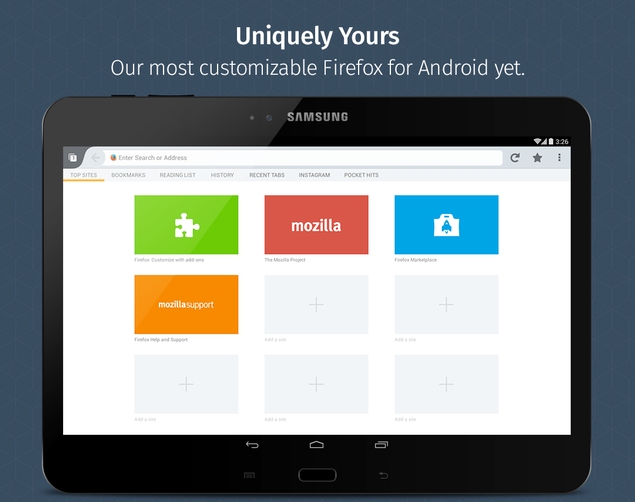
Mozilla Firefox for Android offers a polished and smooth browsing experience and it has a vast library of addons that will please power users. These addons add a lot of flexibility to the browser, allowing you to block ads, manage your passwords, or create custom gestures for common actions such as opening new tabs. Firefox also lets you save articles for offline reading and features a wide range of customisation options.

Also Read Swatch's Android-Compatible Smartwatch Won't Require Charging: CEO

Download Firefox

firefox_android_google_play.jpg
Hover Browser
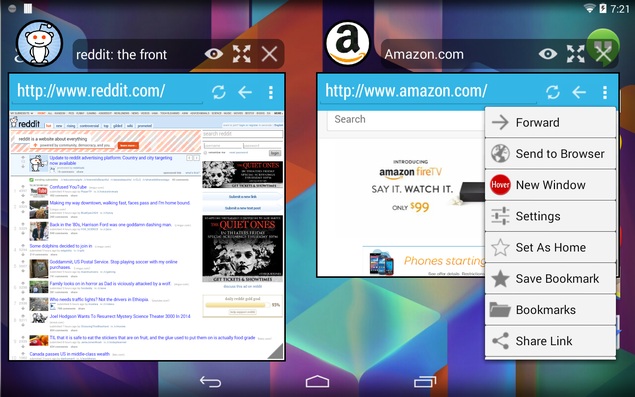
Hover Browser has one truly unique feature - it is a floating app. This means that it "hovers" over other apps, so you can use browse the Web while doing something else such as watching a movie or sending emails. The app did not run on an LG G3, but did work on other devices, but luckily, the G3 has a similar browser pre-installed. This is useful if you want to keep an eye on a webpage while using other apps. For example, you could work on document, while keeping cricket scores open in a corner.

Download Hover Browser

hover_browser_android_google_play.jpg
Opera Mini
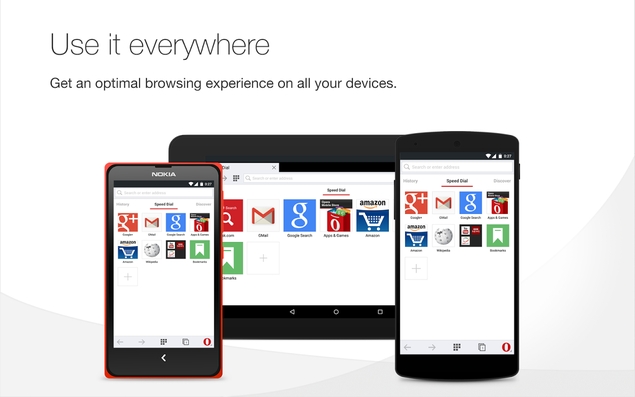
Opera Mini's interface has begun to look dated but that doesn't stop us from recommending it for those with low-end phones. The app takes up less than 4MB space after installation. It offers a data compression feature and lets you reduce quality of images on websites. This will help those facing Internet connectivity issues. The full Opera browser also has these features, and a much better interface, but it takes up more resources as well.

Download Opera MiniDownload Opera

opera_browser_android_google_play.jpg

CM Browser

Also Read Motorola Moto E (Gen 2) Leaked in Images; Expected to Launch at MWC

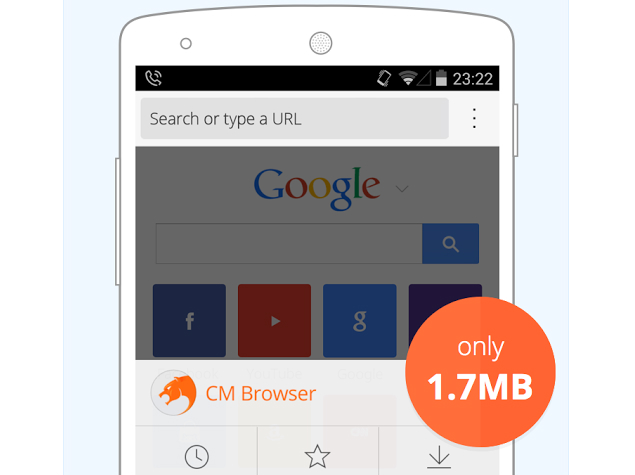
If you're using a phone that doesn't have too much storage, then CM Browser from Cheetah Mobile - the makers of Android antivirus app CM Security - is a good, lean choice. CM Browser offers a smooth browsing experience with a clean interface, and the app is just a 1.92MB download that takes around 5MB after installation. The interface is nicer compared to Opera Mini, making it a decent alternative.

Download CM Browser

cm_browser_android_size_google_play.png
UC Browser
UC Browser is one of the most popular Android browsers. It has some cool features that improve the browsing experience; for instance, it preloads webpages so they load quickly. It also tries to manage downloads and automatically resumes them if there is an Internet connection drop. UC Browser also integrates with Facebook to show you notifications, and has a host of in-app content like cricket scores.

Download UC Browser

uc_browser_android_tabs_google_play.png

These are the best browsers on Android, but there is one more that you might want to check out. Dolphin doesn't have a particular essential feature that makes it stand out, but it is a well-designed browser with some nice addons. For example, it lets you convert any webpage to PDF and even has Dropbox addon. Unlike Firefox, Dolphin's addons are on Google Play, so you'll have to install them like you install apps.


Also Read Lenovo A6000's First Sale Sees 10,000 Units Go Out of Stock in 2 Seconds

NOTE: Feel Free To Comment....
Unknown  /  at  09:06  /  No comments

Name Your Link
firefox_android_home_panels_google_play.jpg

Also Read Facebook's Internet.org Comes to India: Everything You Need to Know

Ask people what makes a phone "smart" and you'll usually hear about apps - but for most of us, the app we use the most is still the browser. Both Google and Apple know this, and that is why both their default browsers are pretty good. Safari still rules the roost on iOS, and Google Chrome is great on Android.
Third-party alternatives are better at a few things do, such as addons, which makes them worth checking out. One shoe doesn't fit all and Android has enough alternatives available for anyone to find the browser they might need. Here are our top picks.
Google Chrome
The default browser on Android is a good enough choice for the most part. Chrome's minimalist design is appealing, and you can sync all browser data across devices and platforms - all your bookmarks and passwords are saved across devices so you don't have to set it up from scratch. The browser also features voice search and a cool data compression feature. Customisation options are a little limited, but aside from this small drawback, Chrome delivers on all counts.

Download Google Chrome

google_chrome_android_google_play_screen.jpg
Firefox
Mozilla Firefox for Android offers a polished and smooth browsing experience and it has a vast library of addons that will please power users. These addons add a lot of flexibility to the browser, allowing you to block ads, manage your passwords, or create custom gestures for common actions such as opening new tabs. Firefox also lets you save articles for offline reading and features a wide range of customisation options.

Also Read Swatch's Android-Compatible Smartwatch Won't Require Charging: CEO

Download Firefox

firefox_android_google_play.jpg
Hover Browser
Hover Browser has one truly unique feature - it is a floating app. This means that it "hovers" over other apps, so you can use browse the Web while doing something else such as watching a movie or sending emails. The app did not run on an LG G3, but did work on other devices, but luckily, the G3 has a similar browser pre-installed. This is useful if you want to keep an eye on a webpage while using other apps. For example, you could work on document, while keeping cricket scores open in a corner.

Download Hover Browser

hover_browser_android_google_play.jpg
Opera Mini
Opera Mini's interface has begun to look dated but that doesn't stop us from recommending it for those with low-end phones. The app takes up less than 4MB space after installation. It offers a data compression feature and lets you reduce quality of images on websites. This will help those facing Internet connectivity issues. The full Opera browser also has these features, and a much better interface, but it takes up more resources as well.

Download Opera MiniDownload Opera

opera_browser_android_google_play.jpg

CM Browser

Also Read Motorola Moto E (Gen 2) Leaked in Images; Expected to Launch at MWC

If you're using a phone that doesn't have too much storage, then CM Browser from Cheetah Mobile - the makers of Android antivirus app CM Security - is a good, lean choice. CM Browser offers a smooth browsing experience with a clean interface, and the app is just a 1.92MB download that takes around 5MB after installation. The interface is nicer compared to Opera Mini, making it a decent alternative.

Download CM Browser

cm_browser_android_size_google_play.png
UC Browser
UC Browser is one of the most popular Android browsers. It has some cool features that improve the browsing experience; for instance, it preloads webpages so they load quickly. It also tries to manage downloads and automatically resumes them if there is an Internet connection drop. UC Browser also integrates with Facebook to show you notifications, and has a host of in-app content like cricket scores.

Download UC Browser

uc_browser_android_tabs_google_play.png

These are the best browsers on Android, but there is one more that you might want to check out. Dolphin doesn't have a particular essential feature that makes it stand out, but it is a well-designed browser with some nice addons. For example, it lets you convert any webpage to PDF and even has Dropbox addon. Unlike Firefox, Dolphin's addons are on Google Play, so you'll have to install them like you install apps.


Also Read Lenovo A6000's First Sale Sees 10,000 Units Go Out of Stock in 2 Seconds

NOTE: Feel Free To Comment....

Posted in: , , Read Complete Article»

Wednesday, 21 January 2015

WhatsApp Bans whatsapp plus Users for Using Third-Party App

whatsapp_banned_24_hours_screenshot_ndtv.jpg

Also Read Moto G Titan and Moto E Styx With Android 5.0 Lollipop Briefly Listed

Some users are reporting WhatsApp banned them for 24 hours because they violated the app's 'terms of service' by using a third-party client.
Users are reporting about the ban via different social networks (Facebook, Google+ and Twitter) revealing that the ban is only for those Android users who are using the popular third-party client WhatsApp+ or WhatsApp Plus.

WhatsApp has also pointed out the same reason in their FAQ section, stating, "WhatsApp Plus is an application that was not developed by WhatsApp, nor is it authorised by WhatsApp. The developers of WhatsApp Plus have no relationship to WhatsApp, and we do not support WhatsApp Plus. Please be aware that WhatsApp Plus contains source code which WhatsApp cannot guarantee as safe and that your private information is potentially being passed to 3rd parties without your knowledge or authorization."

The company is now asking users to uninstall WhatsApp+ and install an authorised version of WhatsApp from official website or Google Play to reuse the service, although the 24-hour ban period will reportedly remain in effect for the full duration despite replacing or uninstalling the app.

Meanwhile, some purported screenshots of WhatsApp's anticipated official Web client have surfaced online. According to GSMArena, the screenshot images were shared by a Google+ user and were shortly removed.

whatsapp_web_client_gsmarena.jpg

Though the images don't show a Web client, it is seen that WhatsApp for Android in its settings screen is prompting users to pair the device with a Web browser and a trusted computer for a secure connection.


Also Read ‘Critical Security Updates’ cancelled for 939 million Android users

NOTE: Feel Free To Comment....
Unknown  /  at  16:18  /  No comments

whatsapp_banned_24_hours_screenshot_ndtv.jpg

Also Read Moto G Titan and Moto E Styx With Android 5.0 Lollipop Briefly Listed

Some users are reporting WhatsApp banned them for 24 hours because they violated the app's 'terms of service' by using a third-party client.
Users are reporting about the ban via different social networks (Facebook, Google+ and Twitter) revealing that the ban is only for those Android users who are using the popular third-party client WhatsApp+ or WhatsApp Plus.

WhatsApp has also pointed out the same reason in their FAQ section, stating, "WhatsApp Plus is an application that was not developed by WhatsApp, nor is it authorised by WhatsApp. The developers of WhatsApp Plus have no relationship to WhatsApp, and we do not support WhatsApp Plus. Please be aware that WhatsApp Plus contains source code which WhatsApp cannot guarantee as safe and that your private information is potentially being passed to 3rd parties without your knowledge or authorization."

The company is now asking users to uninstall WhatsApp+ and install an authorised version of WhatsApp from official website or Google Play to reuse the service, although the 24-hour ban period will reportedly remain in effect for the full duration despite replacing or uninstalling the app.

Meanwhile, some purported screenshots of WhatsApp's anticipated official Web client have surfaced online. According to GSMArena, the screenshot images were shared by a Google+ user and were shortly removed.

whatsapp_web_client_gsmarena.jpg

Though the images don't show a Web client, it is seen that WhatsApp for Android in its settings screen is prompting users to pair the device with a Web browser and a trusted computer for a secure connection.


Also Read ‘Critical Security Updates’ cancelled for 939 million Android users

NOTE: Feel Free To Comment....

Posted in: , Read Complete Article»

Friday, 14 November 2014

Android 5.0 Lollipop Review: A Sweet Upgrade

android_lolipop_screenshot_05.jpg

Also Read Get 50Rs. Instant recharge through TimesCity App!!! Working 100%

Android's sweet new "Lollipop" flavor brings security improvements and easier ways to view and respond to notifications. The new Google software for mobile devices even lets you lend out your phone without worrying about a friend circulating your naked selfies on Facebook.
I tested Lollipop on Google's new Nexus 6 phone, which comes out this week. I can only hope that as other phones get the upgrade over time, it will be as good as what you get on the Nexus.
It's a shame many phone manufacturers that use Android believe they have to tweak it extensively to make the software theirs and not Google's. Mucking around with it only confuses customers and steers app developers toward working on iPhone versions first, where there is more uniformity - and thus incentive to incorporate the latest features.
Assuming your phone maker is running Lollipop in its purest form, here's what you'll get:
Notifications
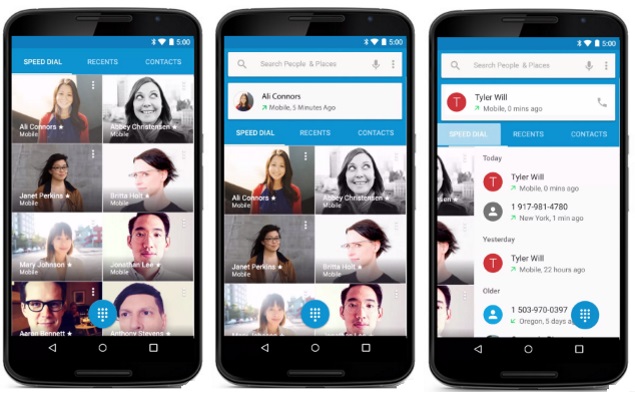
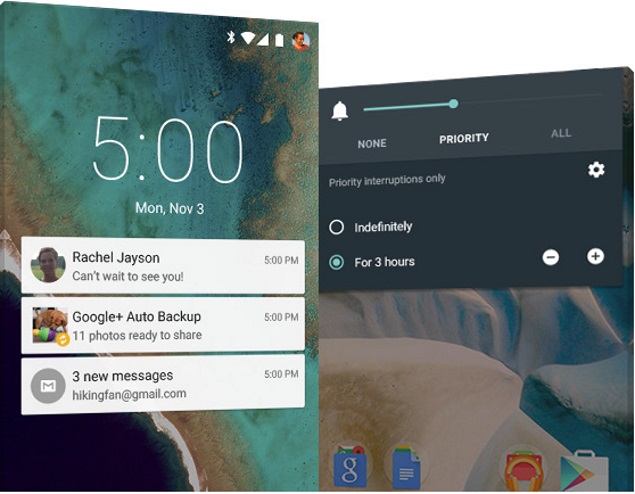
You used to have to pull down the notification tray from the top, as you would a window shade. With Lollipop, notifications appear in the center of the lock screen. You can expand messages and reply right from the lock screen.
android_lolipop_screenshot_03.jpg
If you've set up a passcode - more on that in a bit - you'll be prompted to enter it before composing that reply. You also have the option to block all notifications or just those from specific apps if you're worried about privacy. Or you can choose to hide sensitive content. In those cases, you'll see you got an email or text, but you won't see who sent it or what the message says.
You can also choose "priority" mode and get notifications only from apps you mark as priority. In that mode, you can also choose to accept calls and texts only from known contacts or favorites. You still see all incoming calls or messages if you're looking, but you're not disrupted by vibrations or rings.
Security
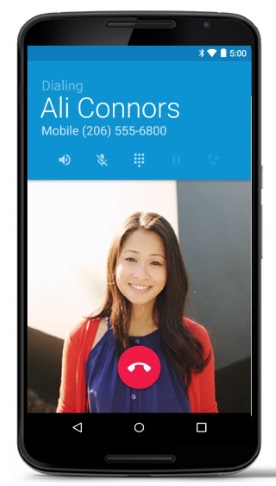
Too often, I've turned off the passcode on my Android phone because I get tired of entering it every time I pick it up. With Lollipop, you can keep your phone unlocked when it's near a trusted device of your choosing - say, a Bluetooth-enabled car or an Android smartwatch. Bluetooth range can extend 30 feet or more, so be sure you trust your friends if you step away without your phone. Or delete those naked selfies first.
Also Read Assassin's Creed Unity Review: An Almost Perfect Past

android_lolipop_screenshot_02.jpg
With Lollipop, Android also joins Apple's iOS 8 software in encrypting data by default. This is important if your phone is lost or stolen.
Multiple profiles
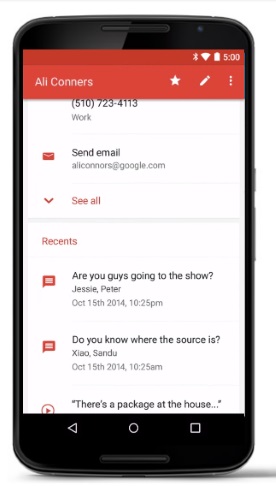
If you lend your phone out, or share it with a family member, you'll now have profile options. You can set up to four profiles, each with its own settings, contacts, photos and apps. Each user can be at a different level on "Candy Crush Saga." Or a friend can download it without having it clutter your apps list. Likewise, guests can use their own email and Facebook accounts - not yours.
android_lolipop_screenshot_04.jpg
Some options are disabled if you're not the owner. For instance, your kid won't be able to restore the phone to factory settings and wipe out all your data. But friends or family can update your apps and accept permissions on your behalf. It's your choice whether they can make calls and text, as they would still be using your phone number. The browser and app store don't come with parental controls, so it isn't meant for unsupervised use. And no secondary profile will keep your kid from smearing grape jelly on the screen.
Shortcuts
Lollipop adds several shortcuts above the notification tray. You can get quick access to the flashlight and the setting for airplane mode, something some Android manufacturers have added, but not all. There's also a new "Cast screen" button to send video from your phone to a TV with an Android TV streaming device. Unfortunately, you can't change the options. Those without an Android TV device won't need "Cast screen," but might want a screen-rotation lock instead, for instance.
android_lolipop_screenshot_01.jpg
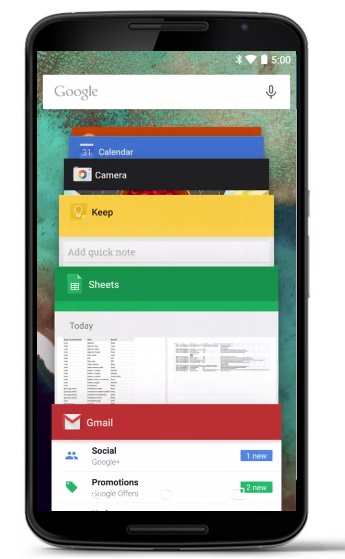
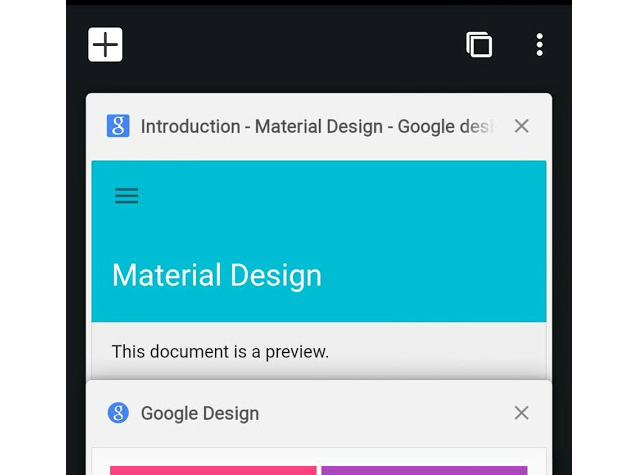
The new Android software also removes some of the distinctions between apps and content. Previous versions of Android offered ways to scroll through open apps to pick which goes to the foreground. Now, individual tabs in the Chrome browser and individual documents in Google Docs appear separately, so you can go straight to your content without having to go to that app first. Other app developers will be able to enable this feature, too.
And the rest
Lollipop comes with an updated Calendar app that integrates with your Gmail service so that flight reservations, concert tickets and other confirmation emails get automatically turned into calendar events. The app is also more visually pleasing and fun. Keywords such as "concerts," "dentist" and "brunch" trigger appropriate graphics.
Still missing, though, is the ability to decide whether individual apps can access your location. I might want Google Maps but not Starbucks to have my location. Apple's iOS software lets you choose on an app-by-app basis, but it's all or nothing with Android.
Nonetheless, Lollipop is a worthy upgrade that I hope will come to your Android device - unfettered - soon.


Also Read Google Nexus 6 32GB Listed on Flipkart as 'Coming Soon'

NOTE: Feel Free To Comment....
Unknown  /  at  13:44  /  No comments

android_lolipop_screenshot_05.jpg

Also Read Get 50Rs. Instant recharge through TimesCity App!!! Working 100%

Android's sweet new "Lollipop" flavor brings security improvements and easier ways to view and respond to notifications. The new Google software for mobile devices even lets you lend out your phone without worrying about a friend circulating your naked selfies on Facebook.
I tested Lollipop on Google's new Nexus 6 phone, which comes out this week. I can only hope that as other phones get the upgrade over time, it will be as good as what you get on the Nexus.
It's a shame many phone manufacturers that use Android believe they have to tweak it extensively to make the software theirs and not Google's. Mucking around with it only confuses customers and steers app developers toward working on iPhone versions first, where there is more uniformity - and thus incentive to incorporate the latest features.
Assuming your phone maker is running Lollipop in its purest form, here's what you'll get:
Notifications
You used to have to pull down the notification tray from the top, as you would a window shade. With Lollipop, notifications appear in the center of the lock screen. You can expand messages and reply right from the lock screen.
android_lolipop_screenshot_03.jpg
If you've set up a passcode - more on that in a bit - you'll be prompted to enter it before composing that reply. You also have the option to block all notifications or just those from specific apps if you're worried about privacy. Or you can choose to hide sensitive content. In those cases, you'll see you got an email or text, but you won't see who sent it or what the message says.
You can also choose "priority" mode and get notifications only from apps you mark as priority. In that mode, you can also choose to accept calls and texts only from known contacts or favorites. You still see all incoming calls or messages if you're looking, but you're not disrupted by vibrations or rings.
Security
Too often, I've turned off the passcode on my Android phone because I get tired of entering it every time I pick it up. With Lollipop, you can keep your phone unlocked when it's near a trusted device of your choosing - say, a Bluetooth-enabled car or an Android smartwatch. Bluetooth range can extend 30 feet or more, so be sure you trust your friends if you step away without your phone. Or delete those naked selfies first.

Also Read Assassin's Creed Unity Review: An Almost Perfect Past

android_lolipop_screenshot_02.jpg
With Lollipop, Android also joins Apple's iOS 8 software in encrypting data by default. This is important if your phone is lost or stolen.
Multiple profiles
If you lend your phone out, or share it with a family member, you'll now have profile options. You can set up to four profiles, each with its own settings, contacts, photos and apps. Each user can be at a different level on "Candy Crush Saga." Or a friend can download it without having it clutter your apps list. Likewise, guests can use their own email and Facebook accounts - not yours.
android_lolipop_screenshot_04.jpg
Some options are disabled if you're not the owner. For instance, your kid won't be able to restore the phone to factory settings and wipe out all your data. But friends or family can update your apps and accept permissions on your behalf. It's your choice whether they can make calls and text, as they would still be using your phone number. The browser and app store don't come with parental controls, so it isn't meant for unsupervised use. And no secondary profile will keep your kid from smearing grape jelly on the screen.
Shortcuts
Lollipop adds several shortcuts above the notification tray. You can get quick access to the flashlight and the setting for airplane mode, something some Android manufacturers have added, but not all. There's also a new "Cast screen" button to send video from your phone to a TV with an Android TV streaming device. Unfortunately, you can't change the options. Those without an Android TV device won't need "Cast screen," but might want a screen-rotation lock instead, for instance.
android_lolipop_screenshot_01.jpg
The new Android software also removes some of the distinctions between apps and content. Previous versions of Android offered ways to scroll through open apps to pick which goes to the foreground. Now, individual tabs in the Chrome browser and individual documents in Google Docs appear separately, so you can go straight to your content without having to go to that app first. Other app developers will be able to enable this feature, too.
And the rest
Lollipop comes with an updated Calendar app that integrates with your Gmail service so that flight reservations, concert tickets and other confirmation emails get automatically turned into calendar events. The app is also more visually pleasing and fun. Keywords such as "concerts," "dentist" and "brunch" trigger appropriate graphics.
Still missing, though, is the ability to decide whether individual apps can access your location. I might want Google Maps but not Starbucks to have my location. Apple's iOS software lets you choose on an app-by-app basis, but it's all or nothing with Android.
Nonetheless, Lollipop is a worthy upgrade that I hope will come to your Android device - unfettered - soon.


Also Read Google Nexus 6 32GB Listed on Flipkart as 'Coming Soon'

NOTE: Feel Free To Comment....

Posted in: , , Read Complete Article»

Thursday, 16 October 2014

Google Nexus 6 aka Nexus X Listed by AT&T and Leaked in Pictures

nexus_6_leak_evleaks.jpg

Also Read Hands-on with HTC’s RE action camera and Desire Eye smartphone

Tk Technews (via Phone Arena) has posted an image that purportedly shows the alleged Nexus 6 or Nexus X pictured beside the iPhone 6 Plus. The alleged Nexus 6 seems to feature a bigger screen, and is slightly wider and taller than the iPhone 6 Plus (which sports a 5.5-inch display) in side by side comparison.
nexus_6_iphone_6plus_tkktechnews.jpg
In addition to this, prolific phone tipster @evleaks is back after a period of relative quiet with a new render (seen above) of the alleged Motorola Shamu, rumoured to be the codename of the alleged Nexus 6 - named after a killer whale and implying a large phone. The smartphone seen in the leaked render looks like an elongated version of the Moto X (Gen 2) and the front panel sports a Moto X-like design.
On the other hand, AT&T ahead of any announcement from Google has listed (via Android Police) the 'Motorola Nexus 6' (as seen on the site). Notably, the alleged smartphone is listed with a price tag of $49.99 on contract. However, the image seen in the listing is clearly of the LG G Vista and the alleged Motorola Nexus 6 phone is seen in the sidebar of the LG G3 Vigor page.
Reports for a while have been tipping that Google's new Nexus smartphone and tablet alongside Android L OS will be released by mid-October (October 15-16), and a new report by Forbes goes in-line with earlier claims.
Jay McGregor in the Forbes report suggests that the Nexus 9 (previously codenamed HTC Volantis) will be launched on Wednesday and will be the first device to run Android L out-of-the-box.
McGregor's sources also claimed that alongside the Nexus 9, the Motorola-built Nexus 6 aka Nexus X smartphone will also be unveiled via a blog post. He further suggested that the Nexus 9 will go on pre-order starting October 17, and will be available for sale only beginning November 3. The purported pricing for the Nexus 9 tablet is - $399 (Rs. 24,500 approximately) for the 16GB model, which along with the dates is in-line with an earlier report, and $499 (Rs. 30,600 approximately) for 32GB LTE variant.
Reportedly both the Nexus 9 variants will come with expandable storage support, a feature that has been missing in Nexus devices since the first offering. The report also tips purported specifications of the Nexus 9, which are in-line with previous leaks, to include an 8.9-inch (2048x1440 pixels) display; 480 grams weight; 64-bit dual-core processor (Nvidia Kepler GPU) and an 8-megapixel rear camera alongside 3-megapixel front-facing camera. The report suggests that HTC has opted for a 'brushed aluminium' frame instead of an all metal frame for keeping the cost down.
Other expected features from the alleged Nexus 9 include Boomsound, a feature which has been seen on HTC's One smartphone family, and dual front-facing speakers.
The report notes, "An additional origami magnetic stand-case will be available tomorrow [Wednesday] which can apparently be bent into any shape - and can fold in all directions - to prop the tablet up."


Also Read How to Run Android Apps on Google Chrome?

NOTE: Feel Free To Comment....
Unknown  /  at  09:00  /  No comments

nexus_6_leak_evleaks.jpg

Also Read Hands-on with HTC’s RE action camera and Desire Eye smartphone

Tk Technews (via Phone Arena) has posted an image that purportedly shows the alleged Nexus 6 or Nexus X pictured beside the iPhone 6 Plus. The alleged Nexus 6 seems to feature a bigger screen, and is slightly wider and taller than the iPhone 6 Plus (which sports a 5.5-inch display) in side by side comparison.
nexus_6_iphone_6plus_tkktechnews.jpg
In addition to this, prolific phone tipster @evleaks is back after a period of relative quiet with a new render (seen above) of the alleged Motorola Shamu, rumoured to be the codename of the alleged Nexus 6 - named after a killer whale and implying a large phone. The smartphone seen in the leaked render looks like an elongated version of the Moto X (Gen 2) and the front panel sports a Moto X-like design.
On the other hand, AT&T ahead of any announcement from Google has listed (via Android Police) the 'Motorola Nexus 6' (as seen on the site). Notably, the alleged smartphone is listed with a price tag of $49.99 on contract. However, the image seen in the listing is clearly of the LG G Vista and the alleged Motorola Nexus 6 phone is seen in the sidebar of the LG G3 Vigor page.
Reports for a while have been tipping that Google's new Nexus smartphone and tablet alongside Android L OS will be released by mid-October (October 15-16), and a new report by Forbes goes in-line with earlier claims.
Jay McGregor in the Forbes report suggests that the Nexus 9 (previously codenamed HTC Volantis) will be launched on Wednesday and will be the first device to run Android L out-of-the-box.
McGregor's sources also claimed that alongside the Nexus 9, the Motorola-built Nexus 6 aka Nexus X smartphone will also be unveiled via a blog post. He further suggested that the Nexus 9 will go on pre-order starting October 17, and will be available for sale only beginning November 3. The purported pricing for the Nexus 9 tablet is - $399 (Rs. 24,500 approximately) for the 16GB model, which along with the dates is in-line with an earlier report, and $499 (Rs. 30,600 approximately) for 32GB LTE variant.
Reportedly both the Nexus 9 variants will come with expandable storage support, a feature that has been missing in Nexus devices since the first offering. The report also tips purported specifications of the Nexus 9, which are in-line with previous leaks, to include an 8.9-inch (2048x1440 pixels) display; 480 grams weight; 64-bit dual-core processor (Nvidia Kepler GPU) and an 8-megapixel rear camera alongside 3-megapixel front-facing camera. The report suggests that HTC has opted for a 'brushed aluminium' frame instead of an all metal frame for keeping the cost down.
Other expected features from the alleged Nexus 9 include Boomsound, a feature which has been seen on HTC's One smartphone family, and dual front-facing speakers.
The report notes, "An additional origami magnetic stand-case will be available tomorrow [Wednesday] which can apparently be bent into any shape - and can fold in all directions - to prop the tablet up."


Also Read How to Run Android Apps on Google Chrome?

NOTE: Feel Free To Comment....
Posted in: , , Read Complete Article»

Thursday, 2 October 2014

Specifications of LG L90(comparable with Moto g 2014)

LG L90 Dual

Also Read Full Specs Of Micromax Canvas Nitro

LG L90 Dual detailed specifications
GENERAL
Alternate namesD410
Release dateMarch 2014
Form factorTouchscreen
Dimensions (mm)131.60 x 66.00 x 9.70
Battery capacity (mAh)2540
Removable batteryYes
ColoursWhite
SAR valueNA
DISPLAY
Screen size (inches)4.70
TouchscreenYes
Touchscreen typeCapacitive
Resolution540x960 pixels
Colours16M
HARDWARE
Processor1.2GHz  quad-core
Processor makeQualcomm Snapdragon 400
RAM1GB
Internal storage8GB
Expandable storageYes
Expandable storage typemicroSD
Expandable storage up to (GB)32
CAMERA
Rear camera8-megapixel
FlashYes
Front camera0.3-megapixel
SOFTWARE
Operating SystemAndroid 4.4
SkinOptimus UI 3.0
Java supportYes
Browser supports FlashYes
CONNECTIVITY
Wi-FiYes
Wi-Fi standards supported802.11 b/ g/ n
GPSYes
BluetoothYes, v 4.00
NFCNo
InfraredYes
DLNAYes
Wi-Fi DirectYes
MHL OutNo
HDMINo
Headphones3.5mm
FMYes
USBMicro-USB
Charging via Micro-USBYes
Proprietary charging connectorNo
Proprietary data connectorNo
Number of SIMs2
SIM 1 
SIM TypeRegular
GSM/ CDMAGSM
3GYes
SIM 2 
SIM TypeRegular
GSM/ CDMAGSM
3GYes
SENSORS
Compass/ MagnetometerNo
Proximity sensorYes
AccelerometerYes
Ambient light sensorYes
GyroscopeNo
BarometerNo
Temperature sensorNo


Also Read 12 Things DuckDuckGo Can Do That Google Can't

NOTE: Feel Free To Comment.....
Unknown  /  at  14:37  /  No comments

LG L90 Dual

Also Read Full Specs Of Micromax Canvas Nitro

LG L90 Dual detailed specifications
GENERAL
Alternate namesD410
Release dateMarch 2014
Form factorTouchscreen
Dimensions (mm)131.60 x 66.00 x 9.70
Battery capacity (mAh)2540
Removable batteryYes
ColoursWhite
SAR valueNA
DISPLAY
Screen size (inches)4.70
TouchscreenYes
Touchscreen typeCapacitive
Resolution540x960 pixels
Colours16M
HARDWARE
Processor1.2GHz  quad-core
Processor makeQualcomm Snapdragon 400
RAM1GB
Internal storage8GB
Expandable storageYes
Expandable storage typemicroSD
Expandable storage up to (GB)32
CAMERA
Rear camera8-megapixel
FlashYes
Front camera0.3-megapixel
SOFTWARE
Operating SystemAndroid 4.4
SkinOptimus UI 3.0
Java supportYes
Browser supports FlashYes
CONNECTIVITY
Wi-FiYes
Wi-Fi standards supported802.11 b/ g/ n
GPSYes
BluetoothYes, v 4.00
NFCNo
InfraredYes
DLNAYes
Wi-Fi DirectYes
MHL OutNo
HDMINo
Headphones3.5mm
FMYes
USBMicro-USB
Charging via Micro-USBYes
Proprietary charging connectorNo
Proprietary data connectorNo
Number of SIMs2
SIM 1 
SIM TypeRegular
GSM/ CDMAGSM
3GYes
SIM 2 
SIM TypeRegular
GSM/ CDMAGSM
3GYes
SENSORS
Compass/ MagnetometerNo
Proximity sensorYes
AccelerometerYes
Ambient light sensorYes
GyroscopeNo
BarometerNo
Temperature sensorNo


Also Read 12 Things DuckDuckGo Can Do That Google Can't

NOTE: Feel Free To Comment.....

About

This blog belong to all our youngster friendz, who believe in sharing their knowledge with others and want to try to hackin', crackin' , full version applications at free of cost.
you will found here valuable stuffs.

Labels

adf.ly blocked (1) android (109) Android and PC (19) android games (11) android news (3) android tricks (43) Antivirus (11) Anvsoft (1) apple (40) asha phones (1) avast (1) avast pro antivirus 8 2013 (1) avg (1) AVG pc tuneup 2013 full version (1) avira (1) blackberry (1) blogspot (2) body_language (1) bootable usb (1) Browsers (16) c cleaner pro + business (1) Cheatbook 2013 (1) Chetan Bhagat (1) compressor (1) crac (1) Crack (1) crack + keygen (2) cyberlink power2go full version (1) daemon tools 5.2 full version (1) daemon tools patch (1) defender (2) dictionary (1) direct link (1) DivX Pro 7 (1) Ebook (2) eset (1) etc (1) facebook (16) Firewall (2) free recharge tricks (1) free sms (1) FRUIT NINJA for windows full version (1) full version (8) Full Version MS Office 13 (1) GTA Sandreas (1) hack (4) hack pc (3) hacking using keylogger (1) hardware (1) hiDownload platinum 8 (1) how to (6) how to install .net (1) HTML (1) idm (1) idm crack (1) IDM full version (1) image editor (2) install .net in windows 8 (1) internet tricks (37) iPhone 5c (2) job (1) k j activator (1) kaspersky (2) keygen (2) leaked images (1) license key (1) manual updates (1) mediafire (1) MEDIAFIRE DOWNLOAD (2) mediafire link (2) mobiles (42) music player (1) nfs most wanted (1) Office 13 Activator (1) official site update (1) offline updates (1) patch (4) PC (3) pc customize (1) PC Drivers (2) pc games (15) pc games cheats (11) PC Software (152) PC tricks (146) PdaNET 3.50 (1) PDF (3) phone specifications (43) pic viewer (3) power iso 5.6 (1) premium zbigz account (1) problem with .net in windows 8 (1) review (11) reviews (2) Revolution 2020 PDF (1) science (2) sharebeast download (6) sharebeast link (2) symbian mobiles (2) tech knowledge (33) Tech News (343) tech reviews (146) Torrent To IDM (1) Tune-Up 2014 Full Version (1) Ubuntu Mobiles (1) video player (13) video tutorial (1) Web design (1) window 8.1 tricks (12) windows 8 activator (1) Windows 8 USB Installer Maker (1) windows phones (16) winrar 5 full version (1)
Copyright © 2014 SimplyGet. WP Theme-junkie converted by Bloggertheme9
Blogger templates. Proudly Powered by Blogger.