Friday, 27 June 2014

Opera Mini for iOS Updated With New Compression Modes and Redesigned UI

opera_mini_ios_images_appstore.jpg

Also Read Seven Extensions That Make Gmail Better

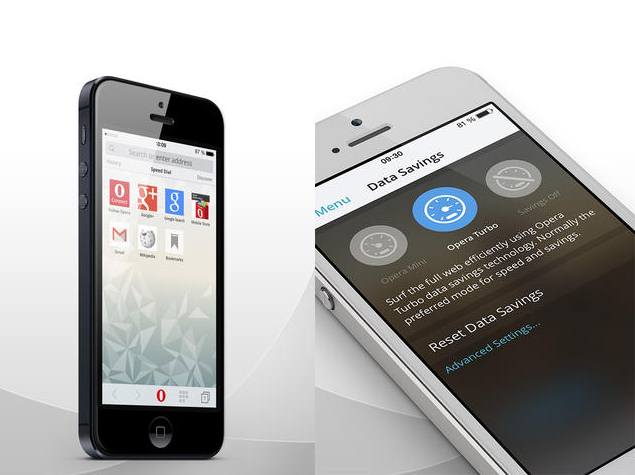
Opera Software on Thursday has released an update for its Opera Mini browser for iOS devices that brings a revamped UI apart from a range of new features.
The updated Opera Mini app (version 8.0.0) can be downloaded via the App Store. Optimised for iPhone 5, the Opera Mini Web browser 8.0.0 app is compatible with all devices running iOS 7.0 or higher.
Along with the flat new design that's in-line with the iOS 7 style, Opera Mini 8.0.0 features a built-in QR code reader for scanning and sharing QR codes from the browser itself, which will eliminate the use of an additional QR code reader app.
The updated app also brings three new compression modes for data saving. The first is the Opera Mini mode that boasts of up to 90 percent data savings with compression, Opera Turbo mode that offers lesser compression, and last is the no compression mode.
"Opera Mini crunches down the size of the websites you visit. It compresses images and text, making the websites lighter. So, stop caring about roaming fees. Quit being frustrated with slow-loading pages. We want to be sure that you connect to the web instantly and access sites super-fast without paying any extra coin," notes the company on its app page.

Also Read Android L: 8 New Features in the Next Major Android Release

Opera Mini 8.0.0 for iOS also includes a 'Speed Dial' page just like the favourites in other browsers. Users can customise it as per their liking.
For the new 'Discover' feature, users can swipe left to access it for curated content in real-time, from a list of news websites and blogs. Users can further choose from the list of options. Once a user has selected a full article to read, they can swipe left and right to access more articles. Other than that the Opera has also added some themes for the Opera Mini 8.0.0.

Other features in the updated Opera Mini 8.0.0 app for iOS include a new tab gallery that stacks tabs for a quick overview and easier tab management; a combined search and address bar; easier editing of addresses and search terms with the slider, and the ability to switch search providers.


Also Read Microsoft Hired Agency to Pay Bloggers to Write Fake IE Reviews

NOTE: Feel Free To Comment....
Unknown  /  at  17:33  /  No comments

opera_mini_ios_images_appstore.jpg

Also Read Seven Extensions That Make Gmail Better

Opera Software on Thursday has released an update for its Opera Mini browser for iOS devices that brings a revamped UI apart from a range of new features.
The updated Opera Mini app (version 8.0.0) can be downloaded via the App Store. Optimised for iPhone 5, the Opera Mini Web browser 8.0.0 app is compatible with all devices running iOS 7.0 or higher.
Along with the flat new design that's in-line with the iOS 7 style, Opera Mini 8.0.0 features a built-in QR code reader for scanning and sharing QR codes from the browser itself, which will eliminate the use of an additional QR code reader app.
The updated app also brings three new compression modes for data saving. The first is the Opera Mini mode that boasts of up to 90 percent data savings with compression, Opera Turbo mode that offers lesser compression, and last is the no compression mode.
"Opera Mini crunches down the size of the websites you visit. It compresses images and text, making the websites lighter. So, stop caring about roaming fees. Quit being frustrated with slow-loading pages. We want to be sure that you connect to the web instantly and access sites super-fast without paying any extra coin," notes the company on its app page.

Also Read Android L: 8 New Features in the Next Major Android Release

Opera Mini 8.0.0 for iOS also includes a 'Speed Dial' page just like the favourites in other browsers. Users can customise it as per their liking.
For the new 'Discover' feature, users can swipe left to access it for curated content in real-time, from a list of news websites and blogs. Users can further choose from the list of options. Once a user has selected a full article to read, they can swipe left and right to access more articles. Other than that the Opera has also added some themes for the Opera Mini 8.0.0.

Other features in the updated Opera Mini 8.0.0 app for iOS include a new tab gallery that stacks tabs for a quick overview and easier tab management; a combined search and address bar; easier editing of addresses and search terms with the slider, and the ability to switch search providers.


Also Read Microsoft Hired Agency to Pay Bloggers to Write Fake IE Reviews

NOTE: Feel Free To Comment....

Posted in: , Read Complete Article»

Thursday, 26 June 2014

Seven Extensions That Make Gmail Better

gmail-new-compose.jpg

Also Read Microsoft Hired Agency to Pay Bloggers to Write Fake IE Reviews

For a majority of people today, email means Gmail. That's because Google's email service is actually very good, even if Google does try to force you to use its social network Google+ and cloud storage service Google Drive. But Gmail is far from perfect. Power users often complain about the lack of advanced features, while basic users are often annoyed by Google's clutter in Gmail. There are a number of Gmail extensions that you can install to make it better organised, more powerful, or just that little bit more user friendly.
These extensions all work on Google Chrome, and most should also work on Opera. Where available, we've also given links for Firefox users. We've not included some incredibly useful tools like Offline Gmail, because that is a Chrome app, and not a Gmail extension, but if you are interested in extensions, you should check out our four favourite Chrome extensions. There are Gmail extensions that let you schedule messages, help you master Gmail's shortcuts, and others that tell you whether the person you emailed has looked at your letter yet.
If you want to make Gmail better, then here are our seven favourite Gmail extensions:
1. Know when someone has read your mail
If you have used WhatsApp, then you know that after you send a message, you will see two tick-marks on the screen. The first one indicates that the message has been sent while the second one shows that it has been received. Imagine having that feature in your Gmail inbox. Sounds cool right?MailTrack does something similar. Its a nifty extension that shows you whether your emails have been read by other Gmail users. The only downside is that the extension adds a signature (Sent with MailTrack) with a link at the end of each message you send.
You can manually remove it before sending a mail, but there is no way to disable it. MailTrack can also send you an email alert when the recipient has read your email. You can enable this by clicking the tiny envelope icon next to the send button in the compose window. While testing MailTrack, we noticed that the addon doesn't work when you have enabled appearance tweaks using Gmelius. It also hides the button that lets you use mxHero for Chrome, another extension mentioned in this article.
Mailtrack_635.jpg

Also Read Android L: 8 New Features in the Next Major Android Release

Firefox users, Boomerang for Gmail sends you read receipts if you want to track whether mails have been opened.
2. De-clutter Gmail
We've already written about Gmelius, which is great for cleaning up your Gmail feed. If you want an extension that helps de-clutter Gmail, then this is your best bet. The extension lets you hide unnecessary elements such as the top bar that links to other Google sites, and things like Google+ activity and Google Hangouts as well.
Gmelius excels at helping you focus on what you use Gmail for - email. It has nifty appearance tweaks such as changing the black buttons for delete, archive, etc to coloured ones. Another nice tweak is Gmelius' ability to show you attachment icons in your inbox. Popular file formats such as Word, Excel and PDF show up as a tiny icon in the list of mails in your inbox. Gmelius is a zero-fuss Chrome extension and works flawlessly so you can go right ahead and install it.
Gmelius is available for Firefox.
Gmelius_635.jpg
3. Track and schedule mails, and create self-destructing letters
If these extensions are too basic for you, then you might want to try mxHero for Chrome. This Gmail extension is a power user's paradise. It not only lets you track when emails have been opened, but also whether the recipient has downloaded attachments. You can also schedule emails so that they are sent at a particular time. Still not happy? The extension also lets you send self-destructing emails, which get deleted from the recipient's inbox five minutes after being read. That should cover pretty much everything one could seek from Gmail. Install the extension and you'll see an orange icon next to the send button when you compose an email. Click this button before sending mails to access mxHero Toolbox's features.
mxHero_635.jpg

Also Read Requirement for a 3D Gaming PC

MxHero Toolbox isn't available for Firefox, but Boomerang for Gmail lets you schedule emails and set email follow-up reminders.
4. Get insider information about your contacts
Today, we're using not just mail but also social networks like Facebook, Twitter and LinkedIn to communicate with people. What Rapportive does, is bring all that information together in one place, so that you can quickly see a person's designation (useful when sending an official mail) or their latest status update (so you're up to date on what your friends are up to when you mail) in the sidebar in Gmail, while you're tapping out your latest missive.
You can add contacts to your network via LinkedIn, see recent mail and contact details via Google - all from the sidebar. You can see details such as contact information, recent email conversations with that contact, in the sidebar, which adds context to your emails.
Rapportive is also available for Firefox.
Rapportive_635.jpg
5. Use cloud storage that isn't Google Drive
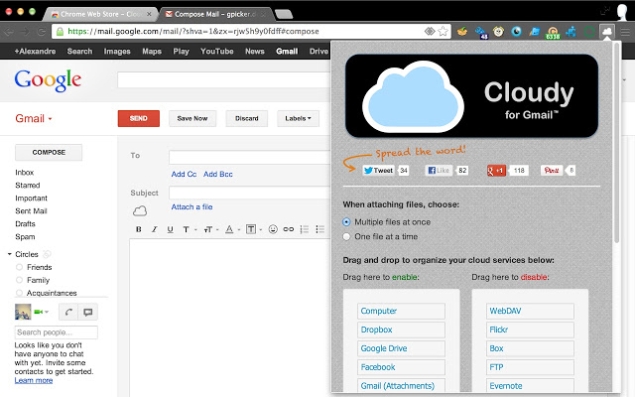
Google does its best to force you to use Google Drive as cloud storage, but many of you might already be using other services such as Dropbox or OneDrive. If you want to attach files stored in the cloud, Cloudy is the best extension you can ask for. It lets you attach files from Dropbox, Box, Google Drive, OneDrive, Github, and Gmail itself. You can also attach photos from Facebook, Instagram, Flickr and Picasa, and attach notes from Evernote.
If that's not enough, this extension also lets you search for images on the Web and attach them. Gmail lets you attach files directly from your computer or Google Drive, but Cloudy eliminates the need to save files to either of these for attachments. Like MailTrack, Cloudy adds a link to its website at the end of each mail. You'll have to manually delete this link every time.
Cloudy_635.jpg

Also Read [[Problem Solved]]  "Windows could not complete the installation. To install Windows on this computer, restart the installation."

Unfortunately, we couldn't find a good Cloudy alternative for Firefox - if you know of one, let us know via the comments.
6. Easily share links
When you're browsing the Web on your mobile phone or tablet and come across a page that is worth sharing with a friend, it's a matter of a few taps to send the link to its recipient. On a desktop browser on the other hand, you will have to copy the URL, then create a mail, paste the address, and finally send it. No wonder sharing has increased as mobiles become more popular. But it's actually easy to send links to people via Gmail, with the Send From Gmail extension. The extension "provides a button that will create a Gmail message when clicked, using the page title as the subject and selected page text and link address as the message" - all you need to do is enter an email id. The button appears next to the address bar in Google Chrome and worked without any hitch.
Send_From_Gmail_635.jpg
7. Play videos in your inbox
Iframely is a simple extension which finds links to media in your email and shows them in an embedded player. If you get an email with a link to a Vimeo video, you can play it directly from your inbox, thanks to Iframely. This is a handy extension for non-YouTube video links in your Inbox.
Iframely_635.jpg
Bonus: Better signatures
WiseStamp
 is a useful addon if you need to use signatures with images and links. This extension lets you add one signature with a link to WiseStamp for free. If you want to make more signatures and remove that link, you will have to pay. This strict limit for free users is why WiseStamp is a bonus in this list of Gmail extensions. WiseStamp works with Gmail, Google Apps mail and Yahoo Mail.
Firefox users can download it here.
WiseStamp_635.jpg


Also Read Best New Google Tips and Tricks

NOTE: Feel Free To Comment....
Unknown  /  at  20:12  /  No comments

gmail-new-compose.jpg

Also Read Microsoft Hired Agency to Pay Bloggers to Write Fake IE Reviews

For a majority of people today, email means Gmail. That's because Google's email service is actually very good, even if Google does try to force you to use its social network Google+ and cloud storage service Google Drive. But Gmail is far from perfect. Power users often complain about the lack of advanced features, while basic users are often annoyed by Google's clutter in Gmail. There are a number of Gmail extensions that you can install to make it better organised, more powerful, or just that little bit more user friendly.
These extensions all work on Google Chrome, and most should also work on Opera. Where available, we've also given links for Firefox users. We've not included some incredibly useful tools like Offline Gmail, because that is a Chrome app, and not a Gmail extension, but if you are interested in extensions, you should check out our four favourite Chrome extensions. There are Gmail extensions that let you schedule messages, help you master Gmail's shortcuts, and others that tell you whether the person you emailed has looked at your letter yet.
If you want to make Gmail better, then here are our seven favourite Gmail extensions:
1. Know when someone has read your mail
If you have used WhatsApp, then you know that after you send a message, you will see two tick-marks on the screen. The first one indicates that the message has been sent while the second one shows that it has been received. Imagine having that feature in your Gmail inbox. Sounds cool right?MailTrack does something similar. Its a nifty extension that shows you whether your emails have been read by other Gmail users. The only downside is that the extension adds a signature (Sent with MailTrack) with a link at the end of each message you send.
You can manually remove it before sending a mail, but there is no way to disable it. MailTrack can also send you an email alert when the recipient has read your email. You can enable this by clicking the tiny envelope icon next to the send button in the compose window. While testing MailTrack, we noticed that the addon doesn't work when you have enabled appearance tweaks using Gmelius. It also hides the button that lets you use mxHero for Chrome, another extension mentioned in this article.
Mailtrack_635.jpg

Also Read Android L: 8 New Features in the Next Major Android Release

Firefox users, Boomerang for Gmail sends you read receipts if you want to track whether mails have been opened.
2. De-clutter Gmail
We've already written about Gmelius, which is great for cleaning up your Gmail feed. If you want an extension that helps de-clutter Gmail, then this is your best bet. The extension lets you hide unnecessary elements such as the top bar that links to other Google sites, and things like Google+ activity and Google Hangouts as well.
Gmelius excels at helping you focus on what you use Gmail for - email. It has nifty appearance tweaks such as changing the black buttons for delete, archive, etc to coloured ones. Another nice tweak is Gmelius' ability to show you attachment icons in your inbox. Popular file formats such as Word, Excel and PDF show up as a tiny icon in the list of mails in your inbox. Gmelius is a zero-fuss Chrome extension and works flawlessly so you can go right ahead and install it.
Gmelius is available for Firefox.
Gmelius_635.jpg
3. Track and schedule mails, and create self-destructing letters
If these extensions are too basic for you, then you might want to try mxHero for Chrome. This Gmail extension is a power user's paradise. It not only lets you track when emails have been opened, but also whether the recipient has downloaded attachments. You can also schedule emails so that they are sent at a particular time. Still not happy? The extension also lets you send self-destructing emails, which get deleted from the recipient's inbox five minutes after being read. That should cover pretty much everything one could seek from Gmail. Install the extension and you'll see an orange icon next to the send button when you compose an email. Click this button before sending mails to access mxHero Toolbox's features.
mxHero_635.jpg

Also Read Requirement for a 3D Gaming PC

MxHero Toolbox isn't available for Firefox, but Boomerang for Gmail lets you schedule emails and set email follow-up reminders.
4. Get insider information about your contacts
Today, we're using not just mail but also social networks like Facebook, Twitter and LinkedIn to communicate with people. What Rapportive does, is bring all that information together in one place, so that you can quickly see a person's designation (useful when sending an official mail) or their latest status update (so you're up to date on what your friends are up to when you mail) in the sidebar in Gmail, while you're tapping out your latest missive.
You can add contacts to your network via LinkedIn, see recent mail and contact details via Google - all from the sidebar. You can see details such as contact information, recent email conversations with that contact, in the sidebar, which adds context to your emails.
Rapportive is also available for Firefox.
Rapportive_635.jpg
5. Use cloud storage that isn't Google Drive
Google does its best to force you to use Google Drive as cloud storage, but many of you might already be using other services such as Dropbox or OneDrive. If you want to attach files stored in the cloud, Cloudy is the best extension you can ask for. It lets you attach files from Dropbox, Box, Google Drive, OneDrive, Github, and Gmail itself. You can also attach photos from Facebook, Instagram, Flickr and Picasa, and attach notes from Evernote.
If that's not enough, this extension also lets you search for images on the Web and attach them. Gmail lets you attach files directly from your computer or Google Drive, but Cloudy eliminates the need to save files to either of these for attachments. Like MailTrack, Cloudy adds a link to its website at the end of each mail. You'll have to manually delete this link every time.
Cloudy_635.jpg

Also Read [[Problem Solved]]  "Windows could not complete the installation. To install Windows on this computer, restart the installation."

Unfortunately, we couldn't find a good Cloudy alternative for Firefox - if you know of one, let us know via the comments.
6. Easily share links
When you're browsing the Web on your mobile phone or tablet and come across a page that is worth sharing with a friend, it's a matter of a few taps to send the link to its recipient. On a desktop browser on the other hand, you will have to copy the URL, then create a mail, paste the address, and finally send it. No wonder sharing has increased as mobiles become more popular. But it's actually easy to send links to people via Gmail, with the Send From Gmail extension. The extension "provides a button that will create a Gmail message when clicked, using the page title as the subject and selected page text and link address as the message" - all you need to do is enter an email id. The button appears next to the address bar in Google Chrome and worked without any hitch.
Send_From_Gmail_635.jpg
7. Play videos in your inbox
Iframely is a simple extension which finds links to media in your email and shows them in an embedded player. If you get an email with a link to a Vimeo video, you can play it directly from your inbox, thanks to Iframely. This is a handy extension for non-YouTube video links in your Inbox.
Iframely_635.jpg
Bonus: Better signatures
WiseStamp
 is a useful addon if you need to use signatures with images and links. This extension lets you add one signature with a link to WiseStamp for free. If you want to make more signatures and remove that link, you will have to pay. This strict limit for free users is why WiseStamp is a bonus in this list of Gmail extensions. WiseStamp works with Gmail, Google Apps mail and Yahoo Mail.
Firefox users can download it here.
WiseStamp_635.jpg


Also Read Best New Google Tips and Tricks

NOTE: Feel Free To Comment....

Posted in: , Read Complete Article»

Microsoft Hired Agency to Pay Bloggers to Write Fake IE Reviews

If you’ve recently seen a slew of blog posts talking about how good of a program Internet Explorer is, the blog posts might be just a little too good to be true. It seems Microsoft is getting a little bit of bad PR lately, as it has come out that they hired an agency called SocialChorus to pay all kinds of bloggers to write positive blog posts about Internet Explorer (IE).
If you’re wondering how this practice found its way into the spotlight, it’s all because of a couple of people SocialChorus sent an email to asking them to write positive IE blogs. One of Twitter’s designers, Paul Stamatiou, received an email and of course later tweeted about it. Also, Techcrunch founder Michael Arrington received an email asking for him to write as well. He actually replied and asked them if they were kidding.

Also Read Five Best Virtual Machine Applications For Your PC

Microsoft Hired Agency To Pay Bloggers To Write Good IE Blogs
Due to at least those 2 sending out what SocialChorus was asking them to do, Microsoft has completely backed off from all of this, saying it’s not the way they work with bloggers. It’s caused some laughs from many folks on social media, though, who chose to connect with everyone else using the Twitter hashtag #IEBloggers.
What do you think of this news? Were you a fan of Internet Explorer before this came out, or could you not have been paid enough to write a good review or blog post about it?


SOURCE: http://news.filehippo.com/


Also Read Google, Microsoft to Put 'Kill Switches' in Android, Windows Phone Devices

NOTE: Feel Free To Comment....
Unknown  /  at  19:57  /  No comments

If you’ve recently seen a slew of blog posts talking about how good of a program Internet Explorer is, the blog posts might be just a little too good to be true. It seems Microsoft is getting a little bit of bad PR lately, as it has come out that they hired an agency called SocialChorus to pay all kinds of bloggers to write positive blog posts about Internet Explorer (IE).
If you’re wondering how this practice found its way into the spotlight, it’s all because of a couple of people SocialChorus sent an email to asking them to write positive IE blogs. One of Twitter’s designers, Paul Stamatiou, received an email and of course later tweeted about it. Also, Techcrunch founder Michael Arrington received an email asking for him to write as well. He actually replied and asked them if they were kidding.

Also Read Five Best Virtual Machine Applications For Your PC

Microsoft Hired Agency To Pay Bloggers To Write Good IE Blogs
Due to at least those 2 sending out what SocialChorus was asking them to do, Microsoft has completely backed off from all of this, saying it’s not the way they work with bloggers. It’s caused some laughs from many folks on social media, though, who chose to connect with everyone else using the Twitter hashtag #IEBloggers.
What do you think of this news? Were you a fan of Internet Explorer before this came out, or could you not have been paid enough to write a good review or blog post about it?


SOURCE: http://news.filehippo.com/


Also Read Google, Microsoft to Put 'Kill Switches' in Android, Windows Phone Devices

NOTE: Feel Free To Comment....

Posted in: Read Complete Article»

Android L: 8 New Features in the Next Major Android Release

android_l_devices_google.jpg

Also Read Specifications Of BlackBerry Z3

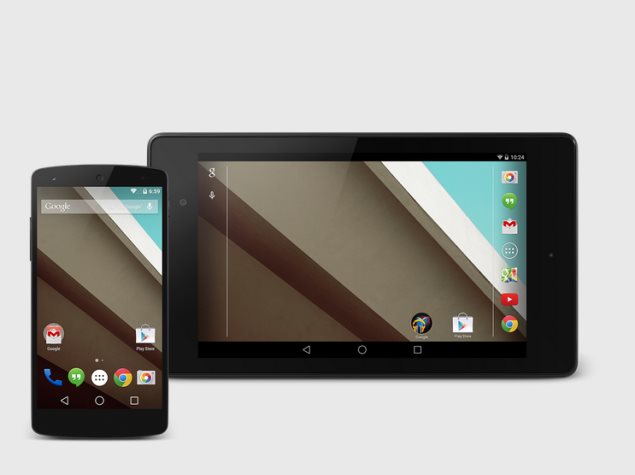
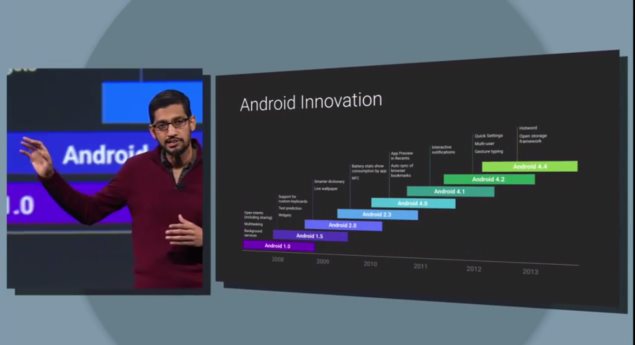
Android has grown from a tiny upstart to the world's dominant mobile computing platform with over a billion active users. Google isn't sitting still, though, and has just unveiled what it calls the most ambitious Android release yet. Currently known only as Android L, there's no dessert-themed codename or even formal version number yet. Android L will release later this year, though an exact date isn't known.
We hope to see new smartphones launch around the same time which take advantage of all the new features, and also updates to existing smartphones. HTC is amongst the companies committed to bringing it to its existing HTC One family, while others should announce support soon.
Here are some of the most exciting new features of Android L
google_io_innovation_google.jpg
Material design
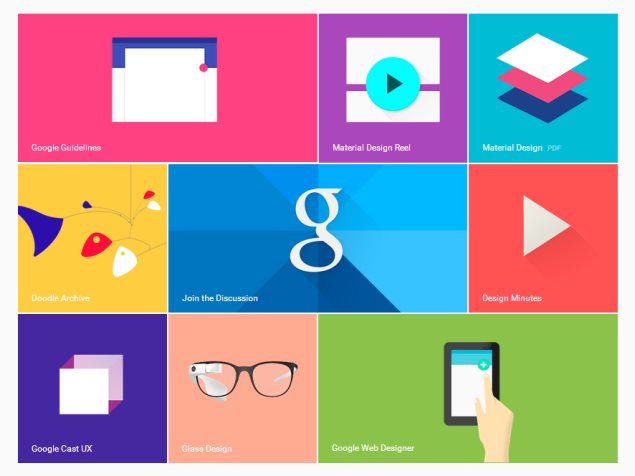
Android will receive a complete visual overhaul aimed at promoting a consistent experience across Android device sizes and types. The new "Material Design" identity is bolder, more colourful, and more animated. Every transition between screens and every user interaction has been refined, down to the system-wide Roboto typeface and the Android navigation buttons.
Screen elements will be able to simulate depth, with automatic shadows and scaling, but will also inherit elements of classic magazine typography and layout. There's more emphasis on simple shapes and consistent actions that lead you from one app into another. Google's new design page offers hints of what is to come.

Also Read PC Gaming is Becoming More Popular Than Console Gaming

The change could also be aimed at discouraging third-party vendors from developing custom Android overlays which greatly deviate from Google's vision. A strong enough core UI experience could lead users to reject anything seen as inferior to it.
The Material Design identity integrates elements of responsive Web design and will extend to other Google properties including Gmail, which will be redesigned for the Web as well as mobile apps. Material Design takes into account the fact that touch, voice, mouse and keyboard are all equally important input methods, clearly illustrating goals above and beyond smartphone usage scenarios.
google_io_desgin_google.jpg
Improved notifications
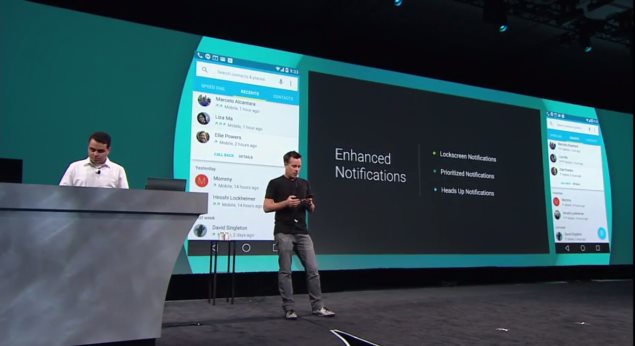
You will be able to interact with notifications more easily in Android L. For starters, you can choose which ones show up on the lock screen and what amount of detail they'll show. You can decide whether snippets of actual messages are displayed when your phone is potentially visible to others, or whether more details will only be revealed when you unlock it. They also aren't necessarily displayed in chronological order anymore - the OS can learn which ones you're more likely to respond to urgently and prioritise those.
There's also a new type of notification altogether - Google calls these heads ups. These appear on top of whatever you're doing and allow you to take action or dismiss them immediately. These are meant to be less intrusive, and can be used for things that can't wait, such as incoming calls.
Trusted environments
Speaking of the lock screen, you'll soon be able to have your phone detect when it's in a trusted environment, which will dispense with the lock code. This could be triggered by the presence of a Bluetooth device such a smartwatch that you wear all the time, a specific Wi-Fi access point, or other factors. When the environment is deemed safe, you won't have to bother with unlocking your phone.
android_l_notifications_google.jpg
Project Volta, battery improvements

Also Read DDR4, the next-gen memory coming soon for PCs and mobile devices

Android L will be able to manage battery life much better, but Google's moves go beyond that to the app development stage, for which new tools have been developed that let developers track battery drain and optimise apps before they ever reach end users. The battery saver mode is similar to those implemented by third parties so far - non-essential services can be turned off or made to run only at intervals in order to save power. Android L will also be able to lower the screen refresh rate, reduce the frequency of data exchanges, or force apps to change their behaviour to match the prevailing battery state.
Google Fit
Everyone's getting into health and activity tracking, and Google is no exception. The new Google Fit framework will take Apple's Healthkit head on, tying into sensors on phones themselves as well as connected accessories to collect data which will be ready for apps to use. Major partners including Nike, Adidas, Runkeeper, HTC, Asus, LG and Motorola are already on board. Google Fit could monitor physical activity and food intake as well as health indicators such as heart rate and breathing.
Greater Web integration
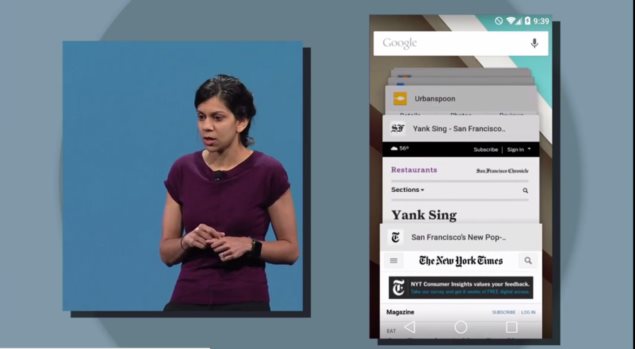
There's also a change to the way individual tabs and documents in apps are handled by Android L. They'll now show up as individual entries in the Recents menu, allowing users to jump directly between them. This pulls the focus away from apps and puts it onto all the things you do with them. For example, Web apps open in Chrome tabs would appear much like native apps running on your device, and you'd be able to jump in and out of them more quickly.
google_io_web_google.jpg
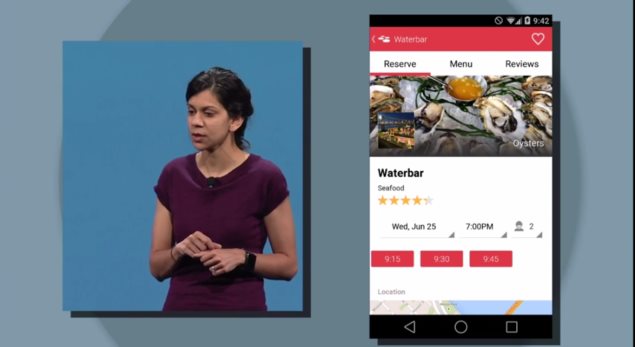
Links on the Web can now also be used to launch apps instead of websites (presumably falling back to the website in case the app is not installed). For example, Google demonstrated looking up a restaurant in Chrome and then tapping a link to not only launch the OpenTable app, but also have it know that it should bring up that restaurant's booking page. Google search results can also now be links that trigger an app, rather than links to websites.
ART Runtime and Android Extension Pack

Also Read How to Find and Trace Location of IP Address


Google is ditching the Dalvik runtime which has served well for years, in favour of a new one called ART. It can make apps load and run quite a bit faster while using less RAM. ART is 64-bit compatible, and is also engineered to allow apps to work across hardware architectures such as ARM and X86. This also means that Android devices will be able to address more RAM than the 32-bit limit allowed.
With greater diversity in Android hardware obviously envisioned for the near future, the move is a welcome change. Google has worked with major hardware vendors to enable more fluid graphics, potentially paving the way for new Android-based game consoles and set-top boxes. Desktop-class graphics including tessellation, geometry shaders and texture compression will potentially be possible on Android devices.
google_io_recents_google.jpg
Knox
Google also made a few announcements that indicate interesting things on the horizon for enterprise users. The company announced that Samsung's Knox feature for work and personal separation will become a part of Android itself. Knox allows corporate IT administrators to control work-related data and policies on employees' smartphones while letting the employees themselves continue to store personal data and use unrelated apps. This alleviates many of the problems with accessing secure information from mobile devices and could make Android far more attractive to businesses.


Source:http://gadgets.ndtv.com/


Also Read Apple, Google and Samsung Battle to Bring Health Apps to Wearables

NOTE: Feel Free To Comment....
Unknown  /  at  19:48  /  No comments

android_l_devices_google.jpg

Also Read Specifications Of BlackBerry Z3

Android has grown from a tiny upstart to the world's dominant mobile computing platform with over a billion active users. Google isn't sitting still, though, and has just unveiled what it calls the most ambitious Android release yet. Currently known only as Android L, there's no dessert-themed codename or even formal version number yet. Android L will release later this year, though an exact date isn't known.
We hope to see new smartphones launch around the same time which take advantage of all the new features, and also updates to existing smartphones. HTC is amongst the companies committed to bringing it to its existing HTC One family, while others should announce support soon.
Here are some of the most exciting new features of Android L
google_io_innovation_google.jpg
Material design
Android will receive a complete visual overhaul aimed at promoting a consistent experience across Android device sizes and types. The new "Material Design" identity is bolder, more colourful, and more animated. Every transition between screens and every user interaction has been refined, down to the system-wide Roboto typeface and the Android navigation buttons.
Screen elements will be able to simulate depth, with automatic shadows and scaling, but will also inherit elements of classic magazine typography and layout. There's more emphasis on simple shapes and consistent actions that lead you from one app into another. Google's new design page offers hints of what is to come.

Also Read PC Gaming is Becoming More Popular Than Console Gaming

The change could also be aimed at discouraging third-party vendors from developing custom Android overlays which greatly deviate from Google's vision. A strong enough core UI experience could lead users to reject anything seen as inferior to it.
The Material Design identity integrates elements of responsive Web design and will extend to other Google properties including Gmail, which will be redesigned for the Web as well as mobile apps. Material Design takes into account the fact that touch, voice, mouse and keyboard are all equally important input methods, clearly illustrating goals above and beyond smartphone usage scenarios.
google_io_desgin_google.jpg
Improved notifications
You will be able to interact with notifications more easily in Android L. For starters, you can choose which ones show up on the lock screen and what amount of detail they'll show. You can decide whether snippets of actual messages are displayed when your phone is potentially visible to others, or whether more details will only be revealed when you unlock it. They also aren't necessarily displayed in chronological order anymore - the OS can learn which ones you're more likely to respond to urgently and prioritise those.
There's also a new type of notification altogether - Google calls these heads ups. These appear on top of whatever you're doing and allow you to take action or dismiss them immediately. These are meant to be less intrusive, and can be used for things that can't wait, such as incoming calls.
Trusted environments
Speaking of the lock screen, you'll soon be able to have your phone detect when it's in a trusted environment, which will dispense with the lock code. This could be triggered by the presence of a Bluetooth device such a smartwatch that you wear all the time, a specific Wi-Fi access point, or other factors. When the environment is deemed safe, you won't have to bother with unlocking your phone.
android_l_notifications_google.jpg
Project Volta, battery improvements

Also Read DDR4, the next-gen memory coming soon for PCs and mobile devices

Android L will be able to manage battery life much better, but Google's moves go beyond that to the app development stage, for which new tools have been developed that let developers track battery drain and optimise apps before they ever reach end users. The battery saver mode is similar to those implemented by third parties so far - non-essential services can be turned off or made to run only at intervals in order to save power. Android L will also be able to lower the screen refresh rate, reduce the frequency of data exchanges, or force apps to change their behaviour to match the prevailing battery state.
Google Fit
Everyone's getting into health and activity tracking, and Google is no exception. The new Google Fit framework will take Apple's Healthkit head on, tying into sensors on phones themselves as well as connected accessories to collect data which will be ready for apps to use. Major partners including Nike, Adidas, Runkeeper, HTC, Asus, LG and Motorola are already on board. Google Fit could monitor physical activity and food intake as well as health indicators such as heart rate and breathing.
Greater Web integration
There's also a change to the way individual tabs and documents in apps are handled by Android L. They'll now show up as individual entries in the Recents menu, allowing users to jump directly between them. This pulls the focus away from apps and puts it onto all the things you do with them. For example, Web apps open in Chrome tabs would appear much like native apps running on your device, and you'd be able to jump in and out of them more quickly.
google_io_web_google.jpg
Links on the Web can now also be used to launch apps instead of websites (presumably falling back to the website in case the app is not installed). For example, Google demonstrated looking up a restaurant in Chrome and then tapping a link to not only launch the OpenTable app, but also have it know that it should bring up that restaurant's booking page. Google search results can also now be links that trigger an app, rather than links to websites.
ART Runtime and Android Extension Pack

Also Read How to Find and Trace Location of IP Address


Google is ditching the Dalvik runtime which has served well for years, in favour of a new one called ART. It can make apps load and run quite a bit faster while using less RAM. ART is 64-bit compatible, and is also engineered to allow apps to work across hardware architectures such as ARM and X86. This also means that Android devices will be able to address more RAM than the 32-bit limit allowed.
With greater diversity in Android hardware obviously envisioned for the near future, the move is a welcome change. Google has worked with major hardware vendors to enable more fluid graphics, potentially paving the way for new Android-based game consoles and set-top boxes. Desktop-class graphics including tessellation, geometry shaders and texture compression will potentially be possible on Android devices.
google_io_recents_google.jpg
Knox
Google also made a few announcements that indicate interesting things on the horizon for enterprise users. The company announced that Samsung's Knox feature for work and personal separation will become a part of Android itself. Knox allows corporate IT administrators to control work-related data and policies on employees' smartphones while letting the employees themselves continue to store personal data and use unrelated apps. This alleviates many of the problems with accessing secure information from mobile devices and could make Android far more attractive to businesses.


Source:http://gadgets.ndtv.com/


Also Read Apple, Google and Samsung Battle to Bring Health Apps to Wearables

NOTE: Feel Free To Comment....

Posted in: , Read Complete Article»

Wednesday, 25 June 2014

Specifications Of BlackBerry Z3

BlackBerry Z3

Also Read How To Shorten a URL?

BlackBerry Z3

BlackBerry Z3

Display

5.00-inch

Processor

1.2GHz

Front Camera

1.1-megapixel

Resolution

540x960 pixels

RAM

1.5GB

OS

BlackBerry OS 10

Storage

8GB

Rear Camera

5-megapixel

Battery capacity

2500mAh

BlackBerry Z3 detailed specifications

Also Read Samsung Officially Announces Galaxy Tab S

General
Release dateApril 2014
Form factorTouchscreen
Dimensions (mm)140.00 x 72.80 x 9.26
Weight (g)164.00
Battery capacity (mAh)2500
Removable batteryNo
SAR valueNA
Display
Screen size (inches)5.00
TouchscreenYes
Touchscreen typeCapacitive
Resolution540x960 pixels
Pixels per inch (PPI)220
Colours16M
Hardware
Processor1.2GHz  dual-core
Processor makeQualcomm MSM8230
RAM1.5GB
Internal storage8GB
Expandable storageYes
Expandable storage typemicroSD
Expandable storage up to (GB)32
Camera
Rear camera5-megapixel
FlashYes
Front camera1.1-megapixel
Software
Operating SystemBlackBerry OS 10
Java supportNo
Browser supports FlashYes
Connectivity
Wi-FiYes
Wi-Fi standards supported802.11 b/ g/ n
GPSYes
BluetoothYes, v 4.00
NFCYes
InfraredNo
DLNANo
Wi-Fi DirectNo
MHL OutNo
HDMIYes
Headphones3.5mm
FMYes
USBMicro-USB
Charging via Micro-USBYes
Proprietary charging connectorNo
Proprietary data connectorNo
Number of SIMs1
GSM/ CDMAGSM
3GYes
Sensors
Compass/ MagnetometerNo
Proximity sensorYes
AccelerometerYes
Ambient light sensorYes
GyroscopeNo
BarometerNo
Temperature sensorNo


Also Read Specs Of Oppo Find 7 'India's First Phone With QHD Display'

NOTE: Feel Free To Comment....
Unknown  /  at  15:49  /  No comments

BlackBerry Z3

Also Read How To Shorten a URL?

BlackBerry Z3

BlackBerry Z3

Display

5.00-inch

Processor

1.2GHz

Front Camera

1.1-megapixel

Resolution

540x960 pixels

RAM

1.5GB

OS

BlackBerry OS 10

Storage

8GB

Rear Camera

5-megapixel

Battery capacity

2500mAh

BlackBerry Z3 detailed specifications

Also Read Samsung Officially Announces Galaxy Tab S

General
Release dateApril 2014
Form factorTouchscreen
Dimensions (mm)140.00 x 72.80 x 9.26
Weight (g)164.00
Battery capacity (mAh)2500
Removable batteryNo
SAR valueNA
Display
Screen size (inches)5.00
TouchscreenYes
Touchscreen typeCapacitive
Resolution540x960 pixels
Pixels per inch (PPI)220
Colours16M
Hardware
Processor1.2GHz  dual-core
Processor makeQualcomm MSM8230
RAM1.5GB
Internal storage8GB
Expandable storageYes
Expandable storage typemicroSD
Expandable storage up to (GB)32
Camera
Rear camera5-megapixel
FlashYes
Front camera1.1-megapixel
Software
Operating SystemBlackBerry OS 10
Java supportNo
Browser supports FlashYes
Connectivity
Wi-FiYes
Wi-Fi standards supported802.11 b/ g/ n
GPSYes
BluetoothYes, v 4.00
NFCYes
InfraredNo
DLNANo
Wi-Fi DirectNo
MHL OutNo
HDMIYes
Headphones3.5mm
FMYes
USBMicro-USB
Charging via Micro-USBYes
Proprietary charging connectorNo
Proprietary data connectorNo
Number of SIMs1
GSM/ CDMAGSM
3GYes
Sensors
Compass/ MagnetometerNo
Proximity sensorYes
AccelerometerYes
Ambient light sensorYes
GyroscopeNo
BarometerNo
Temperature sensorNo


Also Read Specs Of Oppo Find 7 'India's First Phone With QHD Display'

NOTE: Feel Free To Comment....

Posted in: , Read Complete Article»

About

This blog belong to all our youngster friendz, who believe in sharing their knowledge with others and want to try to hackin', crackin' , full version applications at free of cost.
you will found here valuable stuffs.

Labels

adf.ly blocked (1) android (109) Android and PC (19) android games (11) android news (3) android tricks (43) Antivirus (11) Anvsoft (1) apple (40) asha phones (1) avast (1) avast pro antivirus 8 2013 (1) avg (1) AVG pc tuneup 2013 full version (1) avira (1) blackberry (1) blogspot (2) body_language (1) bootable usb (1) Browsers (16) c cleaner pro + business (1) Cheatbook 2013 (1) Chetan Bhagat (1) compressor (1) crac (1) Crack (1) crack + keygen (2) cyberlink power2go full version (1) daemon tools 5.2 full version (1) daemon tools patch (1) defender (2) dictionary (1) direct link (1) DivX Pro 7 (1) Ebook (2) eset (1) etc (1) facebook (16) Firewall (2) free recharge tricks (1) free sms (1) FRUIT NINJA for windows full version (1) full version (8) Full Version MS Office 13 (1) GTA Sandreas (1) hack (4) hack pc (3) hacking using keylogger (1) hardware (1) hiDownload platinum 8 (1) how to (6) how to install .net (1) HTML (1) idm (1) idm crack (1) IDM full version (1) image editor (2) install .net in windows 8 (1) internet tricks (37) iPhone 5c (2) job (1) k j activator (1) kaspersky (2) keygen (2) leaked images (1) license key (1) manual updates (1) mediafire (1) MEDIAFIRE DOWNLOAD (2) mediafire link (2) mobiles (42) music player (1) nfs most wanted (1) Office 13 Activator (1) official site update (1) offline updates (1) patch (4) PC (3) pc customize (1) PC Drivers (2) pc games (15) pc games cheats (11) PC Software (152) PC tricks (146) PdaNET 3.50 (1) PDF (3) phone specifications (43) pic viewer (3) power iso 5.6 (1) premium zbigz account (1) problem with .net in windows 8 (1) review (11) reviews (2) Revolution 2020 PDF (1) science (2) sharebeast download (6) sharebeast link (2) symbian mobiles (2) tech knowledge (33) Tech News (343) tech reviews (146) Torrent To IDM (1) Tune-Up 2014 Full Version (1) Ubuntu Mobiles (1) video player (13) video tutorial (1) Web design (1) window 8.1 tricks (12) windows 8 activator (1) Windows 8 USB Installer Maker (1) windows phones (16) winrar 5 full version (1)
Copyright © 2014 SimplyGet. WP Theme-junkie converted by Bloggertheme9
Blogger templates. Proudly Powered by Blogger.