Friday, 12 December 2014

Create a WiFi hotspot in Windows 7,8 & Share Internet connection for use in smartphones


Also Read Lenovo K3 Budget Smartphone Launched as Xiaomi Redmi 1S Competitor

Nowadays, almost all cell phones have an inbuilt WiFi adapter. And also, Android OS is much popular these days. Thus most of us have an Android phone with latest WiFi technology, may be 802.11 b/g/n. As almost all PC’s today are equipped with a WiFi adapter and almost every computer OS provides the feature of creating a Wireless Connection, one may think of creating one and share the internet connection for use in Android. But it is of no use, as Android is unable to detect “ad-hoc” wireless networks and it needs an “infrastructure network”. Its well enough if you have a wireless router as its somewhat not possible to create an “infrastructure network” using PC’s WiFi.
But, here comes the twist. The line you read just 2 seconds ago is wrong. Yeah, one can create a Wireless Network using PC’s WiFi for use in Android (Under some conditions!). This guide features a complete tutorial on creating a Wireless Connection in Windows (detectable by Android) and sharing your Internet Connection over WiFi.

Before continuing with this tutorial, I recommend you to download mHotspot. Its required for creating an infrastructure network (A Hotspot!). Also, let me assure, that this software works only in Windows 7 and above. Thus, XP users have to find some other solution as we cannot continue without this application. Sorry for that !! So, lets begin.

First of all, we need to share our working Internet Connection with the WiFi adapter. For doing so, proceed as follows.

Open “Network and Sharing Center”. From the left pane, click on “Change adapter settings”.
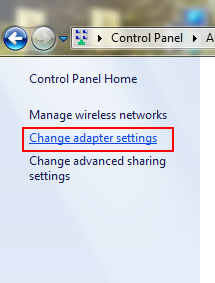
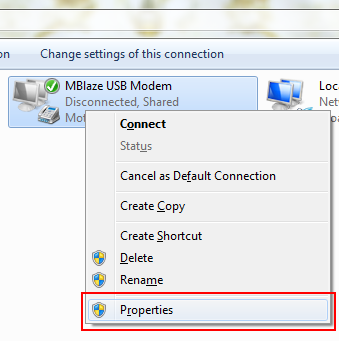
This will list all your network adapters and connections. Now right-click on your current, working Internet Connection and select “Properties”.
A dialog box will be opened as shown in the image. Go to the sharing tab. Check the option“Allow other network users to connect through this computer’s Internet connection“. If it is already checked, uncheck and check it again. Now, from the dropdown under the label“Home networking connection”, select “Wireless Network Connection 2″ from the list.

Also Read Moto E (Gen 2) With 4.5-Inch Display and 4G LTE Tipped to Launch Soon
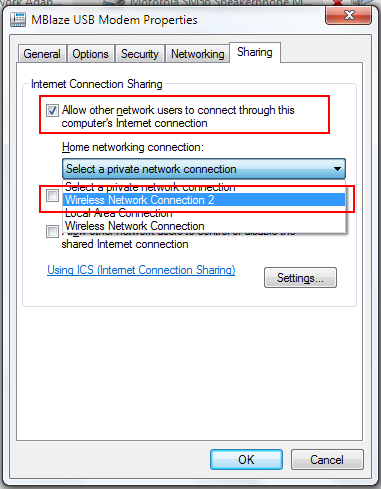
In most PC’s its name is “Wireless Network Connection 2″ by default, unless changed. If you can not find it in the list, just search for your “Microsoft Virtual WiFi Miniport Adapter” and select its name from the list. Then, click on “OK”. If prompted about some IP Address settings, just click “OK” and proceed further.
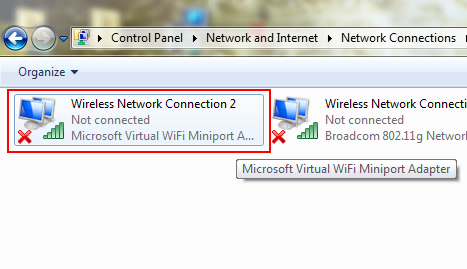
Now, open Properties of that “Wireless Network Connection 2″ (Microsoft Virtual WiFi Miniport Adapter). Double-click on “Internet Protocol Version 4 (TCP/IPv4)”.
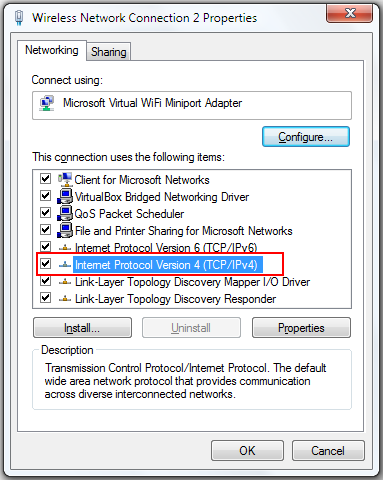
It will open up another Properties window. Here, select the option “Use the following IP adress”. Set the “IP address” to 192.168.0.1, the “Subnet mask” to 255.255.255.0 and leave the “Default gateway” blank. Also, set 8.8.8.8 as the “Preferred DNS server”. Leave“Alternate DNS server”, blank. Click “OK” and also close other Properties window. Thus, we have shared our Internet connection. Then, connect to the Internet connection.
Now, we proceed towards creating a WiFi hotspot. For that double-click on “mHotspot.exe” that we downloaded a the beginning of this tutorial. Then, click on “SETUP HOTSPOT”.
Give the desired name and a password (minimum 8 characters). Make sure you provide a strong password (I recommend that the password should contain alphanumeric characters with atleast one uppercase letter and one special character like for example: “Ggsr@143″). After that, click on“OK”.

Also Read Motorola India Claims to Have Sold 2.5 Million Smartphones This Year
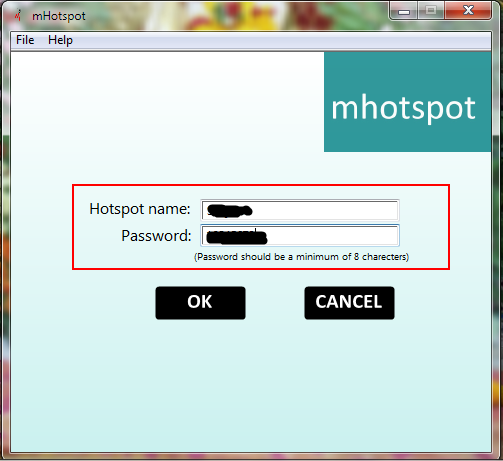

Now click on the “START” button.
Now, click on the network icon in the taskbar and check whether the name of the newly created WiFi hotspot appears or not. If the name is listed, means we have successfully configured our hotspot.
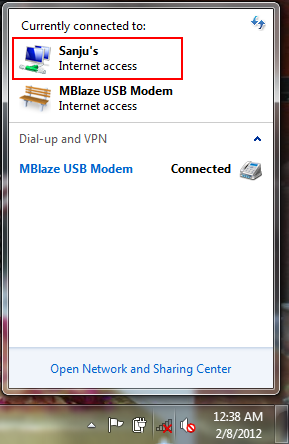
It will show “Internet access” under the name of your current Internet connection and also under the name of our recently created WiFi hotspot. If “No internet access” is mentioned under the name of your current Internet connection, means you are not yet connected to the internet. While, if“Internet access” is mentioned under your current connection but “No internet access” is mentioned under the name of the hotspot, means the Internet connection is not properly shared. Just repeat the previous steps for sharing the Internet connection properly. If all set, then its time to configure the Android device.
Below here, I have mentioned steps for the Android device running Android v2.3.6 (Gingerbread). Though, the steps are somewhat similar for other versions. So, just go toSettings -> Wireless and networks -> Wi-Fi settings. Now open menu and select“Advanced” option.
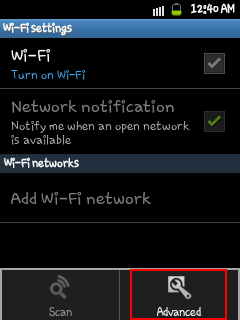
Here, check the option “Use static IP”. Set the “IP address” to 192.168.0.2, “Gateway” to192.168.0.1, “Netmask” to 255.255.255.0 and “DNS1″ to 8.8.8.8 and leave “DNS2″ blank. Now save the settings and turn the Wi-Fi on.
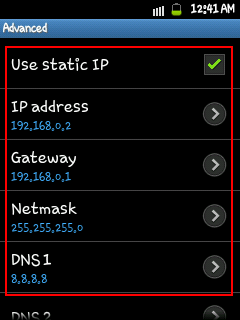
It will detect and display the name of our hotspot in the available networks list. Select the network, enter the password and tap on Connect. If you are authenticated correctly, your cell phone will be connected to the hotspot.
That’s it. You can now use the Internet on your device.
I have basically shown the steps for Android but, these can be done the same way in other devices. One just needs to know how to configure the IP settings in that device. This hotspot is detectable in almost every WiFi enabled device. Thus it can be used to share an Internet connection between PC’s too.
Happy and Safe Browsing !!


Also Read Google India's Great Online Shopping Festival (GOSF) Kicks Off Wednesday

NOTE: Feel Free To Comment....
Unknown  /  at  01:00  /  No comments


Also Read Lenovo K3 Budget Smartphone Launched as Xiaomi Redmi 1S Competitor

Nowadays, almost all cell phones have an inbuilt WiFi adapter. And also, Android OS is much popular these days. Thus most of us have an Android phone with latest WiFi technology, may be 802.11 b/g/n. As almost all PC’s today are equipped with a WiFi adapter and almost every computer OS provides the feature of creating a Wireless Connection, one may think of creating one and share the internet connection for use in Android. But it is of no use, as Android is unable to detect “ad-hoc” wireless networks and it needs an “infrastructure network”. Its well enough if you have a wireless router as its somewhat not possible to create an “infrastructure network” using PC’s WiFi.
But, here comes the twist. The line you read just 2 seconds ago is wrong. Yeah, one can create a Wireless Network using PC’s WiFi for use in Android (Under some conditions!). This guide features a complete tutorial on creating a Wireless Connection in Windows (detectable by Android) and sharing your Internet Connection over WiFi.

Before continuing with this tutorial, I recommend you to download mHotspot. Its required for creating an infrastructure network (A Hotspot!). Also, let me assure, that this software works only in Windows 7 and above. Thus, XP users have to find some other solution as we cannot continue without this application. Sorry for that !! So, lets begin.

First of all, we need to share our working Internet Connection with the WiFi adapter. For doing so, proceed as follows.

Open “Network and Sharing Center”. From the left pane, click on “Change adapter settings”.
This will list all your network adapters and connections. Now right-click on your current, working Internet Connection and select “Properties”.
A dialog box will be opened as shown in the image. Go to the sharing tab. Check the option“Allow other network users to connect through this computer’s Internet connection“. If it is already checked, uncheck and check it again. Now, from the dropdown under the label“Home networking connection”, select “Wireless Network Connection 2″ from the list.

Also Read Moto E (Gen 2) With 4.5-Inch Display and 4G LTE Tipped to Launch Soon

In most PC’s its name is “Wireless Network Connection 2″ by default, unless changed. If you can not find it in the list, just search for your “Microsoft Virtual WiFi Miniport Adapter” and select its name from the list. Then, click on “OK”. If prompted about some IP Address settings, just click “OK” and proceed further.
Now, open Properties of that “Wireless Network Connection 2″ (Microsoft Virtual WiFi Miniport Adapter). Double-click on “Internet Protocol Version 4 (TCP/IPv4)”.
It will open up another Properties window. Here, select the option “Use the following IP adress”. Set the “IP address” to 192.168.0.1, the “Subnet mask” to 255.255.255.0 and leave the “Default gateway” blank. Also, set 8.8.8.8 as the “Preferred DNS server”. Leave“Alternate DNS server”, blank. Click “OK” and also close other Properties window. Thus, we have shared our Internet connection. Then, connect to the Internet connection.
Now, we proceed towards creating a WiFi hotspot. For that double-click on “mHotspot.exe” that we downloaded a the beginning of this tutorial. Then, click on “SETUP HOTSPOT”.
Give the desired name and a password (minimum 8 characters). Make sure you provide a strong password (I recommend that the password should contain alphanumeric characters with atleast one uppercase letter and one special character like for example: “Ggsr@143″). After that, click on“OK”.

Also Read Motorola India Claims to Have Sold 2.5 Million Smartphones This Year


Now click on the “START” button.
Now, click on the network icon in the taskbar and check whether the name of the newly created WiFi hotspot appears or not. If the name is listed, means we have successfully configured our hotspot.
It will show “Internet access” under the name of your current Internet connection and also under the name of our recently created WiFi hotspot. If “No internet access” is mentioned under the name of your current Internet connection, means you are not yet connected to the internet. While, if“Internet access” is mentioned under your current connection but “No internet access” is mentioned under the name of the hotspot, means the Internet connection is not properly shared. Just repeat the previous steps for sharing the Internet connection properly. If all set, then its time to configure the Android device.
Below here, I have mentioned steps for the Android device running Android v2.3.6 (Gingerbread). Though, the steps are somewhat similar for other versions. So, just go toSettings -> Wireless and networks -> Wi-Fi settings. Now open menu and select“Advanced” option.
Here, check the option “Use static IP”. Set the “IP address” to 192.168.0.2, “Gateway” to192.168.0.1, “Netmask” to 255.255.255.0 and “DNS1″ to 8.8.8.8 and leave “DNS2″ blank. Now save the settings and turn the Wi-Fi on.

It will detect and display the name of our hotspot in the available networks list. Select the network, enter the password and tap on Connect. If you are authenticated correctly, your cell phone will be connected to the hotspot.
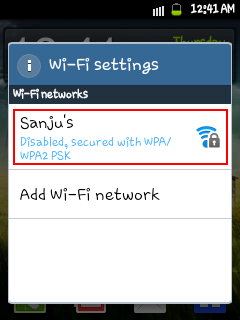
That’s it. You can now use the Internet on your device.
I have basically shown the steps for Android but, these can be done the same way in other devices. One just needs to know how to configure the IP settings in that device. This hotspot is detectable in almost every WiFi enabled device. Thus it can be used to share an Internet connection between PC’s too.
Happy and Safe Browsing !!


Also Read Google India's Great Online Shopping Festival (GOSF) Kicks Off Wednesday

NOTE: Feel Free To Comment....

Posted in: , , Read Complete Article»

Tuesday, 9 December 2014

Google India's Great Online Shopping Festival (GOSF) Kicks Off Wednesday

gosf_2014_google_banner.jpg

Also Read Moto E (Gen 2) With 4.5-Inch Display and 4G LTE Tipped to Launch Soon

Google's much-awaited Great Online Shopping Festival (GOSF) will kick off on Wednesday and will feature more than 400 partners offering deals and discounts. The GOSF will be a three day event starting Wednesday and will end on Friday.
Google India this year has announced an 'exclusive launch corner' that will feature new products released exclusively on GOSF. The Mountain View giant is expected to launch the Google Nexus 6 during GOSF. Notably, Google listed the Nexus 6 in India last month and still lists the handset in 'Devices' section of Google Play India as 'Coming soon'.

The company this year ahead of the GOSF 2014 festival introduced offers for consumers such as 'Pre-Party', which promised to offer users a chance to win 14 minutes of free shopping (up to Rs 2.5 lakhs in value) hosted by brands like Asian Paints, Jet Airways, Kindle, Micromax, HP, Big Bazaar, KOOVs, Lakme and Lenovo.

The search engine giant is also launching a new section this year, focused on the first time buyers, called the 'Rs. 299 Corner' that will feature heavy discounted products with free shipping and cash on delivery option. The new section will include popular brands such as Philips, Uber, JBL, Benetton, Alia Bhatt Collection and EverPure water purifier.

Google India has partnered Aditya Birla Money My Universe as a preferred partner for this year's event.

For those unaware, the Great Online Shopping Festival (GOSF) is in its third edition and was initially launched in 2012 by Google to boost the adoption of online shopping in India.

Last year, GOSF saw tremendous response from consumers in India and the company claimed it attracted 2 million visitors. The company had also claimed that its GOSF 2013 partners (over 200 e-commerce websites) saw daily sales jumping 3 to 4 times. Google had revealed that out of the 2 million unique visitors, almost half were women.

For GOSF 2013, Google said the peak time of traffic was between 2pm and 8pm each day, with 62 percent viewers coming from the 18 to 34-year old category. Online shopping sites like Snapdeal, Myntra, and eBay also mentioned spectacular sales jumps in the period.


Also Read Lenovo K3 Budget Smartphone Launched as Xiaomi Redmi 1S Competitor

NOTE: Feel Free To Comment....
Unknown  /  at  18:03  /  No comments

gosf_2014_google_banner.jpg

Also Read Moto E (Gen 2) With 4.5-Inch Display and 4G LTE Tipped to Launch Soon

Google's much-awaited Great Online Shopping Festival (GOSF) will kick off on Wednesday and will feature more than 400 partners offering deals and discounts. The GOSF will be a three day event starting Wednesday and will end on Friday.
Google India this year has announced an 'exclusive launch corner' that will feature new products released exclusively on GOSF. The Mountain View giant is expected to launch the Google Nexus 6 during GOSF. Notably, Google listed the Nexus 6 in India last month and still lists the handset in 'Devices' section of Google Play India as 'Coming soon'.

The company this year ahead of the GOSF 2014 festival introduced offers for consumers such as 'Pre-Party', which promised to offer users a chance to win 14 minutes of free shopping (up to Rs 2.5 lakhs in value) hosted by brands like Asian Paints, Jet Airways, Kindle, Micromax, HP, Big Bazaar, KOOVs, Lakme and Lenovo.

The search engine giant is also launching a new section this year, focused on the first time buyers, called the 'Rs. 299 Corner' that will feature heavy discounted products with free shipping and cash on delivery option. The new section will include popular brands such as Philips, Uber, JBL, Benetton, Alia Bhatt Collection and EverPure water purifier.

Google India has partnered Aditya Birla Money My Universe as a preferred partner for this year's event.

For those unaware, the Great Online Shopping Festival (GOSF) is in its third edition and was initially launched in 2012 by Google to boost the adoption of online shopping in India.

Last year, GOSF saw tremendous response from consumers in India and the company claimed it attracted 2 million visitors. The company had also claimed that its GOSF 2013 partners (over 200 e-commerce websites) saw daily sales jumping 3 to 4 times. Google had revealed that out of the 2 million unique visitors, almost half were women.

For GOSF 2013, Google said the peak time of traffic was between 2pm and 8pm each day, with 62 percent viewers coming from the 18 to 34-year old category. Online shopping sites like Snapdeal, Myntra, and eBay also mentioned spectacular sales jumps in the period.


Also Read Lenovo K3 Budget Smartphone Launched as Xiaomi Redmi 1S Competitor

NOTE: Feel Free To Comment....
Posted in: Read Complete Article»

Saturday, 6 December 2014

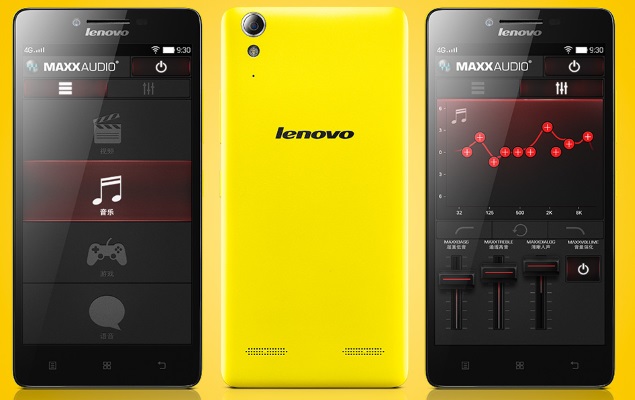
Lenovo K3 Budget Smartphone Launched as Xiaomi Redmi 1S Competitor

lenovo_k3_yellow.jpg

Also Read Moto E (Gen 2) With 4.5-Inch Display and 4G LTE Tipped to Launch Soon

Lenovo has introduced a new budget smartphone called the K3 in China. The smartphone was listed by a Chinese online retailer, JD, with an impressive price tag of CNY 599 (roughly Rs. 6,000). The Lenovo K3 is being touted as a direct competitor of Xiaomi's popular budget Redmi 1S smartphone.

A Chinese publication claims that the Lenovo K3 will be available only online, just like Xiaomi handsets. So far no announcements have been made by Lenovo regarding K3's global availability.

The new budget smartphone from the company is available to buy in China via JD's e-commerce website as the Lenovo K3 Music Lemon (K30-T).

The Lenovo K3 features a 5-inch HD (720x1280 pixels) IPS display with a pixel density of 294ppi. The listing notes that the smartphone sports a sleek profile of 7.9mm. The Lenovo K3 is powered by a quad-core Qualcomm Snapdragon 410 processor clocked at 1.2GHz alongside 1GB of RAM. There is 16GB of inbuilt storage with microSD card support.

The Redmi 1S, on the other hand, came with a 4.7-inch HD display; powered by a 1.6GHz quad-core Snapdragon 400 SoC; 1GB of RAM, and packs 8GB of built-in storage with expandable storage support (up to 32GB).

The Lenovo K3 sports an 8-megapixel rear camera and a 2-megapixel front camera. It measures 141x70.5x7.9mm and packs a 2300mAh battery. It sports a vibrant Yellow-coloured back panel while featuring Waves MaxxAudio for sound experience.

The Chinese handset brand back in October had revealed that it plans to create a new mobile brand and company next year to counter the meteoric rise of Xiaomi, which is just a three-year old company. The company had claimed that its new smartphone brand and company would mainly focus on selling mobile phones online, and officially open for business in April 2015.

Lenovo K3

Lenovo K3

Display

5.00-inch

Processor

1.2GHz

Front Camera

 2-megapixel

Resolution

 720x1280 pixels

RAM

 1GB

OS

 Android 4.4

Storage

16GB

Rear Camera

8-megapixel

Battery capacity

2300mAh


Also Read Motorola India Claims to Have Sold 2.5 Million Smartphones This Year

NOTE: Feel Free To Comment....
Unknown  /  at  14:19  /  No comments

lenovo_k3_yellow.jpg

Also Read Moto E (Gen 2) With 4.5-Inch Display and 4G LTE Tipped to Launch Soon

Lenovo has introduced a new budget smartphone called the K3 in China. The smartphone was listed by a Chinese online retailer, JD, with an impressive price tag of CNY 599 (roughly Rs. 6,000). The Lenovo K3 is being touted as a direct competitor of Xiaomi's popular budget Redmi 1S smartphone.

A Chinese publication claims that the Lenovo K3 will be available only online, just like Xiaomi handsets. So far no announcements have been made by Lenovo regarding K3's global availability.

The new budget smartphone from the company is available to buy in China via JD's e-commerce website as the Lenovo K3 Music Lemon (K30-T).

The Lenovo K3 features a 5-inch HD (720x1280 pixels) IPS display with a pixel density of 294ppi. The listing notes that the smartphone sports a sleek profile of 7.9mm. The Lenovo K3 is powered by a quad-core Qualcomm Snapdragon 410 processor clocked at 1.2GHz alongside 1GB of RAM. There is 16GB of inbuilt storage with microSD card support.

The Redmi 1S, on the other hand, came with a 4.7-inch HD display; powered by a 1.6GHz quad-core Snapdragon 400 SoC; 1GB of RAM, and packs 8GB of built-in storage with expandable storage support (up to 32GB).

The Lenovo K3 sports an 8-megapixel rear camera and a 2-megapixel front camera. It measures 141x70.5x7.9mm and packs a 2300mAh battery. It sports a vibrant Yellow-coloured back panel while featuring Waves MaxxAudio for sound experience.

The Chinese handset brand back in October had revealed that it plans to create a new mobile brand and company next year to counter the meteoric rise of Xiaomi, which is just a three-year old company. The company had claimed that its new smartphone brand and company would mainly focus on selling mobile phones online, and officially open for business in April 2015.

Lenovo K3

Lenovo K3

Display

5.00-inch

Processor

1.2GHz

Front Camera

 2-megapixel

Resolution

 720x1280 pixels

RAM

 1GB

OS

 Android 4.4

Storage

16GB

Rear Camera

8-megapixel

Battery capacity

2300mAh


Also Read Motorola India Claims to Have Sold 2.5 Million Smartphones This Year

NOTE: Feel Free To Comment....

Posted in: , Read Complete Article»

Friday, 5 December 2014

Moto E (Gen 2) With 4.5-Inch Display and 4G LTE Tipped to Launch Soon

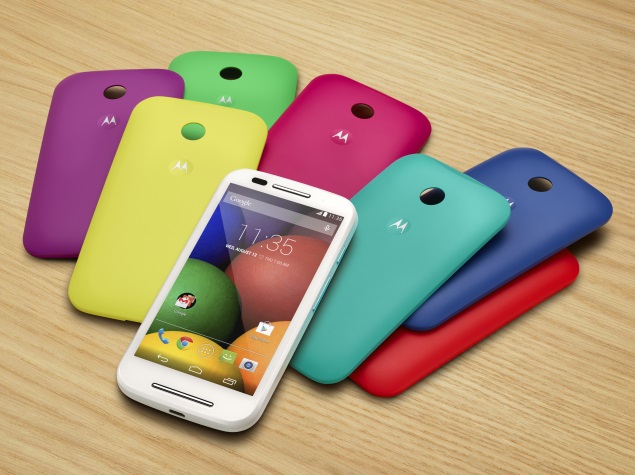
moto_e_multiple_rear_shells.jpg

Also Read Motorola India Claims to Have Sold 2.5 Million Smartphones This Year

Motorola has been rumoured to be working on a successor to the popular budget Moto E smartphone, expected to be called the Moto E (Gen 2), for a while.

Now, more details about the alleged Moto E (seen above) successor have surfaced via a report by a Greek site (via GSMArena) that claims the handset can be expected to launch "soon enough."

Notably, the publication suggests that the rumoured Moto E (Gen 2) will pack the same innards as the first-generation Moto G, which means a Snapdragon 400 processor clocked at 1.2GHz coupled with 1GB of RAM.

Some of the preliminary specifications of the Moto E (Gen 2) tipped by the report include a 4.5-inch qHD (540x960 pixels) display; a 5-megapixel rear camera with LED flash, and LTE connectivity. Interestingly, the report also claims that the Moto E (Gen 2) will run Android 5.0 Lollipop out-of-the-box. The report, without revealing exact pricing, for the new Moto E suggests that it will carry "very low price."

For those unaware, the first-generation Moto E comes with a 4.3-inch display with a qHD (540x960 pixels) resolution with Corning Gorilla Glass 3 protection; 1.2GHz dual-core Qualcomm Snapdragon 200 processor alongside 1GB of RAM, and sports a 5-megapixel rear camera.

Last month, a new Motorola smartphone was spotted on the Geekbench benchmark website with a quad-core Qualcomm Snapdragon (MSM8916) 410 chipset clocked at 1.19GHz and 1GB of RAM.

Corroborating speculations of a possible successor to the Moto E is the fact that Motorola back in September launched refreshed versions of the Moto G and Moto X, and is unlikely to release another variant of the Moto G for some time.

We remind readers however, that nothing is official yet, and that all such leaks must be taken with a pinch of salt.

Motorola back in May launched its dual-SIM budget smartphone Moto E in India carrying a price tag of Rs. 6,999. In less than 48 hours after the Moto E went on sale in India, Flipkart's entire stock was wiped out.


Also Read Android 5.0 Lollipop Review: A Sweet Upgrade

NOTE: Feel Free To Comment....

Unknown  /  at  07:00  /  No comments

moto_e_multiple_rear_shells.jpg

Also Read Motorola India Claims to Have Sold 2.5 Million Smartphones This Year

Motorola has been rumoured to be working on a successor to the popular budget Moto E smartphone, expected to be called the Moto E (Gen 2), for a while.

Now, more details about the alleged Moto E (seen above) successor have surfaced via a report by a Greek site (via GSMArena) that claims the handset can be expected to launch "soon enough."

Notably, the publication suggests that the rumoured Moto E (Gen 2) will pack the same innards as the first-generation Moto G, which means a Snapdragon 400 processor clocked at 1.2GHz coupled with 1GB of RAM.

Some of the preliminary specifications of the Moto E (Gen 2) tipped by the report include a 4.5-inch qHD (540x960 pixels) display; a 5-megapixel rear camera with LED flash, and LTE connectivity. Interestingly, the report also claims that the Moto E (Gen 2) will run Android 5.0 Lollipop out-of-the-box. The report, without revealing exact pricing, for the new Moto E suggests that it will carry "very low price."

For those unaware, the first-generation Moto E comes with a 4.3-inch display with a qHD (540x960 pixels) resolution with Corning Gorilla Glass 3 protection; 1.2GHz dual-core Qualcomm Snapdragon 200 processor alongside 1GB of RAM, and sports a 5-megapixel rear camera.

Last month, a new Motorola smartphone was spotted on the Geekbench benchmark website with a quad-core Qualcomm Snapdragon (MSM8916) 410 chipset clocked at 1.19GHz and 1GB of RAM.

Corroborating speculations of a possible successor to the Moto E is the fact that Motorola back in September launched refreshed versions of the Moto G and Moto X, and is unlikely to release another variant of the Moto G for some time.

We remind readers however, that nothing is official yet, and that all such leaks must be taken with a pinch of salt.

Motorola back in May launched its dual-SIM budget smartphone Moto E in India carrying a price tag of Rs. 6,999. In less than 48 hours after the Moto E went on sale in India, Flipkart's entire stock was wiped out.


Also Read Android 5.0 Lollipop Review: A Sweet Upgrade

NOTE: Feel Free To Comment....

Posted in: Read Complete Article»

Wednesday, 26 November 2014

Motorola India Claims to Have Sold 2.5 Million Smartphones This Year

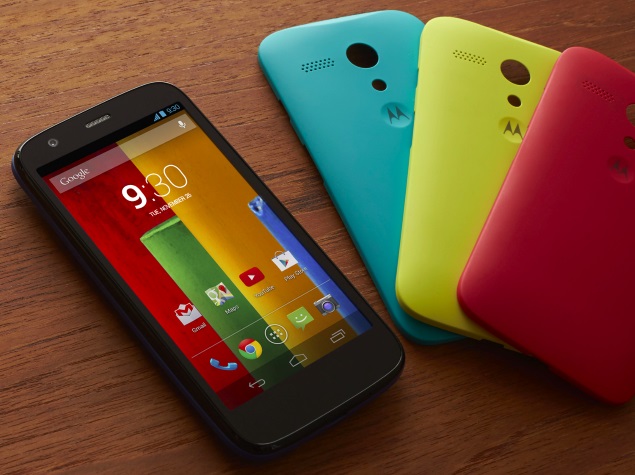
moto_g_rear_options.jpg

Also Read Android 5.0 Lollipop Review: A Sweet Upgrade

Motorola India on Monday announced that it has sold 2.5 million smartphones in India this year. Additionally, the Lenovo-owned company is offering special offers on Flipkart to new customers on the purchase of Moto E, Moto G, Moto G (Gen 2), Moto X, and Moto X (Gen 2) smartphones.

The company announced the news on Twitter and said, "#MotoFans, thanks for choosing us! To celebrate 2.5M customers, we have some cool offers in store!"

Flipkart, the exclusive retail partner for Motorola smartphones in India since the Moto G, lists the new offers on every 'buy now' page of Moto E, Moto G, Moto G (Gen 2), Moto X, and Moto X (Gen 2) smartphones, such as '5 lucky winners to get Rs. 50,000 worth of gift vouchers' and '100 lucky customers to get 100 percent cashback'.

Interestingly, Flipkart's Vice President, Retail and Head Strategic Brand Alliances, Michael Adnani in September at the launch of second generation of Moto G and Moto X smartphones had claimed that it sold over 1.6 million units of its Moto (Moto E, Moto G and Moto X) devices in the first seven months of sales - since the exclusive Flipkart launch of the Moto G in February.

This means that Motorola sold about 900,000 Moto phones in the months of October and November. The company has not shared the breakup of units sold in India.

A market research company in August claimed that Motorola's Moto G was one of the most popular handsets in the company's smartphone lineup in India, closely followed by the Moto E. It also suggested that Moto G sales helped the company to overtake Nokia (now operated by Microsoft) to become the fourth-largest smartphone vendor in India in terms of units shipped in the quarter-ended June. Last month, Motorola brought back the first generation Moto G to India.

Motorola and Flipkart were recently offering the second-generation Moto X under an exchange where users could get a discount of up to Rs. 6,000 depending on the handset they put up for exchange.


Also Read Get 50Rs. Instant recharge through TimesCity App!!! Working 100%

NOTE: Feel Free To Comment....
Unknown  /  at  11:57  /  No comments

moto_g_rear_options.jpg

Also Read Android 5.0 Lollipop Review: A Sweet Upgrade

Motorola India on Monday announced that it has sold 2.5 million smartphones in India this year. Additionally, the Lenovo-owned company is offering special offers on Flipkart to new customers on the purchase of Moto E, Moto G, Moto G (Gen 2), Moto X, and Moto X (Gen 2) smartphones.

The company announced the news on Twitter and said, "#MotoFans, thanks for choosing us! To celebrate 2.5M customers, we have some cool offers in store!"

Flipkart, the exclusive retail partner for Motorola smartphones in India since the Moto G, lists the new offers on every 'buy now' page of Moto E, Moto G, Moto G (Gen 2), Moto X, and Moto X (Gen 2) smartphones, such as '5 lucky winners to get Rs. 50,000 worth of gift vouchers' and '100 lucky customers to get 100 percent cashback'.

Interestingly, Flipkart's Vice President, Retail and Head Strategic Brand Alliances, Michael Adnani in September at the launch of second generation of Moto G and Moto X smartphones had claimed that it sold over 1.6 million units of its Moto (Moto E, Moto G and Moto X) devices in the first seven months of sales - since the exclusive Flipkart launch of the Moto G in February.

This means that Motorola sold about 900,000 Moto phones in the months of October and November. The company has not shared the breakup of units sold in India.

A market research company in August claimed that Motorola's Moto G was one of the most popular handsets in the company's smartphone lineup in India, closely followed by the Moto E. It also suggested that Moto G sales helped the company to overtake Nokia (now operated by Microsoft) to become the fourth-largest smartphone vendor in India in terms of units shipped in the quarter-ended June. Last month, Motorola brought back the first generation Moto G to India.

Motorola and Flipkart were recently offering the second-generation Moto X under an exchange where users could get a discount of up to Rs. 6,000 depending on the handset they put up for exchange.


Also Read Get 50Rs. Instant recharge through TimesCity App!!! Working 100%

NOTE: Feel Free To Comment....
Posted in: Read Complete Article»

Friday, 14 November 2014

Android 5.0 Lollipop Review: A Sweet Upgrade

android_lolipop_screenshot_05.jpg

Also Read Get 50Rs. Instant recharge through TimesCity App!!! Working 100%

Android's sweet new "Lollipop" flavor brings security improvements and easier ways to view and respond to notifications. The new Google software for mobile devices even lets you lend out your phone without worrying about a friend circulating your naked selfies on Facebook.
I tested Lollipop on Google's new Nexus 6 phone, which comes out this week. I can only hope that as other phones get the upgrade over time, it will be as good as what you get on the Nexus.
It's a shame many phone manufacturers that use Android believe they have to tweak it extensively to make the software theirs and not Google's. Mucking around with it only confuses customers and steers app developers toward working on iPhone versions first, where there is more uniformity - and thus incentive to incorporate the latest features.
Assuming your phone maker is running Lollipop in its purest form, here's what you'll get:
Notifications
You used to have to pull down the notification tray from the top, as you would a window shade. With Lollipop, notifications appear in the center of the lock screen. You can expand messages and reply right from the lock screen.
android_lolipop_screenshot_03.jpg
If you've set up a passcode - more on that in a bit - you'll be prompted to enter it before composing that reply. You also have the option to block all notifications or just those from specific apps if you're worried about privacy. Or you can choose to hide sensitive content. In those cases, you'll see you got an email or text, but you won't see who sent it or what the message says.
You can also choose "priority" mode and get notifications only from apps you mark as priority. In that mode, you can also choose to accept calls and texts only from known contacts or favorites. You still see all incoming calls or messages if you're looking, but you're not disrupted by vibrations or rings.
Security
Too often, I've turned off the passcode on my Android phone because I get tired of entering it every time I pick it up. With Lollipop, you can keep your phone unlocked when it's near a trusted device of your choosing - say, a Bluetooth-enabled car or an Android smartwatch. Bluetooth range can extend 30 feet or more, so be sure you trust your friends if you step away without your phone. Or delete those naked selfies first.

Also Read Assassin's Creed Unity Review: An Almost Perfect Past

android_lolipop_screenshot_02.jpg
With Lollipop, Android also joins Apple's iOS 8 software in encrypting data by default. This is important if your phone is lost or stolen.
Multiple profiles
If you lend your phone out, or share it with a family member, you'll now have profile options. You can set up to four profiles, each with its own settings, contacts, photos and apps. Each user can be at a different level on "Candy Crush Saga." Or a friend can download it without having it clutter your apps list. Likewise, guests can use their own email and Facebook accounts - not yours.
android_lolipop_screenshot_04.jpg
Some options are disabled if you're not the owner. For instance, your kid won't be able to restore the phone to factory settings and wipe out all your data. But friends or family can update your apps and accept permissions on your behalf. It's your choice whether they can make calls and text, as they would still be using your phone number. The browser and app store don't come with parental controls, so it isn't meant for unsupervised use. And no secondary profile will keep your kid from smearing grape jelly on the screen.
Shortcuts
Lollipop adds several shortcuts above the notification tray. You can get quick access to the flashlight and the setting for airplane mode, something some Android manufacturers have added, but not all. There's also a new "Cast screen" button to send video from your phone to a TV with an Android TV streaming device. Unfortunately, you can't change the options. Those without an Android TV device won't need "Cast screen," but might want a screen-rotation lock instead, for instance.
android_lolipop_screenshot_01.jpg
The new Android software also removes some of the distinctions between apps and content. Previous versions of Android offered ways to scroll through open apps to pick which goes to the foreground. Now, individual tabs in the Chrome browser and individual documents in Google Docs appear separately, so you can go straight to your content without having to go to that app first. Other app developers will be able to enable this feature, too.
And the rest
Lollipop comes with an updated Calendar app that integrates with your Gmail service so that flight reservations, concert tickets and other confirmation emails get automatically turned into calendar events. The app is also more visually pleasing and fun. Keywords such as "concerts," "dentist" and "brunch" trigger appropriate graphics.
Still missing, though, is the ability to decide whether individual apps can access your location. I might want Google Maps but not Starbucks to have my location. Apple's iOS software lets you choose on an app-by-app basis, but it's all or nothing with Android.
Nonetheless, Lollipop is a worthy upgrade that I hope will come to your Android device - unfettered - soon.


Also Read Google Nexus 6 32GB Listed on Flipkart as 'Coming Soon'

NOTE: Feel Free To Comment....
Unknown  /  at  13:44  /  No comments

android_lolipop_screenshot_05.jpg

Also Read Get 50Rs. Instant recharge through TimesCity App!!! Working 100%

Android's sweet new "Lollipop" flavor brings security improvements and easier ways to view and respond to notifications. The new Google software for mobile devices even lets you lend out your phone without worrying about a friend circulating your naked selfies on Facebook.
I tested Lollipop on Google's new Nexus 6 phone, which comes out this week. I can only hope that as other phones get the upgrade over time, it will be as good as what you get on the Nexus.
It's a shame many phone manufacturers that use Android believe they have to tweak it extensively to make the software theirs and not Google's. Mucking around with it only confuses customers and steers app developers toward working on iPhone versions first, where there is more uniformity - and thus incentive to incorporate the latest features.
Assuming your phone maker is running Lollipop in its purest form, here's what you'll get:
Notifications
You used to have to pull down the notification tray from the top, as you would a window shade. With Lollipop, notifications appear in the center of the lock screen. You can expand messages and reply right from the lock screen.
android_lolipop_screenshot_03.jpg
If you've set up a passcode - more on that in a bit - you'll be prompted to enter it before composing that reply. You also have the option to block all notifications or just those from specific apps if you're worried about privacy. Or you can choose to hide sensitive content. In those cases, you'll see you got an email or text, but you won't see who sent it or what the message says.
You can also choose "priority" mode and get notifications only from apps you mark as priority. In that mode, you can also choose to accept calls and texts only from known contacts or favorites. You still see all incoming calls or messages if you're looking, but you're not disrupted by vibrations or rings.
Security
Too often, I've turned off the passcode on my Android phone because I get tired of entering it every time I pick it up. With Lollipop, you can keep your phone unlocked when it's near a trusted device of your choosing - say, a Bluetooth-enabled car or an Android smartwatch. Bluetooth range can extend 30 feet or more, so be sure you trust your friends if you step away without your phone. Or delete those naked selfies first.

Also Read Assassin's Creed Unity Review: An Almost Perfect Past

android_lolipop_screenshot_02.jpg
With Lollipop, Android also joins Apple's iOS 8 software in encrypting data by default. This is important if your phone is lost or stolen.
Multiple profiles
If you lend your phone out, or share it with a family member, you'll now have profile options. You can set up to four profiles, each with its own settings, contacts, photos and apps. Each user can be at a different level on "Candy Crush Saga." Or a friend can download it without having it clutter your apps list. Likewise, guests can use their own email and Facebook accounts - not yours.
android_lolipop_screenshot_04.jpg
Some options are disabled if you're not the owner. For instance, your kid won't be able to restore the phone to factory settings and wipe out all your data. But friends or family can update your apps and accept permissions on your behalf. It's your choice whether they can make calls and text, as they would still be using your phone number. The browser and app store don't come with parental controls, so it isn't meant for unsupervised use. And no secondary profile will keep your kid from smearing grape jelly on the screen.
Shortcuts
Lollipop adds several shortcuts above the notification tray. You can get quick access to the flashlight and the setting for airplane mode, something some Android manufacturers have added, but not all. There's also a new "Cast screen" button to send video from your phone to a TV with an Android TV streaming device. Unfortunately, you can't change the options. Those without an Android TV device won't need "Cast screen," but might want a screen-rotation lock instead, for instance.
android_lolipop_screenshot_01.jpg
The new Android software also removes some of the distinctions between apps and content. Previous versions of Android offered ways to scroll through open apps to pick which goes to the foreground. Now, individual tabs in the Chrome browser and individual documents in Google Docs appear separately, so you can go straight to your content without having to go to that app first. Other app developers will be able to enable this feature, too.
And the rest
Lollipop comes with an updated Calendar app that integrates with your Gmail service so that flight reservations, concert tickets and other confirmation emails get automatically turned into calendar events. The app is also more visually pleasing and fun. Keywords such as "concerts," "dentist" and "brunch" trigger appropriate graphics.
Still missing, though, is the ability to decide whether individual apps can access your location. I might want Google Maps but not Starbucks to have my location. Apple's iOS software lets you choose on an app-by-app basis, but it's all or nothing with Android.
Nonetheless, Lollipop is a worthy upgrade that I hope will come to your Android device - unfettered - soon.


Also Read Google Nexus 6 32GB Listed on Flipkart as 'Coming Soon'

NOTE: Feel Free To Comment....
Posted in: , , Read Complete Article»

[Expired]Get 50Rs. Instant recharge through TimesCity App!!!

This offer has been expired now....


Also Read Assassin's Creed Unity Review: An Almost Perfect Past

We have Already posted about Gaana app 50 Rs free recharge offer...
Tonight we are back with another promotion from times you will get free 50 Rs Mobile recharge for just downloading an app and signing in to facebook..

The user just needs download the app and signin with his facebook account,subject to the condition that his facebook account is atleast 90 days old and has at least 10 friends in his friends list,the user will get a 50 Rs paytm voucher which can be redeemed for Post-paid, Prepaid Mobile , DTH & Data Card transactions on Paytm app,offer is valid till 31st December 2014


How to avail:-

Firstly download the times city app for android or ios(http://timescity.com/mobile) or just download from your playstore.

after downloading the app open it and login with your facebook account ,
imageonce you login wait for few minutes,you  will get a notification for free recharge,open the notification
imageyou will see a coupon,Once you have the coupon

NOTE: If you didn't got any notification, just open the timescity app, open the menu by swiping right on the screen then click on "Get Rewards" and then click "REWARD", there u will see your paytm code...

Goto the paytm app(paytm.com/mobile)

and initiate a recharge for 50 rs,apply the coupon code before payment and get your recharge for free
The coupon will be valid till 31st December 2014,Rs. 50 Recharge coupon can be used/redeemed only by one User/Email/Mobile number,the postpaid customers can use the coupon as per time limit specified by the operator,offer not valid for add cash transactions,This offer is only applicable for the Android and iOS users, who are residing in India barring all users in Jammu and Kashmir and North East States of India (Arunachal Pradesh, Assam, Meghalaya, Manipur, Mizoram, Nagaland and Tripura ) and also Post-paid users of Aircel, MTS across India & Post-paid users of Reliance GSM in, Bihar, HP, Kolkata, MPCG, , Orissa, West Bengal.


Also Read How to Check if your PC can Run the Latest Games

NOTE: Feel Free To Comment....
Unknown  /  at  07:00  /  No comments

This offer has been expired now....


Also Read Assassin's Creed Unity Review: An Almost Perfect Past

We have Already posted about Gaana app 50 Rs free recharge offer...
Tonight we are back with another promotion from times you will get free 50 Rs Mobile recharge for just downloading an app and signing in to facebook..

The user just needs download the app and signin with his facebook account,subject to the condition that his facebook account is atleast 90 days old and has at least 10 friends in his friends list,the user will get a 50 Rs paytm voucher which can be redeemed for Post-paid, Prepaid Mobile , DTH & Data Card transactions on Paytm app,offer is valid till 31st December 2014


How to avail:-

Firstly download the times city app for android or ios(http://timescity.com/mobile) or just download from your playstore.

after downloading the app open it and login with your facebook account ,
imageonce you login wait for few minutes,you  will get a notification for free recharge,open the notification
imageyou will see a coupon,Once you have the coupon

NOTE: If you didn't got any notification, just open the timescity app, open the menu by swiping right on the screen then click on "Get Rewards" and then click "REWARD", there u will see your paytm code...

Goto the paytm app(paytm.com/mobile)

and initiate a recharge for 50 rs,apply the coupon code before payment and get your recharge for free
The coupon will be valid till 31st December 2014,Rs. 50 Recharge coupon can be used/redeemed only by one User/Email/Mobile number,the postpaid customers can use the coupon as per time limit specified by the operator,offer not valid for add cash transactions,This offer is only applicable for the Android and iOS users, who are residing in India barring all users in Jammu and Kashmir and North East States of India (Arunachal Pradesh, Assam, Meghalaya, Manipur, Mizoram, Nagaland and Tripura ) and also Post-paid users of Aircel, MTS across India & Post-paid users of Reliance GSM in, Bihar, HP, Kolkata, MPCG, , Orissa, West Bengal.


Also Read How to Check if your PC can Run the Latest Games

NOTE: Feel Free To Comment....

Posted in: , Read Complete Article»

Wednesday, 12 November 2014

Assassin's Creed Unity Review: An Almost Perfect Past

ubisoft_assassins_creed_unity_streets.jpg

Also Read Google Nexus 6 32GB Listed on Flipkart as 'Coming Soon'

You know the French Revolution had a profound impact when every history textbook makes it a staple feature. Though history was never our strong suit, we do recall the French being on the cutting edge of technology, what with their clean, efficient guillotine killings.
One of history's bloodiest chapters makes for a more than interesting setting for Assassin's Creed Unity, the latest entry in Ubisoft's historical action-adventure open world video game series, minus, thankfully the painfully bad puns. Read on to find out how.
Viva la revolution
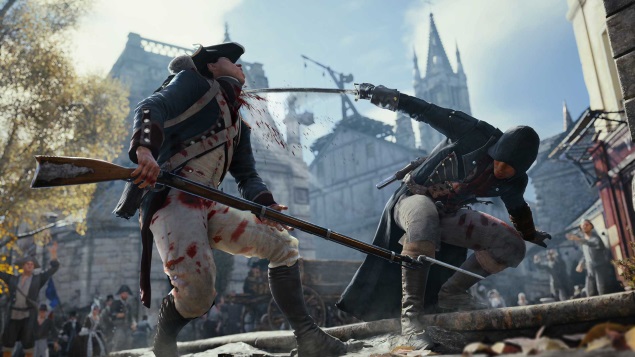
Assassin's Creed Unity has you in the role of an assassin, Arno Dorian as you parkour, slide, and skulk across France. Along the way you'll meet a host of intriguing characters (both historical and fictional) and of course, end the lives of many foes in the most gruesome fashion. All the while, you get to take in the sights and sounds of a country in the throes of anarchy. 
ubisoft_assassins_creed_unity_combat.jpg
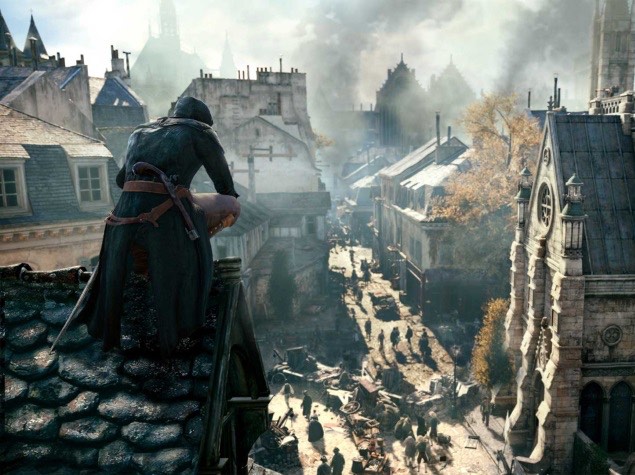
And what a sight it is. Whether you're walking through a Parisian street or free-running on the rooftops of Versailles, Unity's world is immersive. Unlike other open world affairs such as Infamous: Second Son, it doesn't feel like a ghost town. Assassin's Creed Unity is teeming with life with realistic crowds that take on a life of their own. A heady mix of angry peasants, snooty bourgeois, and antsy guards all come together in a fashion that convincingly portrays an atmosphere of revolt and protest. It's almost palpable. This attention to detail makes the game's atmosphere and world its greatest strengths.
Aside from making Unity captivating, social stealth is a viable option, allowing you to slip into crowds unnoticed. You could do it in earlier games as well but the sheer number of people on screen make it all the more easier. It also opens up more options in terms of traversal. Can't shake off annoying guards? Simply slip into a building. Almost every structure can be entered, allowing you to a greater sense of flexibility in approaching a mission.
Mission possible
In Assassin's Creed Unity's single-player campaign that lasts around 20 hours or so, you'll traipse around cathedrals, lurk through Parisian sewers, sneak across graveyards and infiltrate palaces. The missions themselves are varied. They range from the usual tailing and eavesdropping of targets to solving murders. Coupled with a well paced plot and you have very little reason to put the controller down.

Also Read The Angry Birds Movie Looks Very Familiar - But It Doesn't Look Like Angry Birds

However new locales, an assortment of missions, and slick presentation alone don't make Unity a joy to play. The controls appear to have undergone a series of subtle enhancements, the biggest of which is - finally - the ability to crouch. It took Ubisoft just eight mainline entries in the series and almost double the number of spin-offs to make it possible. 
ubisoft_assassins_creed_unity_gun.jpg
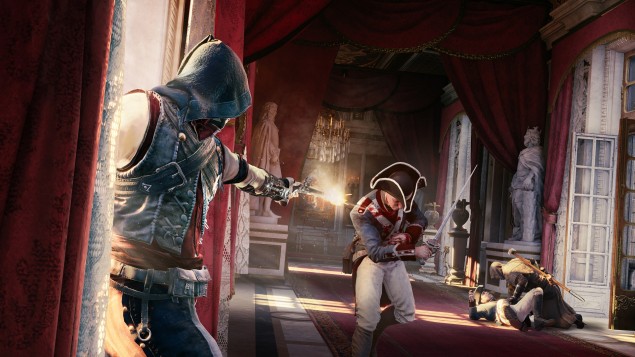
Having said that, it's a welcome addition in keeping yourself out of sight from the game's many enemies. Do snipers on the terrace have a bead on you? Simply crouch behind barrels instead of running like away like you would in previous entries in the series. Old timers would find it easy to use and especially useful in constrained quarters.
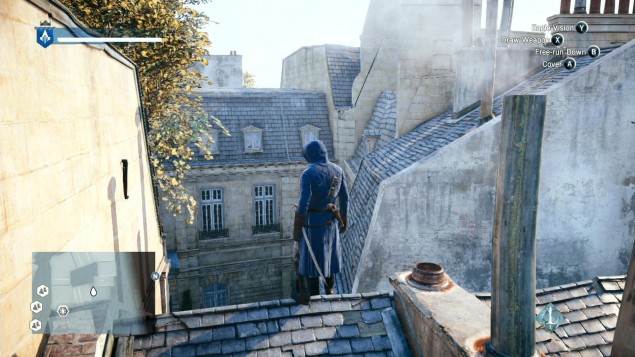
Also new is the last known position system, borrowed from the Splinter Cell series - a silhouette of Arno indicates the last position you were seen at by enemies, the one they'll converge on in an attempt to find you.
Mortal combat
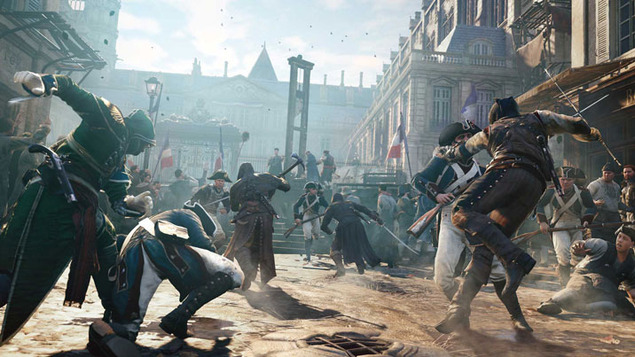
Combat has also been rehauled. For one, it isn't as easy as the earlier games. You can no longer simply unleash hell on a squad of soldiers in your way and hope to get away with it. Anything but. At the most, tackling two or three of enemies at once is possible. Anything more becomes a nightmare. 
ubisoft_assassins_creed_unity_roof.jpg
This is because the AI is aware of its numerical strength and uses it against you. Rather than have foes attacking you one at a time, they use their numbers and even distance to an advantage. So a group of four soldiers would probably have one or two at a distance using pistols or rifles, while the remainder would come up close with swords or pikes.
Furthermore, combat feels a lot more agile that what we're used to. This is in no small part thanks to smoother animations and swordplay that's responsive. Gone is the series' staple counter kill. In its place is a parry system that borrows from Japanese hack-and-slash masterpieces such as Bayonetta. If you manage to parry an enemy strike at the very last moment you can turn it into a counter-attack. All of this results in combat that rewards skill rather than button mashing.
Compared to earlier games in the series, the changes to combat allow players to explore the game's stealthier options, making it the preferred way to play in our opinion, though your mileage may vary. 
ubisoft_assassins_creed_unity_sword.jpg
Freedom of progression
Instead of holding your hand and guiding you to a target, you can execute your target in a multitude of ways. From creating diversions such as leading a revolt of beggars, to disguising yourself as a henchman, to entering restricted areas undetected, the choices are aplenty. It's this sense of freedom and emergent gameplay that makes Unity a welcome change from earlier games in the series.
Thankfully absent are the series' many instant-fail scenarios. If you fail objectives such as tailing a target within a time limit, you aren't forced to try your hand at it again. In its stead the objective evolves, so you'll now have to chase down your target. Even if your target dies, you can still progress to the next mission except it would be tougher. This adaptive design sensibility makes for a game that's more fun compared to its predecessors, which often left us wanting to break our head against the wall.
ubisoft_assassins_creed_unity_protests.JPG
The good, the bad, and the glitchy
In the run up to the game's release much had been said about its technical prowess or lack thereof. From a visual standpoint, Unity is a treat to play. Yes, this extends to the Xbox One version that we've played. It looks rather good. Nonetheless it is plagued by a few issues.
Run down the streets of Paris and you'll see some buildings and parts of the crowd popping up at the very last moment. Similarly, climbing some of the game's grander structures results in a very visible frame drop.
Luckily, these are few and far between. For most part, Unity looks and plays the part of a grand, open world adventure with aplomb.
Verdict
For a series that's tackled colonial America, the high seas, and the Italian renaissance, Assassin's Creed Unity manages to keep it fresh. It has enough going for it to make it worth a purchase for the discerning gamer who may or may not still be suffering from the trauma of rote learning every detail of the French Revolution for academic purposes. Well worth the price of admission, and then some.
Price: Rs. 1,799 on PC, Rs. 3,499 on PS4 and Xbox One.


Also Read Assassin’s Creed Unity PC Specs A Little Too Extravagant

NOTE: Feel Free To Comment.....
Unknown  /  at  15:09  /  No comments

ubisoft_assassins_creed_unity_streets.jpg

Also Read Google Nexus 6 32GB Listed on Flipkart as 'Coming Soon'

You know the French Revolution had a profound impact when every history textbook makes it a staple feature. Though history was never our strong suit, we do recall the French being on the cutting edge of technology, what with their clean, efficient guillotine killings.
One of history's bloodiest chapters makes for a more than interesting setting for Assassin's Creed Unity, the latest entry in Ubisoft's historical action-adventure open world video game series, minus, thankfully the painfully bad puns. Read on to find out how.
Viva la revolution
Assassin's Creed Unity has you in the role of an assassin, Arno Dorian as you parkour, slide, and skulk across France. Along the way you'll meet a host of intriguing characters (both historical and fictional) and of course, end the lives of many foes in the most gruesome fashion. All the while, you get to take in the sights and sounds of a country in the throes of anarchy. 
ubisoft_assassins_creed_unity_combat.jpg
And what a sight it is. Whether you're walking through a Parisian street or free-running on the rooftops of Versailles, Unity's world is immersive. Unlike other open world affairs such as Infamous: Second Son, it doesn't feel like a ghost town. Assassin's Creed Unity is teeming with life with realistic crowds that take on a life of their own. A heady mix of angry peasants, snooty bourgeois, and antsy guards all come together in a fashion that convincingly portrays an atmosphere of revolt and protest. It's almost palpable. This attention to detail makes the game's atmosphere and world its greatest strengths.
Aside from making Unity captivating, social stealth is a viable option, allowing you to slip into crowds unnoticed. You could do it in earlier games as well but the sheer number of people on screen make it all the more easier. It also opens up more options in terms of traversal. Can't shake off annoying guards? Simply slip into a building. Almost every structure can be entered, allowing you to a greater sense of flexibility in approaching a mission.
Mission possible
In Assassin's Creed Unity's single-player campaign that lasts around 20 hours or so, you'll traipse around cathedrals, lurk through Parisian sewers, sneak across graveyards and infiltrate palaces. The missions themselves are varied. They range from the usual tailing and eavesdropping of targets to solving murders. Coupled with a well paced plot and you have very little reason to put the controller down.

Also Read The Angry Birds Movie Looks Very Familiar - But It Doesn't Look Like Angry Birds

However new locales, an assortment of missions, and slick presentation alone don't make Unity a joy to play. The controls appear to have undergone a series of subtle enhancements, the biggest of which is - finally - the ability to crouch. It took Ubisoft just eight mainline entries in the series and almost double the number of spin-offs to make it possible. 
ubisoft_assassins_creed_unity_gun.jpg
Having said that, it's a welcome addition in keeping yourself out of sight from the game's many enemies. Do snipers on the terrace have a bead on you? Simply crouch behind barrels instead of running like away like you would in previous entries in the series. Old timers would find it easy to use and especially useful in constrained quarters.
Also new is the last known position system, borrowed from the Splinter Cell series - a silhouette of Arno indicates the last position you were seen at by enemies, the one they'll converge on in an attempt to find you.
Mortal combat
Combat has also been rehauled. For one, it isn't as easy as the earlier games. You can no longer simply unleash hell on a squad of soldiers in your way and hope to get away with it. Anything but. At the most, tackling two or three of enemies at once is possible. Anything more becomes a nightmare. 
ubisoft_assassins_creed_unity_roof.jpg
This is because the AI is aware of its numerical strength and uses it against you. Rather than have foes attacking you one at a time, they use their numbers and even distance to an advantage. So a group of four soldiers would probably have one or two at a distance using pistols or rifles, while the remainder would come up close with swords or pikes.
Furthermore, combat feels a lot more agile that what we're used to. This is in no small part thanks to smoother animations and swordplay that's responsive. Gone is the series' staple counter kill. In its place is a parry system that borrows from Japanese hack-and-slash masterpieces such as Bayonetta. If you manage to parry an enemy strike at the very last moment you can turn it into a counter-attack. All of this results in combat that rewards skill rather than button mashing.
Compared to earlier games in the series, the changes to combat allow players to explore the game's stealthier options, making it the preferred way to play in our opinion, though your mileage may vary. 
ubisoft_assassins_creed_unity_sword.jpg
Freedom of progression
Instead of holding your hand and guiding you to a target, you can execute your target in a multitude of ways. From creating diversions such as leading a revolt of beggars, to disguising yourself as a henchman, to entering restricted areas undetected, the choices are aplenty. It's this sense of freedom and emergent gameplay that makes Unity a welcome change from earlier games in the series.
Thankfully absent are the series' many instant-fail scenarios. If you fail objectives such as tailing a target within a time limit, you aren't forced to try your hand at it again. In its stead the objective evolves, so you'll now have to chase down your target. Even if your target dies, you can still progress to the next mission except it would be tougher. This adaptive design sensibility makes for a game that's more fun compared to its predecessors, which often left us wanting to break our head against the wall.
ubisoft_assassins_creed_unity_protests.JPG
The good, the bad, and the glitchy
In the run up to the game's release much had been said about its technical prowess or lack thereof. From a visual standpoint, Unity is a treat to play. Yes, this extends to the Xbox One version that we've played. It looks rather good. Nonetheless it is plagued by a few issues.
Run down the streets of Paris and you'll see some buildings and parts of the crowd popping up at the very last moment. Similarly, climbing some of the game's grander structures results in a very visible frame drop.
Luckily, these are few and far between. For most part, Unity looks and plays the part of a grand, open world adventure with aplomb.
Verdict
For a series that's tackled colonial America, the high seas, and the Italian renaissance, Assassin's Creed Unity manages to keep it fresh. It has enough going for it to make it worth a purchase for the discerning gamer who may or may not still be suffering from the trauma of rote learning every detail of the French Revolution for academic purposes. Well worth the price of admission, and then some.
Price: Rs. 1,799 on PC, Rs. 3,499 on PS4 and Xbox One.


Also Read Assassin’s Creed Unity PC Specs A Little Too Extravagant

NOTE: Feel Free To Comment.....

Posted in: , Read Complete Article»

Thursday, 6 November 2014

Download Quikr App & Get Free Rs. 30 Mobile Recharge

Quikr App is giving away free Rs. 30 for downloading there app. We have previously shared similar apps like Gaana and in future we will keep on updating new apps which will give free recharge.

Steps To Get Free Rs. 30:

  • You will see above page where a popup appears.
  • Click on that popup, it will redirect you to Play Store.
  • Download Quikr App.
  • Now wait atleast for 24 hours, you will get notification related to free recharge of Rs. 30
  • Click on that notification to avail recharge.

Terms & Conditions:

  • The coupon will give you 30 Rs instant discount on 50 Recharge.
  • Offer valid till 30th November 2014,
  • Offer valid only once per user / email / mobile number / debit card / credit card,
  • Offer valid on all products – Prepaid and Postpaid mobile, DTH and Data Card
  • Not valid on add cash transactions,
  • Quikr reserves the right to change the terms of the offer without any prior communication.
Unknown  /  at  23:32  /  No comments

Quikr App is giving away free Rs. 30 for downloading there app. We have previously shared similar apps like Gaana and in future we will keep on updating new apps which will give free recharge.

Steps To Get Free Rs. 30:

  • You will see above page where a popup appears.
  • Click on that popup, it will redirect you to Play Store.
  • Download Quikr App.
  • Now wait atleast for 24 hours, you will get notification related to free recharge of Rs. 30
  • Click on that notification to avail recharge.

Terms & Conditions:

  • The coupon will give you 30 Rs instant discount on 50 Recharge.
  • Offer valid till 30th November 2014,
  • Offer valid only once per user / email / mobile number / debit card / credit card,
  • Offer valid on all products – Prepaid and Postpaid mobile, DTH and Data Card
  • Not valid on add cash transactions,
  • Quikr reserves the right to change the terms of the offer without any prior communication.

Posted in: Read Complete Article»

Monday, 3 November 2014

Google Nexus 6 32GB Listed on Flipkart as 'Coming Soon'

google_nexus_6_flipkart_list_screenshot.jpg

Also Read Google Nexus 6 Price and Availability Details Confirmed

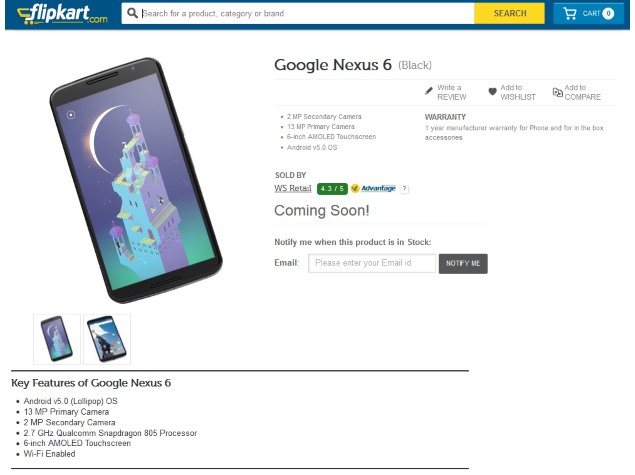
Google's flagship phablet, the Nexus 6, has been listed in India by Flipkart without any price or availability. Also, the Google Play India page for the Nexus 6 doesn't have any information regarding the release so far, though Nexus 9 page had recently listed the tablet with a 'Coming Soon' tag and price of Rs. 28,900.
The Flipkart listing of the 32GB variant of the Google Nexus 6 notes that the device is 'Coming Soon', and it is still uncertain whether the Nexus 6 will be listed by other e-commerce sites in the future or if it will only be available via Google Play and Flipkart in India.

In tge US, a factory unlocked Google Nexus 6 with 32GB storage on Google Play costs $649 (approximately Rs. 40,000) and the 64GB variant costs $699 (approximately Rs. 43,000). The device will also be available separately via carriers in the US like AT&T, Sprint, T-Mobile, US Cellular, and Verizon, each of which will announce their own pricing.

In the meanwhile, over in Europe, the Nexus 6 was reportedly set to go up for pre-orders starting Monday, November 3, but a Dutch website reports pre-orders will be delayed to November 18. The report also notes that the 32GB Nexus 6 is expected to be priced at EUR 569 (approximately Rs. 44,000), and 64GB at EUR 649 (approximately Rs. 50,000).

On the specifications front, the Google Nexus 6 comes with a 5.96-inch QHD (1440x2560 pixels) display with a 493ppi pixel density; a 2.7GHz quad-core Qualcomm Snapdragon 805 processor; 3GB of RAM; 32GB and 64GB internal storage options; a 13-megapixel rear camera; a 2-megapixel front camera; a 3220mAh battery, and Android 5.0 Lollipop.


Also Read Specifications Of Motorola Droid Turbo

NOTE: Feel Free To Comment....
Unknown  /  at  14:07  /  No comments

google_nexus_6_flipkart_list_screenshot.jpg

Also Read Google Nexus 6 Price and Availability Details Confirmed

Google's flagship phablet, the Nexus 6, has been listed in India by Flipkart without any price or availability. Also, the Google Play India page for the Nexus 6 doesn't have any information regarding the release so far, though Nexus 9 page had recently listed the tablet with a 'Coming Soon' tag and price of Rs. 28,900.
The Flipkart listing of the 32GB variant of the Google Nexus 6 notes that the device is 'Coming Soon', and it is still uncertain whether the Nexus 6 will be listed by other e-commerce sites in the future or if it will only be available via Google Play and Flipkart in India.

In tge US, a factory unlocked Google Nexus 6 with 32GB storage on Google Play costs $649 (approximately Rs. 40,000) and the 64GB variant costs $699 (approximately Rs. 43,000). The device will also be available separately via carriers in the US like AT&T, Sprint, T-Mobile, US Cellular, and Verizon, each of which will announce their own pricing.

In the meanwhile, over in Europe, the Nexus 6 was reportedly set to go up for pre-orders starting Monday, November 3, but a Dutch website reports pre-orders will be delayed to November 18. The report also notes that the 32GB Nexus 6 is expected to be priced at EUR 569 (approximately Rs. 44,000), and 64GB at EUR 649 (approximately Rs. 50,000).

On the specifications front, the Google Nexus 6 comes with a 5.96-inch QHD (1440x2560 pixels) display with a 493ppi pixel density; a 2.7GHz quad-core Qualcomm Snapdragon 805 processor; 3GB of RAM; 32GB and 64GB internal storage options; a 13-megapixel rear camera; a 2-megapixel front camera; a 3220mAh battery, and Android 5.0 Lollipop.


Also Read Specifications Of Motorola Droid Turbo

NOTE: Feel Free To Comment....
Posted in: Read Complete Article»

About

This blog belong to all our youngster friendz, who believe in sharing their knowledge with others and want to try to hackin', crackin' , full version applications at free of cost.
you will found here valuable stuffs.

Labels

adf.ly blocked (1) android (109) Android and PC (19) android games (11) android news (3) android tricks (43) Antivirus (11) Anvsoft (1) apple (40) asha phones (1) avast (1) avast pro antivirus 8 2013 (1) avg (1) AVG pc tuneup 2013 full version (1) avira (1) blackberry (1) blogspot (2) body_language (1) bootable usb (1) Browsers (16) c cleaner pro + business (1) Cheatbook 2013 (1) Chetan Bhagat (1) compressor (1) crac (1) Crack (1) crack + keygen (2) cyberlink power2go full version (1) daemon tools 5.2 full version (1) daemon tools patch (1) defender (2) dictionary (1) direct link (1) DivX Pro 7 (1) Ebook (2) eset (1) etc (1) facebook (16) Firewall (2) free recharge tricks (1) free sms (1) FRUIT NINJA for windows full version (1) full version (8) Full Version MS Office 13 (1) GTA Sandreas (1) hack (4) hack pc (3) hacking using keylogger (1) hardware (1) hiDownload platinum 8 (1) how to (6) how to install .net (1) HTML (1) idm (1) idm crack (1) IDM full version (1) image editor (2) install .net in windows 8 (1) internet tricks (37) iPhone 5c (2) job (1) k j activator (1) kaspersky (2) keygen (2) leaked images (1) license key (1) manual updates (1) mediafire (1) MEDIAFIRE DOWNLOAD (2) mediafire link (2) mobiles (42) music player (1) nfs most wanted (1) Office 13 Activator (1) official site update (1) offline updates (1) patch (4) PC (3) pc customize (1) PC Drivers (2) pc games (15) pc games cheats (11) PC Software (152) PC tricks (146) PdaNET 3.50 (1) PDF (3) phone specifications (43) pic viewer (3) power iso 5.6 (1) premium zbigz account (1) problem with .net in windows 8 (1) review (11) reviews (2) Revolution 2020 PDF (1) science (2) sharebeast download (6) sharebeast link (2) symbian mobiles (2) tech knowledge (33) Tech News (343) tech reviews (146) Torrent To IDM (1) Tune-Up 2014 Full Version (1) Ubuntu Mobiles (1) video player (13) video tutorial (1) Web design (1) window 8.1 tricks (12) windows 8 activator (1) Windows 8 USB Installer Maker (1) windows phones (16) winrar 5 full version (1)
Copyright © 2014 SimplyGet. WP Theme-junkie converted by Bloggertheme9
Blogger templates. Proudly Powered by Blogger.