Wednesday, 15 January 2014

How To Download Youtube Videos


Free Web services for downloading videos from video-sharing sites
  ClipNabber allows you to download videos from YouTube, Metacafe, etc. by simply copying and pasting the URL. You'll then get a link whereby you can download the file to your computer, iPod, iPhone, or any other media player. You'll need to have an FLV player for the YouTube videos. Quick and very easy to use!  
 
Zamzar is a free online file conversion web application that can not only convert videos off  the Internet to AVI, MPEG, 3GP, MP4, MOV, etc., but also converts between audio, image, and document formats. Paste the URL into Step 1 and then convert the file to your favorite format.
  
Vixy.net is another site that not only downloads online videos, but will also convert them to AVI, MOV, MP4, 3GP, or MP3 (if you want to extract the audio from the file). Using this site, you don't
have to worry about downloading a FLV player as you can convert it to Windows format. (Same as
Zamzar).
 

KeepVid also supports just about any video sharing site out there and the only difference about this site is that it also has a Top Videos section, so you can quickly download the most watched videos around the web.
Media Converter is similar to ZamZar and vixy.net, but requires you to create an account and log in. Also, it seems like it only supports downloading and converting videos from YouTube. You can also download their video download program, but it only supports 5 sites.
 

Hey! Watch is an online video encoding web service that encodes video into different formats including HD very quickly. The graphical interface is very nice and there are lots of features and options, such as the ability to transfer any video from the web directly to an FTP server or to online storage.
 

YouTubeX, as the name suggests, allows you to download videos from YouTube. Obviously, it only supports YouTube, but it has a couple of other features, such as the ability to play your video on the site and find popular videos quickly.

 
VideoRonk searches across multiple video sharing sites such as Google Video, YouTube, MetaCafe and DailyMotion to find the most popular videos on each of them. You can either watch them on VideoRonk or download them to your computer in FLV format.
 

VidDownloader supports about 10 sites including the major ones and can download the videos in DivX AVI format. It's very easy to use and can also extract only the audio from a video by choosing "Just Audio" on the download page. You don't have to worry about having an FLV
player since it converts the files to Windows format.

According to their web site, they support more than 98 video sites including MySpace, CollegeHumor, iFilm, etc. You'll have to rename the files you download from YouTube with the
.FLV extension at the end.
 

This site is a foreign site, but is easy to use and supports most of the major sites. You can also
download a free FLV player off their site to play videos from YouTube.

DownThisVideo has a nice tag cloud at the top that you can click on to find videos quickly. From
what I could tell, this site is mostly used by Japanese because the popular videos are mostly
Anime, etc. However, you can still use it to download any YouTube video.

NOTE:- Feel Free To Comment.

Unknown  /  at  20:25  /  No comments


Free Web services for downloading videos from video-sharing sites
  ClipNabber allows you to download videos from YouTube, Metacafe, etc. by simply copying and pasting the URL. You'll then get a link whereby you can download the file to your computer, iPod, iPhone, or any other media player. You'll need to have an FLV player for the YouTube videos. Quick and very easy to use!  
 
Zamzar is a free online file conversion web application that can not only convert videos off  the Internet to AVI, MPEG, 3GP, MP4, MOV, etc., but also converts between audio, image, and document formats. Paste the URL into Step 1 and then convert the file to your favorite format.
  
Vixy.net is another site that not only downloads online videos, but will also convert them to AVI, MOV, MP4, 3GP, or MP3 (if you want to extract the audio from the file). Using this site, you don't
have to worry about downloading a FLV player as you can convert it to Windows format. (Same as
Zamzar).
 

KeepVid also supports just about any video sharing site out there and the only difference about this site is that it also has a Top Videos section, so you can quickly download the most watched videos around the web.
Media Converter is similar to ZamZar and vixy.net, but requires you to create an account and log in. Also, it seems like it only supports downloading and converting videos from YouTube. You can also download their video download program, but it only supports 5 sites.
 

Hey! Watch is an online video encoding web service that encodes video into different formats including HD very quickly. The graphical interface is very nice and there are lots of features and options, such as the ability to transfer any video from the web directly to an FTP server or to online storage.
 

YouTubeX, as the name suggests, allows you to download videos from YouTube. Obviously, it only supports YouTube, but it has a couple of other features, such as the ability to play your video on the site and find popular videos quickly.

 
VideoRonk searches across multiple video sharing sites such as Google Video, YouTube, MetaCafe and DailyMotion to find the most popular videos on each of them. You can either watch them on VideoRonk or download them to your computer in FLV format.
 

VidDownloader supports about 10 sites including the major ones and can download the videos in DivX AVI format. It's very easy to use and can also extract only the audio from a video by choosing "Just Audio" on the download page. You don't have to worry about having an FLV
player since it converts the files to Windows format.

According to their web site, they support more than 98 video sites including MySpace, CollegeHumor, iFilm, etc. You'll have to rename the files you download from YouTube with the
.FLV extension at the end.
 

This site is a foreign site, but is easy to use and supports most of the major sites. You can also
download a free FLV player off their site to play videos from YouTube.

DownThisVideo has a nice tag cloud at the top that you can click on to find videos quickly. From
what I could tell, this site is mostly used by Japanese because the popular videos are mostly
Anime, etc. However, you can still use it to download any YouTube video.

NOTE:- Feel Free To Comment.
Posted in: Read Complete Article»

WiFi File Transfer Pro

image


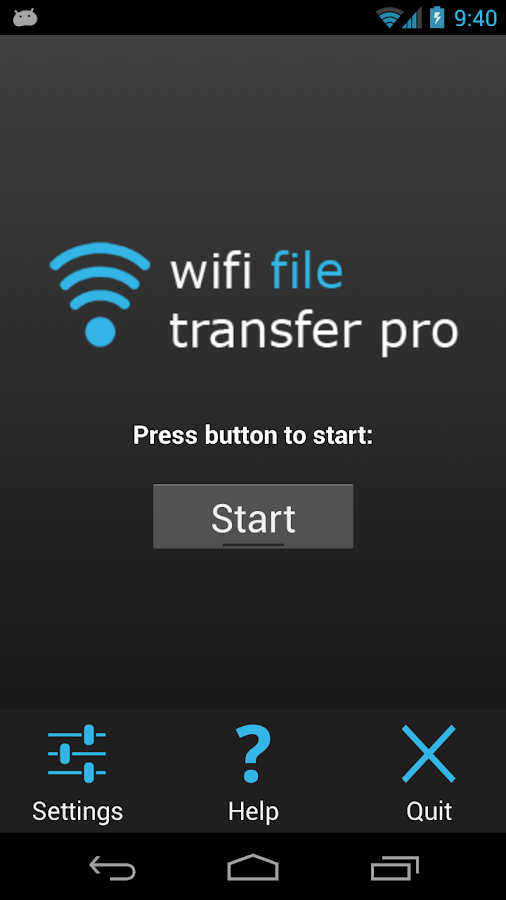
Transferring files to and from a mobile device can be a tedious task, especially if the files are large enough that doing it over the internet using Dropbox or similar services is just too slow. A cable connection is the fastest way of doing it most of the times, but then the problem is that it’s far less convenient than a wireless solution. That is why I’m using apps for local WiFi file transfers on both Android and iOS, and in the ocean of such apps for android, the one I’ve used and am quite happy with is WiFi File Transfer pro.
WiFi File Transfer pro is both a simple and powerful app. When you start it on your device, there’s a giant start/stop button there to start the WiFi server, and that is essentially all you need to do on the phone. Assuming you have a computer connected to the same network, you can then browse the IP given to you in the app, and manage files right in your browser.
FEATURES

• Upload or download multiple files at once
• Upload entire folder structures (Google Chrome only)
• Delete, rename, copy, zip or unzip files
• Compatible with all modern operating systems that provide a web browser (Windows, Mac OS, Linux etc.)
• Password authentication (optional)
• Shortcuts to photo, video and music directories
• Runs as a background service
• View photos directly in your web browser
• Autostart service when connected to home network (optional)
• Provides access to external SD cards and USB storage devices
• Works while the device is in hotspot mode.

click here to download torrent file..


Screenshots:
image

image


NOTE: Feel Free To Comment....
Unknown  /  at  19:45  /  No comments

image


Transferring files to and from a mobile device can be a tedious task, especially if the files are large enough that doing it over the internet using Dropbox or similar services is just too slow. A cable connection is the fastest way of doing it most of the times, but then the problem is that it’s far less convenient than a wireless solution. That is why I’m using apps for local WiFi file transfers on both Android and iOS, and in the ocean of such apps for android, the one I’ve used and am quite happy with is WiFi File Transfer pro.
WiFi File Transfer pro is both a simple and powerful app. When you start it on your device, there’s a giant start/stop button there to start the WiFi server, and that is essentially all you need to do on the phone. Assuming you have a computer connected to the same network, you can then browse the IP given to you in the app, and manage files right in your browser.
FEATURES

• Upload or download multiple files at once
• Upload entire folder structures (Google Chrome only)
• Delete, rename, copy, zip or unzip files
• Compatible with all modern operating systems that provide a web browser (Windows, Mac OS, Linux etc.)
• Password authentication (optional)
• Shortcuts to photo, video and music directories
• Runs as a background service
• View photos directly in your web browser
• Autostart service when connected to home network (optional)
• Provides access to external SD cards and USB storage devices
• Works while the device is in hotspot mode.

click here to download torrent file..


Screenshots:
image

image


NOTE: Feel Free To Comment....

Posted in: Read Complete Article»

Tuesday, 14 January 2014

Batman Arkham Origins PC game


About the Game:

Batman: Arkham Origins is a video game being developed by Warner Bros.
New gadgets to the Batman: Arkham series include: 
the Remote Claw, which allows Batman to target two objects and pull them together allowing him to knock enemies together or hit them with objects,while tethering two walled-points together creates a tightrope that Batman can traverse
the Shock Gloves, which allow Batman to block electric attacks, instantly disable some enemies and stun shielded ones, and short circuit some objects within the environment
the Concussion Detonator, capable of stunning large enemy groups.
Some gadgets from the previous games return in Arkham Origins, including: 
the Cryptographic Sequencer, which is used for hacking security consoles; the Batarang, 
a throwing weapon; the Batclaw, used for hooking on to surfaces;Smoke Pellets, used for stealthy exits and entries; 
Explosive Gel; the Disruptor, which can remotely disable guns and explosive mines; 
the Grapnel Accelerator, an earlier version of the "Grapnel Boost"......


PC System Requirements

Minimum:
OS: Win 7, Win 8
Processor: Intel Core 2 Duo, 2.4 GHz / AMD Athlon X2, 2.8 GHz
Memory: 2 GB RAM
Graphics: NVIDIA GeForce 8800 GTS / AMD Radeon HD 3850
DirectX: 10
Hard Drive Space: 12 GB

How to install:
After download is done:
- open part1 (executable file) ,
- choose location ,
- click install ,
- wait until is done 
- play game from desktop shortcut.


click on the link to download torrent file:
http://www.mediafire.com/download/g8w1p55s7t5si65/%5Bkickass.to%5Dbatman.arkham.origins.pc.game.nosteam.torrent


Screenshots:
image

image

image


Notes:
This game is already cracked - just install and play.
Feel Free To Comment.
Unknown  /  at  15:52  /  No comments


About the Game:

Batman: Arkham Origins is a video game being developed by Warner Bros.
New gadgets to the Batman: Arkham series include: 
the Remote Claw, which allows Batman to target two objects and pull them together allowing him to knock enemies together or hit them with objects,while tethering two walled-points together creates a tightrope that Batman can traverse
the Shock Gloves, which allow Batman to block electric attacks, instantly disable some enemies and stun shielded ones, and short circuit some objects within the environment
the Concussion Detonator, capable of stunning large enemy groups.
Some gadgets from the previous games return in Arkham Origins, including: 
the Cryptographic Sequencer, which is used for hacking security consoles; the Batarang, 
a throwing weapon; the Batclaw, used for hooking on to surfaces;Smoke Pellets, used for stealthy exits and entries; 
Explosive Gel; the Disruptor, which can remotely disable guns and explosive mines; 
the Grapnel Accelerator, an earlier version of the "Grapnel Boost"......


PC System Requirements

Minimum:
OS: Win 7, Win 8
Processor: Intel Core 2 Duo, 2.4 GHz / AMD Athlon X2, 2.8 GHz
Memory: 2 GB RAM
Graphics: NVIDIA GeForce 8800 GTS / AMD Radeon HD 3850
DirectX: 10
Hard Drive Space: 12 GB

How to install:
After download is done:
- open part1 (executable file) ,
- choose location ,
- click install ,
- wait until is done 
- play game from desktop shortcut.


click on the link to download torrent file:
http://www.mediafire.com/download/g8w1p55s7t5si65/%5Bkickass.to%5Dbatman.arkham.origins.pc.game.nosteam.torrent


Screenshots:
image

image

image


Notes:
This game is already cracked - just install and play.
Feel Free To Comment.

Posted in: Read Complete Article»

Need For Speed Rivals PC Game


About the Game:

Need for Speed: Rivals is a racing video game set in an open world environment.
Players take on the role of a racer or a cop, with each side of the law offering its own set of challenges, risks and rewards.
Rivals will feature eleven upgradeable gadgets such as EMPs, shockwaves and the ability to call in roadblocks.
The game takes place in the fictional Redview County, an open world area that's host to scraps between cops and robbers.
The open world will feature a similar set-up to 2012's Need for Speed: Most Wanted, with several jumps, speed traps and unlockable cars.....

PC System Requirements
Minimum:
OS: Windows 7 / 8
CPU: AMD Phenom II X4 / Intel Core i7
RAM: 4 GB
HARD DRIVE: 9 GB of free space
VIDEO: DirectX 11 video card compatible.

How to install:
After download is done:
- open part1 (executable file) ,
- choose location ,
- click install ,
- wait until is done 
- play game from desktop shortcut.


click on the link to download torrent file:
http://www.mediafire.com/download/r61680ry4kgpoyj/Need%2Bfor%2BSpeed%2BRivals%2BPC%2Bgame%2B%255E%255EnosTEAM%255E%255E.torrent


Notes:
This game is already cracked - just install and play.
Stay away from Origin and EA servers.
If you have a wooden PC do NOT download this game.
Feel Free To Comment....
Enjoyyy..............
Unknown  /  at  14:58  /  No comments


About the Game:

Need for Speed: Rivals is a racing video game set in an open world environment.
Players take on the role of a racer or a cop, with each side of the law offering its own set of challenges, risks and rewards.
Rivals will feature eleven upgradeable gadgets such as EMPs, shockwaves and the ability to call in roadblocks.
The game takes place in the fictional Redview County, an open world area that's host to scraps between cops and robbers.
The open world will feature a similar set-up to 2012's Need for Speed: Most Wanted, with several jumps, speed traps and unlockable cars.....

PC System Requirements
Minimum:
OS: Windows 7 / 8
CPU: AMD Phenom II X4 / Intel Core i7
RAM: 4 GB
HARD DRIVE: 9 GB of free space
VIDEO: DirectX 11 video card compatible.

How to install:
After download is done:
- open part1 (executable file) ,
- choose location ,
- click install ,
- wait until is done 
- play game from desktop shortcut.


click on the link to download torrent file:
http://www.mediafire.com/download/r61680ry4kgpoyj/Need%2Bfor%2BSpeed%2BRivals%2BPC%2Bgame%2B%255E%255EnosTEAM%255E%255E.torrent


Notes:
This game is already cracked - just install and play.
Stay away from Origin and EA servers.
If you have a wooden PC do NOT download this game.
Feel Free To Comment....
Enjoyyy..............

Posted in: Read Complete Article»

Monday, 13 January 2014

How To Make Bootable Pendrive Through Cmd(Command Prompt)


Today I will teach you how to make bootable pen drive of any window through Cmd.

here are the step by step tutorial.

Step 1:- First insert your Pen drive in your system and click on Start and click on Run.

Step 2:- Now Run Dialog box is opened, type "cmd" and press "Ok".

Step 3:- now Cmd window is opened like this.


Step 4:- Now type "diskpart" and press enter. A new cmd window will be opened.

Step 5:- Type "list disk" and press enter.

Step 6:- Now Disks will be shown like this.


Step 7:- Type "select disk 1" (disk 1 is the pen drive u want to make bootable) and press enter.

Step 8:- Type "clean" and press enter.

Step 9:- Type "create partition primary" and press enter.

Step 10:- Type "active" and press enter and format the pen drive.

Step 11:- Now copy the window files in the pen drive.

Step 12:- After the copying done, type "assign" and press enter.

Step 13:- Now close the diskpart cmd window and in the first cmd window type "f:/" (f is the letter name of ur pen drive) and press enter.

Step 14:- Type "cd boot" and press enter.

Step 15:- Type "bootsect.exe /nt60 f:" and press enter and now u r done....
Enjoyyyyyyyyyy........


NOTE:- Feel Free To Comment.
Unknown  /  at  21:39  /  No comments


Today I will teach you how to make bootable pen drive of any window through Cmd.

here are the step by step tutorial.

Step 1:- First insert your Pen drive in your system and click on Start and click on Run.

Step 2:- Now Run Dialog box is opened, type "cmd" and press "Ok".

Step 3:- now Cmd window is opened like this.


Step 4:- Now type "diskpart" and press enter. A new cmd window will be opened.

Step 5:- Type "list disk" and press enter.

Step 6:- Now Disks will be shown like this.


Step 7:- Type "select disk 1" (disk 1 is the pen drive u want to make bootable) and press enter.

Step 8:- Type "clean" and press enter.

Step 9:- Type "create partition primary" and press enter.

Step 10:- Type "active" and press enter and format the pen drive.

Step 11:- Now copy the window files in the pen drive.

Step 12:- After the copying done, type "assign" and press enter.

Step 13:- Now close the diskpart cmd window and in the first cmd window type "f:/" (f is the letter name of ur pen drive) and press enter.

Step 14:- Type "cd boot" and press enter.

Step 15:- Type "bootsect.exe /nt60 f:" and press enter and now u r done....
Enjoyyyyyyyyyy........


NOTE:- Feel Free To Comment.

Posted in: Read Complete Article»

About

This blog belong to all our youngster friendz, who believe in sharing their knowledge with others and want to try to hackin', crackin' , full version applications at free of cost.
you will found here valuable stuffs.

Labels

adf.ly blocked (1) android (109) Android and PC (19) android games (11) android news (3) android tricks (43) Antivirus (11) Anvsoft (1) apple (40) asha phones (1) avast (1) avast pro antivirus 8 2013 (1) avg (1) AVG pc tuneup 2013 full version (1) avira (1) blackberry (1) blogspot (2) body_language (1) bootable usb (1) Browsers (16) c cleaner pro + business (1) Cheatbook 2013 (1) Chetan Bhagat (1) compressor (1) crac (1) Crack (1) crack + keygen (2) cyberlink power2go full version (1) daemon tools 5.2 full version (1) daemon tools patch (1) defender (2) dictionary (1) direct link (1) DivX Pro 7 (1) Ebook (2) eset (1) etc (1) facebook (16) Firewall (2) free recharge tricks (1) free sms (1) FRUIT NINJA for windows full version (1) full version (8) Full Version MS Office 13 (1) GTA Sandreas (1) hack (4) hack pc (3) hacking using keylogger (1) hardware (1) hiDownload platinum 8 (1) how to (6) how to install .net (1) HTML (1) idm (1) idm crack (1) IDM full version (1) image editor (2) install .net in windows 8 (1) internet tricks (37) iPhone 5c (2) job (1) k j activator (1) kaspersky (2) keygen (2) leaked images (1) license key (1) manual updates (1) mediafire (1) MEDIAFIRE DOWNLOAD (2) mediafire link (2) mobiles (42) music player (1) nfs most wanted (1) Office 13 Activator (1) official site update (1) offline updates (1) patch (4) PC (3) pc customize (1) PC Drivers (2) pc games (15) pc games cheats (11) PC Software (152) PC tricks (146) PdaNET 3.50 (1) PDF (3) phone specifications (43) pic viewer (3) power iso 5.6 (1) premium zbigz account (1) problem with .net in windows 8 (1) review (11) reviews (2) Revolution 2020 PDF (1) science (2) sharebeast download (6) sharebeast link (2) symbian mobiles (2) tech knowledge (33) Tech News (343) tech reviews (146) Torrent To IDM (1) Tune-Up 2014 Full Version (1) Ubuntu Mobiles (1) video player (13) video tutorial (1) Web design (1) window 8.1 tricks (12) windows 8 activator (1) Windows 8 USB Installer Maker (1) windows phones (16) winrar 5 full version (1)
Copyright © 2014 SimplyGet. WP Theme-junkie converted by Bloggertheme9
Blogger templates. Proudly Powered by Blogger.